
Bluetooth hearing devices are often promoted for their smartphone connectivity, but they don’t require a phone to function. The earpieces contain microphones, sound processors, memory, and manual buttons, so they can capture and process ambient sound on their own.
Without a smartphone connected, most modern models can still:
- Adjust automatically to changing noise levels
- Change volume or switch environment modes using physical buttons
- Connect directly to TV streamers, remote mics, or simple remote controls
What you miss without a phone includes app-based tuning, direct hands-free calls, remote audiologist updates, and audio streaming from non-accessory devices.
This guide explains how these devices operate independently, how they connect to other equipment, and which features to consider if you prefer to avoid using a smartphone.
Standalone Hearing vs. Bluetooth Connectivity
A Bluetooth hearing device consists of two main components: the core hearing system and the wireless link.
The Core Hearing Engine
The core hearing system operates entirely on its own within the hardware:
- Microphones pick up ambient sound.
- An internal chip processes the audio according to your saved prescription.
- The speaker (receiver) delivers the clean sound straight into your ear.
- Sensors automatically modify settings based on changes in your environment’s noise levels.
None of these functions need a smartphone, Bluetooth, Wi-Fi, or cellular network.
What Bluetooth Adds
Bluetooth functions as an additional connection. Depending on your model, it enables the hearing device to receive audio signals or settings from:
- Phones, tablets, and computers.
- TV streaming boxes.
- Remote lapel microphones.
- Handheld remote controls.
You lose that external link only if your Bluetooth disconnects. The hearing aids keep functioning normally, with settings stored internally.
What Works Without a Smartphone?
After an audiologist sets them up, a hearing aid stores your personalized settings on its internal chip. It continues to process sound normally, even if your phone is powered off, placed in another room, or unavailable.
Features That Work Independently
- Normal conversation & daily listening: The microphones and internal chip analyze sound based on your saved profile.
- Auto-environment switching: Many models can automatically detect whether a room is quiet or noisy and adapt the background noise levels accordingly.
- On-device volume shifts: Physical rocker switches or buttons let you adjust the volume manually.
- Program changes: Built-in buttons often let you tap to cycle through preset modes (e.g., Restaurant, Outdoors, and Music).
- Battery care: Recharging at a dock or swapping disposable batteries requires no app interaction.
- Handheld remote controls: Simple push-button remotes let you control volume and channels without using a phone screen.
On-Device Controls Vary
Different models vary in how they handle manual adjustments. Ultra-small, invisible-in-canal (IIC) devices typically lack space for buttons and rely on auto-adjustments or a pocket remote. Meanwhile, some models feature physical buttons for simple adjustments, with more precise tuning available via a phone app.
Health agencies such as the NIDCD note that the main components of a hearing aid include the microphone, amplifier, and speaker, which are located directly on your ear. A smartphone provides an additional control interface, but it does not supply power to the hearing device.
Connecting to Other Devices Without a Phone
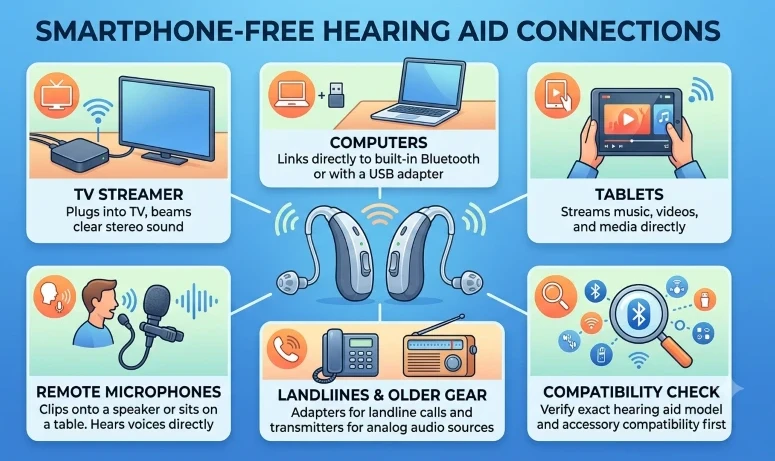
A smartphone is just one possible source of wireless audio. Compatible hearing devices can connect directly to other equipment or to a separate transmitter. The connection method varies by the hearing device, the audio source, and the wireless standard they support.
Common smartphone-free connections include:
- Television: The TV streamer linked to the television transmits audio directly to hearing devices. Some recent TVs and hearing devices might also support direct Bluetooth LE Audio or Auracast connections.
- Computer: Certain hearing devices can connect directly to compatible computers, while others need a USB adapter or an external Bluetooth transmitter.
- Tablet: A compatible tablet can stream audio and provide app controls without a smartphone.
- Landline telephone: Some phone adapters relay landline calls to hearing devices. Additionally, a telecoil can operate with compatible handsets or hearing-loop systems.
- Radio or CD player: An audio transmitter can connect to the headphone or audio output port, allowing users to listen through it or the device’s regular speakers.
- Remote microphone: Wearing or placing a small microphone near another person transmits their voice directly to the hearing devices, making it effective across a table or in group settings.
These connections are not universal. Even if two products display the Bluetooth logo, they might use different protocols and may not communicate directly. Always verify the specific hearing device model with the manufacturer’s compatibility guidelines before purchasing an adapter or accessory.
A Simple Smartphone-Free Setup
Initial setup depends heavily on the model you buy. Professionally fitted hearing aids are programmed directly by an audiologist, whereas many over-the-counter (OTC) self-fitting models do require a smartphone app for the initial setup. Verify this requirement in advance if you want to avoid using smartphones altogether.
5-Step Smartphone-Free Checklist
- Program internally: Ask your audiologist to save your personalized sound profiles onto your hearing aids during the fitting process.
- Master the physical buttons: Practice locating and pressing the onboard switches to control volume, change programs, and power the units on or off.
- Pair accessories early: Connect your handheld remote, TV streamer, or external mic first.
- Test without a phone nearby: Test the physical buttons and connected accessories in the rooms where you’ll use them.
- Keep paper manuals handy: Keep the printed quick-start guide and your clinic’s phone number in an easily accessible place.
Helpful Tip: Pairing procedures vary between brands. Some accessories need your audiologist to connect them using specialized software during your appointment, so inform them about your accessories beforehand.
Read our guide to MFi, ASHA, and Bluetooth LE Audio for more information about wireless hearing-device connections.
What Happens If Your Phone Dies or Goes Missing?
Turning off or losing your paired smartphone does not reset your hearing aids. Your customized settings remain stored on the internal chips, and the devices will continue to process surrounding sound as usual.
What You’ll Temporarily Lose
- App controls: You won’t be able to make app-based changes.
- Direct streaming: Phone calls, music, and notifications will no longer reach your ears.
- Remote care: Virtual audiologist check-ins and remote adjustments won’t be effective.
- Tracking features: Find My Hearing Aid GPS features and health tracking will be paused.
What Keeps Working
Physical buttons, automatic noise adjustments, and phone-free accessories (such as your TV streamer or a dedicated remote) will continue to work seamlessly.
Your hearing aids usually reconnect automatically when your phone is nearby and turned back on. If they don’t, turning Bluetooth off and on again on your phone, or restarting the hearing aids, often restores the connection.
Those who plan to use a phone occasionally should also read our guide to smartphone compatibility with hearing devices before choosing a specific combination.
Advantages and Limitations for Older Adults
Using hearing aids without a phone can greatly streamline daily life, particularly for those without smartphones or who dislike touchscreen navigation. However, to go phone-free effectively, the physical controls must be simple to operate.
The Advantages
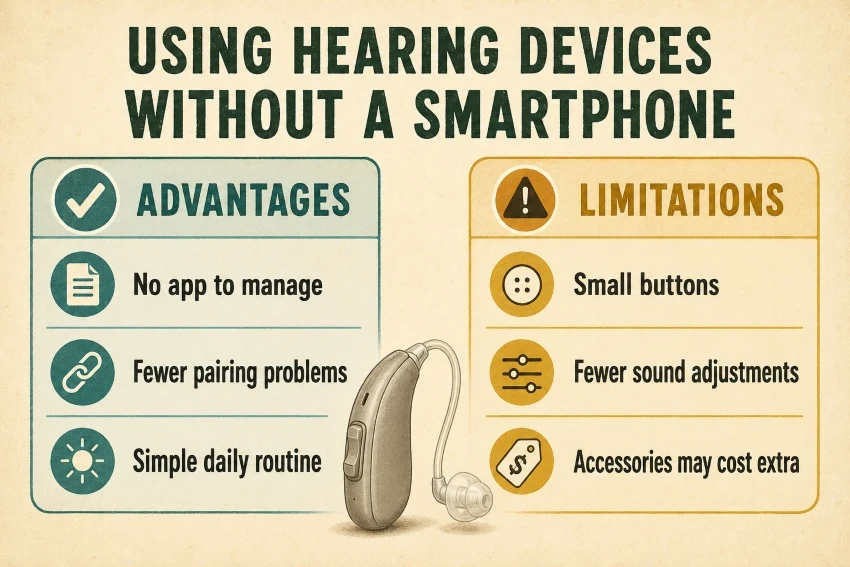
- No app headaches: Ignore software updates, navigating screen menus, and unexpected phone glitches.
- Fewer Bluetooth dropouts: Avoid frustration from unexpected disconnections.
- No reliance on phone battery: Your hearing aids continue working even if your phone battery dies.
- Fewer accidental tweaks: You’re less likely to accidentally alter sound profiles when you’re not navigating through an app.
- Predictable daily performance: Rely on steady, reliable sound profiles your provider has programmed.
The Limitations
- Tiny physical buttons: Onboard controls can be hard to see or operate with stiff or arthritic fingers.
- Easy to lose remotes: Handheld remote controls add one more item to misplace.
- More clinic visits: Adjusting sound settings typically requires an in-person visit to your audiologist.
- Added accessory costs: You need to buy TV streamers and external microphones separately, which increases the overall cost.
- Less on-the-fly fine-tuning: You no longer have access to equalizers and custom environmental filters available in the apps.
Key Takeaway: Simpler doesn’t necessarily mean fewer features. A model with effective automatic adjustments and a large handheld remote can be more user-friendly than a “basic” aid with small, difficult-to-press buttons.
Review our Senior-Friendly Hearing Devices Usability Checklist before choosing a quality device.
What to Check Before Buying
Don’t purchase a device solely because the box claims it is “Bluetooth compatible.” Instead, ask the seller or provider how the specific model works without a phone.
- Initial setup: Can a provider set up the device without using an app?
- Onboard controls: Can I easily see and press the buttons?
- Binaural sync: Does pressing a button on one side adjust both ear units at the same time?
- Auto-adjustments: Which sound features adjust automatically?
- Handheld remotes: Is there a dedicated remote control available?
- Accessory options: Which TV streaming services and external mics work with this model?
- Pairing setup: Can accessories connect directly without first needing a phone app?
- Missing features: What specific features do you lose when you skip the phone?
- Memory retention: Do the settings remain saved after charging or replacing the batteries?
- Total price: What is the total cost of the hearing aids, remote control, and accessories?
Pro Tip: Ask for a test run in the clinic with the smartphone off to ensure the physical controls match your daily needs.
You can also learn how connected devices can support everyday independence in our guide to how technology helps seniors age in place.
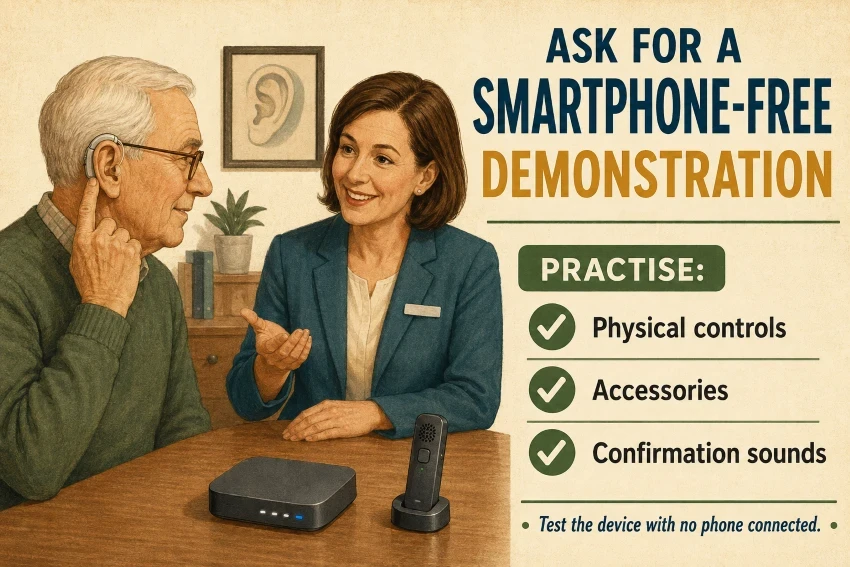
Ask for a Smartphone-Free Demonstration
Spec sheets don’t reveal how user-friendly a device is in daily use. Ask your provider for a hands-on trial with the smartphone turned off.
Practice These Actions
- Powering: Turn the hearing aids on and off independently.
- Button controls: Manually adjust the volume and switch programs.
- Audio cues: Familiarize yourself with the chimes or voice alerts that indicate volume and program adjustments.
- Remotes: Use a handheld remote control to operate the device.
- Accessories: Test out TV streamers or remote microphones.
- Resetting: Return to normal hearing mode when streaming ends.
Proactive Steps
- Ask your provider to disable any programs you do not use to simplify the setup.
- Request printed manuals for all physical controls and accessories.
- Check the contact person for device failures.
Frequently Asked Questions
Do Bluetooth hearing devices need Wi-Fi?
Core hearing features don’t require Wi-Fi or an internet connection. You only need an internet connection for app updates or remote audiologist check-ins.
Will hearing aids work if my phone is in airplane mode?
The core hearing functions remain active. Airplane mode disables Bluetooth streaming, but you can usually re-enable Bluetooth manually in your phone’s settings.
Does deleting the app delete saved hearing settings?
The hearing aid stores your audiologist’s settings directly, rather than through the app.
Can hearing devices store multiple accessories?
Many models store pairings for accessories such as a TV streamer and a lapel mic, but the active connections vary by model.
Do I need a smartphone after replacing or charging the batteries?
No, swapping batteries or removing them from the charger will not delete your stored hearing profiles.
Can I use Auracast without a smartphone?
Yes, Auracast hearing aids can receive broadcasts directly, but you might need an auxiliary device or a smart transmitter to find and select the broadcast channel.
Final Thoughts
Bluetooth hearing devices do not require a smartphone to function. After programming, the device stores your personalized settings in its internal chips. The microphones automatically capture ambient sound, while physical buttons and accessories, such as TV streamers, handle daily adjustments.
Smartphones offer additional features, such as music streaming and app-based tuning, but not everyone needs them. Going phone-free avoids battery drain, software updates, and pairing glitches. Basic physical controls provide a more reliable daily experience for many users.
- Check whether each feature works independently and confirm the physical buttons are user-friendly before buying.
- Include the cost of any necessary accessories, such as handheld remotes, in your considerations.
- Lastly, test the devices in the clinic with the smartphone turned off to ensure they integrate smoothly into your routine.