Technology can feel daunting, especially when devices, apps, and online services use unfamiliar terms. This glossary explains hundreds of technology terms in simple English, covering smartphones, tablets, smartwatches, medical alert systems, hearing devices, online safety, smart home technology, and more. Whether you’re new to the basics or seeking a specific term, this guide helps older adults use technology more confidently.
Smartphones and tablets help older adults stay connected with family, access health information, manage appointments, and enjoy entertainment. The terms below clarify the typical features, settings, and technologies you might encounter when using these devices.
Android
Definition: Android is an operating system found on numerous smartphones and tablets.
Why It Matters: Knowing whether your device runs Android helps you find the right apps, settings, and support options.
Example: Samsung Galaxy and Google Pixel devices run on Android.
What Seniors Need to Know: Android phones may have slight differences in appearance depending on the manufacturer, leading to variation in menu layouts across devices.
Related Terms: Operating System, App, Smartphone
App
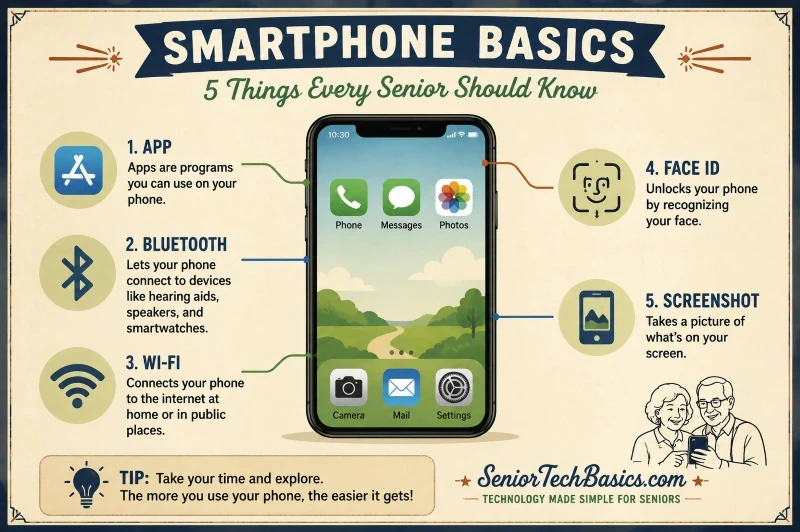
Definition: An app is a software program designed to perform a specific task on a smartphone or tablet.
Why It Matters:
Apps enable you to send messages, join video calls, track your health, play games, and do much more.
Example: WhatsApp, Zoom, and Google Maps are all apps.
What Seniors Need to Know: To minimize security risks, only download apps from trusted sources like the App Store or Google Play.
Related Terms: App Store, Download, Update.
App Store
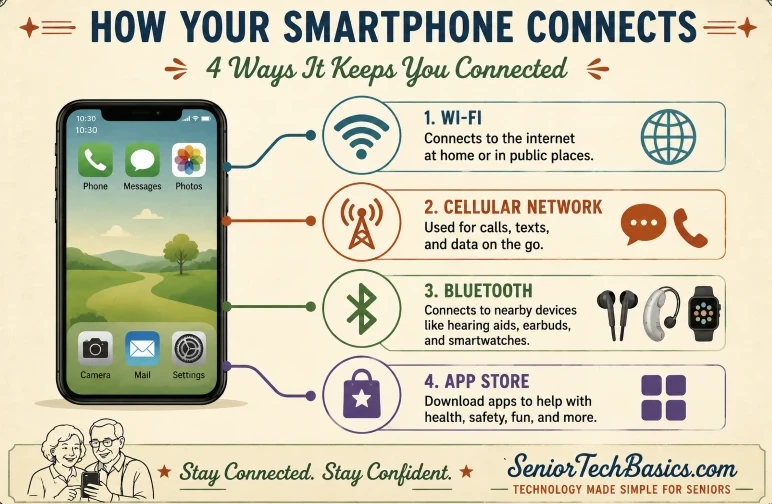
Definition: An App Store is an online marketplace where you can download and update apps.
Why It Matters: Most apps are installed through an App Store, making the App Store an essential feature on smartphones and tablets.
Example: Apple devices use the App Store, while Android devices use Google Play.
What Seniors Need to Know: Many helpful apps are free, though some need subscriptions or in-app purchases.
Related Terms: App, Download, Google Play.
Bluetooth
Definition: Bluetooth is a wireless technology that enables devices to connect and share data over short distances.
Why It Matters: Many devices, including hearing aids, smartwatches, speakers, and medical equipment, depend on Bluetooth connections.
Example: Wireless earbuds can be connected to a smartphone via Bluetooth.
What Seniors Need to Know: If a device suddenly loses its connection, turning Bluetooth off and then on again often fixes the issue.
Related Terms: Wireless, smartwatch, hearing aid.
Cellular Network
Definition:
A cellular network consists of mobile towers that enable smartphones to make calls, send texts, and access the internet.
Why It Matters: Cellular service keeps you connected when Wi-Fi isn’t accessible.
Example: Making a phone call when you’re away from home relies on a cellular network.
What Seniors Need to Know: Weak signal strength can impair call quality and internet speed, particularly in rural regions or within large buildings.
Related Terms: Data Plan, Mobile Carrier, Wi-Fi.
Download
Definition: Downloading is the process of moving data from the internet to your device.
Why It Matters: Apps, photos, documents, and software updates frequently need to be downloaded.
Definition: A tablet is a portable device with a touchscreen and a larger screen than a smartphone.
Why It Matters: Many seniors prefer tablets since their larger text and icons are easier to see.
Example: The Apple iPad is one of the most popular tablets.
What Seniors Need to Know: Tablets are generally easier to read than smartphones due to their larger screens.
Related Terms: Touchscreen, Smartphone, App.
Touchscreen
Definition: A touchscreen is a display that reacts to finger taps, swipes, and gestures.
Why It Matters: Most smartphones and tablets use a touchscreen for control.
Example: Tapping an app icon on the screen to launch it.
What Seniors Need to Know: A light tap generally proves more effective than pressing firmly on the screen.
Related Terms: Tablet, Smartphone, Gesture.
Computer & Internet Terms
Computers and the internet are essential in daily life, supporting activities like online banking, shopping, email, and video calls. Knowing these basic terms can empower older adults to navigate the digital world more confidently and securely.
Bookmark
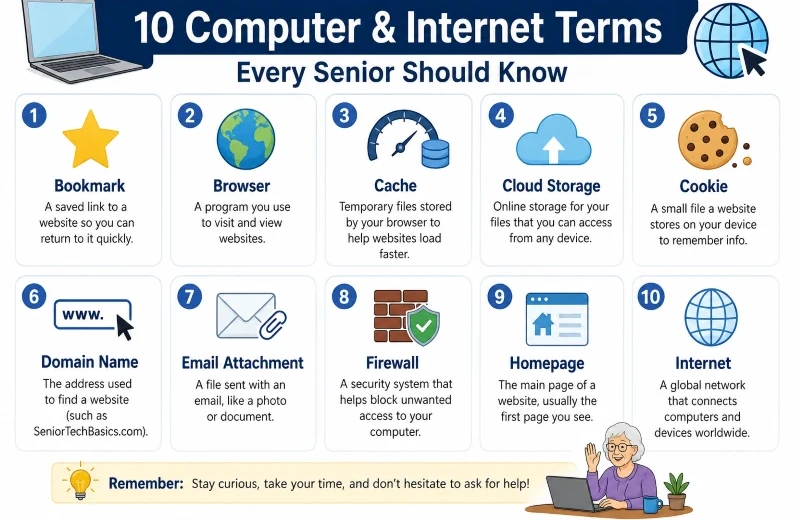
Definition: A bookmark is a saved hyperlink to a website that enables quick access to it.
Why It Matters for Seniors: Bookmarks simplify visiting your favorite websites by providing quick access without needing to remember or type the URL each time.
Example: Bookmark your online banking website for quick, one-click access.
What Seniors Need to Know: Grouping bookmarks into folders helps you locate important websites more quickly later.
Related Terms: Browser, Website, URL.
Browser
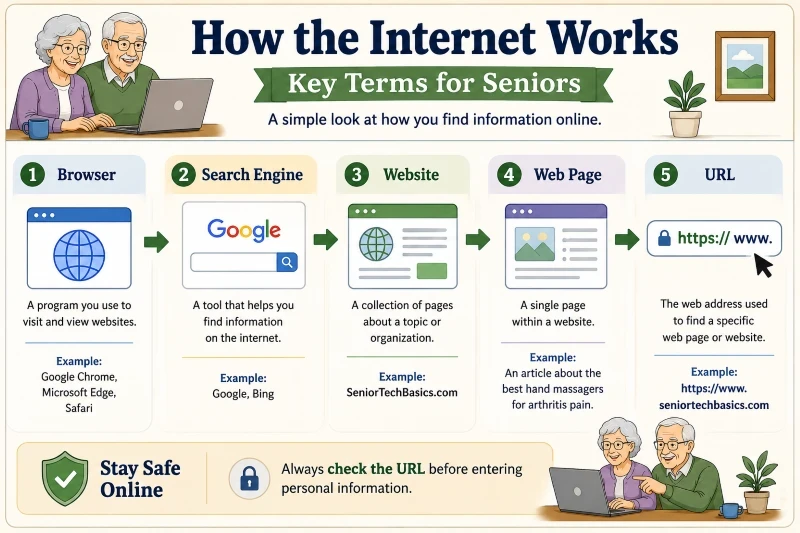
Definition: A browser is a software program that allows users to access and view websites on the internet.
Why It Matters for Seniors: Every online action, whether reading news or checking email, begins with a browser.
Real-World Example: Google Chrome, Microsoft Edge, and Safari are widely used web browsers.
What Seniors Need to Know: Keeping your browser up to date is essential for safeguarding against security threats.
What Seniors Need to Know: Check carefully for typos or strange characters in website URLs.
Related Terms: Domain Name, Website, Browser.
Username
Definition: A username is a distinctive identifier used to recognize an account.
Why It Matters for Seniors: Users often need to provide their usernames to log in to websites and services.
Example: An email address can serve as a username.
What Seniors Need to Know: Never share your usernames or passwords with anyone.
Related Terms: Account, Password, Login.
VPN
Definition: A VPN (Virtual Private Network) establishes a secure link between your device and the internet.
Why It Matters for Seniors: It can help safeguard your privacy when connecting to public Wi-Fi networks.
Example: A traveler connects to hotel Wi-Fi using a VPN.
What Seniors Need to Know: A VPN enhances your privacy; however, it does not fully ensure complete anonymity online.
Related Terms: Wi-Fi, Security, Internet.
Website
Definition: A website consists of multiple accessible webpages on the internet.
Why It Matters for Seniors: Websites offer information, services, entertainment, and communication tools.
Example: SeniorTechBasics.com is a website that offers information on technology products and services tailored for older adults, including top hand massagers for arthritis relief.
What Seniors Need to Know: Trusted websites typically provide contact information and clear privacy policies.
Related Terms: Web Page, URL, Browser.
Web Page
Definition: A web page is an individual page on a website.
Why It Matters for Seniors: Most online information is presented on separate web pages.
Example: A web page on a larger website in the tech niche can include an article about medical alert systems.
What Seniors Need to Know: A website may consist of hundreds or even thousands of web pages.
Related Terms: Website, URL, Homepage.
Online Safety & Scam Protection Terms.
It’s crucial for older adults to understand key online safety terms because the rise in online scams and security threats makes this knowledge essential. The following terms cover common security features, scam tactics, and privacy tools to help you stay protected online.
Two-Factor Authentication (2FA)
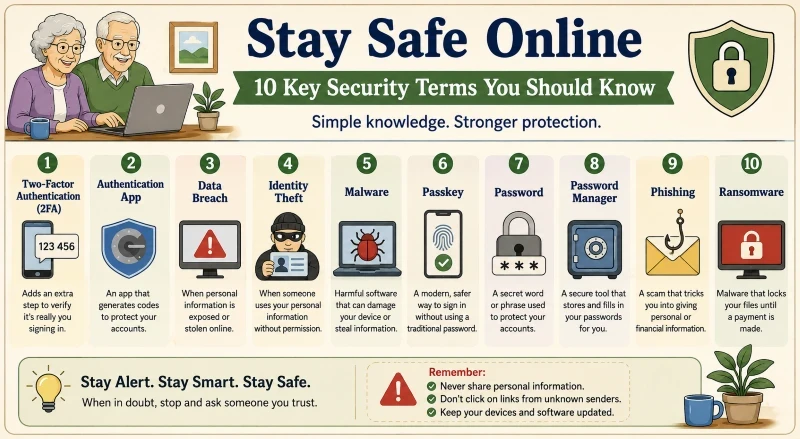
Definition: Two-factor authentication enhances security by requiring a second factor of authentication during sign-in.
Why It Matters for Seniors: It prevents unauthorized access even if someone discovers your password.
Example: After you enter your password, your bank will send a code to your phone.
What Seniors Need to Know: Enabling two-factor authentication (2FA) on critical accounts is one of the most effective methods to enhance online security.
Related Terms: Verification code, password, and authentication app.
Authentication App
Definition: An authentication app generates security codes to verify your identity.
Why It Matters for Seniors: These apps offer more robust security than passwords alone.
Example: Google Authenticator produces a temporary code each time you sign in.
What Seniors Need to Know: Ensure your authentication app remains secure, since losing it could complicate account recovery.
Definition: A passkey is an advanced authentication method designed to replace conventional passwords.
Why It Matters for Seniors: Passkeys are typically simpler to use and offer greater protection against hacking.
Example: Logging into an account with Face ID rather than a password.
What Seniors Need to Know: Many leading companies endorse passkeys as a more secure login method.
Related Terms: Password, Face ID, Security.
Password
Definition: A password is a confidential set of characters that secures an account.
Why It Matters for Seniors: Using strong passwords helps to protect personal data from unauthorized access.
Example: Use a strong, unique password for your email account.
What Seniors Need to Know: Do not reuse the same password for different accounts.
Related Terms: Password Manager, Passkey, Username.
Password Manager
Definition: A password manager safely stores and manages passwords.
Why It Matters for Seniors: It reduces the need to remember numerous passwords.
Example: A password manager automatically inputs login details on websites.
What Seniors Need to Know: A strong master password enhances a password manager’s security.
Related Terms: Password, Security, Login.
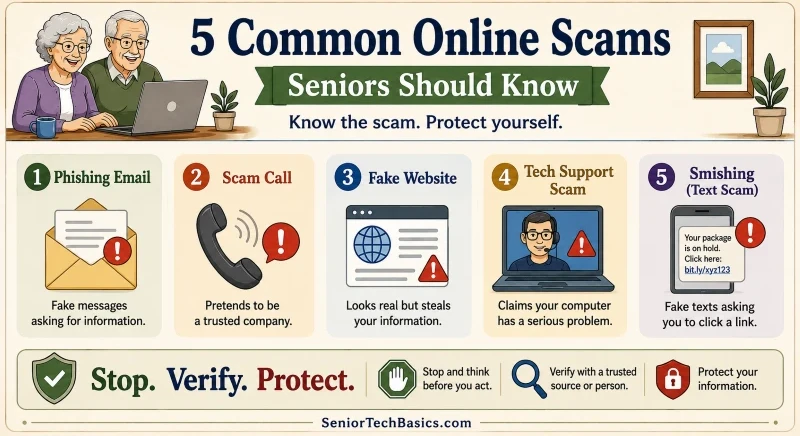
Phishing
Definition: Phishing is a fraudulent scheme that tries to deceive individuals into disclosing personal details.
Why It Matters for Seniors: Phishing attacks frequently aim at gathering passwords, banking details, and account credentials.
Example: An email that appears to be from your bank asks you to click a link and verify your account.
What Seniors Need to Know: Reliable organizations seldom request sensitive information via email links.
Related Terms: Scam Email, Smishing, Spoofing.
Ransomware
Definition: Ransomware is a form of malware that encrypts files or devices and demands a ransom.
Why It Matters for Seniors: Important documents and photos may become difficult to access.
Example: A computer shows a message requesting payment to unlock files.
What Seniors Need to Know: Performing regular backups helps lessen the effects of a ransomware attack.
Related Terms: Malware, Virus, Backup.
Scam Call
Definition: A scam call is a phone call intended to deceive people into giving away money or personal details.
Why It Matters for Seniors: Scammers frequently target seniors by posing as government officials, bank representatives, or tech support staff.
Example: A caller claims your bank account has been hacked and asks for your account information.
What Seniors Need to Know: Legitimate organizations seldom request sensitive information via phone.
Related Terms: Scam Website, Spoofing, Fraud.
Scam Website
Definition: A scam website is a fraudulent site designed to steal information or money.
Why It Matters for Seniors: These sites often closely resemble authentic websites.
Example: A counterfeit online shop promotes products with suspiciously low prices.
What Seniors Need to Know: Ensure there are no spelling errors, no unusual URLs, and no missing contact details.
Related Terms: Phishing, URL, Website.
Security Update
Definition: A security update is a software release designed to fix vulnerabilities and enhance protection.
Why It Matters for Seniors: Updates protect devices from new threats.
Example: Your computer prompts you to download and install the most recent security update.
What Seniors Need to Know: Delaying updates for extended periods can increase security risks.
Related Terms: Update, Malware, Security.
Smishing
Definition: Smishing is a type of phishing scam that is carried out via text messages.
Why It Matters for Seniors: Fake text messages frequently seem to originate from trusted companies.
Example: A message states there is an issue with a package delivery and requests you to click a link.
What Seniors Need to Know: Be wary of urgent messages that prompt you to act quickly.
Related Terms: Phishing, Scam, Spoofing.
Social Engineering
Definition: Social engineering involves manipulating individuals to obtain information or trigger specific actions.
Why It Matters for Seniors: Many scams rely on trust, fear, or urgency rather than technical deception.
Example: A scammer impersonates a family member requesting urgent financial assistance.
What Seniors Need to Know: Always verify requests carefully before sharing information or transferring money.
Related Terms: Scam Call, Phishing, Fraud.
Spoofing
Definition: Spoofing occurs when a scammer impersonates someone to appear legitimate.
Why It Matters for Seniors: It can make scam calls, emails, and websites appear authentic.
Example: A caller ID shows the name of a local bank, but the call is actually fraudulent.
What Seniors Need to Know: Caller ID data can be manipulated and cannot be fully relied upon.
Related Terms: Scam Call, Phishing, Smishing.
Spyware
Definition: Spyware is malicious software that covertly tracks activity on a device.
Why It Matters for Seniors: It might gather personal data without informing the user.
Example: The software tracks your browsing activity and transmits this information to another location.
What Seniors Need to Know: Unexpected slowdowns or pop-ups may indicate spyware.
Related Terms: Malware, Virus, Security.
Tech Support Scam
Definition: A tech support scam convinces individuals that their device has a critical issue.
Why It Matters for Seniors: Scammers frequently request remote access or payments for unnecessary services.
Example: A pop-up alerts that your computer is infected and shows a phone number to call.
What Seniors Need to Know: Close any suspicious pop-ups instead of clicking on the provided phone number.
Related Terms: Scam Call, Malware, Pop-Up Window.
Verification Code
Definition: A verification code is a short-lived code used to verify your identity.
Why It Matters for Seniors: Verification codes are essential for safeguarding accounts against unauthorized access.
Example: A six-digit code is sent to your phone when you sign in.
What Seniors Need to Know: Never give verification codes to anyone who contacts you unexpectedly.
Related Terms: 2FA, Authentication App, Security.
Virus
Definition: A virus is a type of malicious software that can spread across devices and cause harm.
Why It Matters for Seniors: Viruses can impair system performance, delete files, or jeopardize personal information.
Example: Opening an infected attachment can install a virus on a computer.
What Seniors Need to Know: Using antivirus software and keeping it up to date regularly can reduce the risk of infection.
Related Terms: Malware, Spyware, Security.
Smartwatch Terms
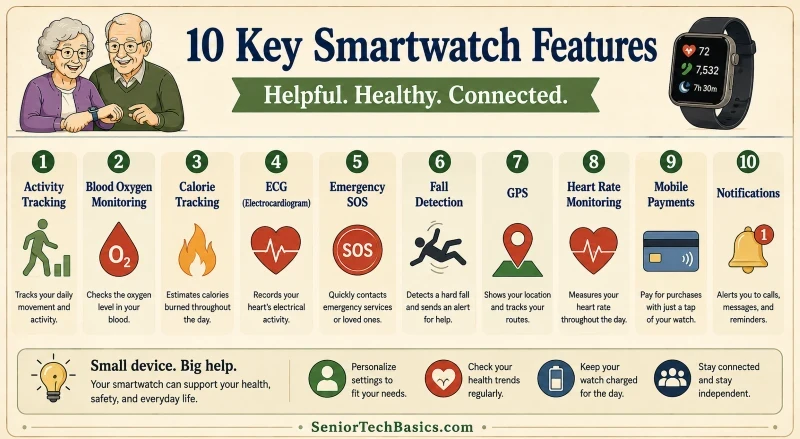
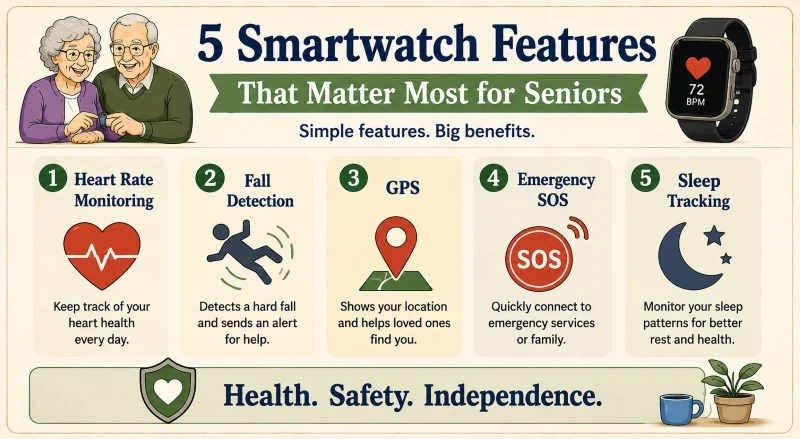
Smartwatches can track activity, monitor health metrics, provide safety features, and help older adults stay connected. Understanding these terms can help you compare devices and choose the features that matter most to you.
Activity Tracking
Definition: Activity tracking logs daily movement and exercise.
Why It Matters for Seniors: It can promote a more active lifestyle and help track progress toward fitness goals.
Example: A smartwatch monitors how many minutes you walk each day.
What Seniors Need to Know: You can typically modify activity goals to suit your fitness level.
Related Terms: Step Counter, Workout Tracking, Calorie Tracking.
Blood Oxygen Monitoring
Definition: Blood oxygen monitoring measures the level of oxygen in your blood.
Why It Matters for Seniors: It offers extra insights into overall wellness and respiratory health.
Example: A smartwatch shows a blood oxygen level following a quick measurement.
What Seniors Need to Know: Smartwatch measurements should not replace professional medical devices.
Definition: Workout tracking logs exercise sessions and physical activities.
Why It Matters for Seniors: It helps users track their progress and maintain motivation.
Example: A smartwatch records a 30-minute walk through the neighborhood.
What Seniors Need to Know: Most watches support a range of activities, including walking, cycling, and swimming.
Related Terms: Activity Tracking, Step Counter, Calorie Tracking.
Wrist-Based Sensors
Definition: Wrist sensors collect health and activity data directly from the wrist.
Why It Matters for Seniors: They enable features like heart rate monitoring and sleep tracking.
Example: A smartwatch’s sensors on the back monitor heart rate continuously throughout the day.
What Seniors Need to Know: Sensor accuracy may differ based on how well the watch fits and how it moves.
Related Terms: Heart Rate Monitoring, ECG, Blood Oxygen Monitoring.
Battery Life
Definition: Battery life indicates the duration a smartwatch can run before requiring a recharge.
Why It Matters for Seniors: Longer battery life results in fewer charges needed and ensures more dependable access to safety features.
Example: A smartwatch can operate for two days after a single charge.
What Seniors Need to Know: Features, such as GPS and cellular connectivity, can drain battery life.
Related Terms: Smartwatch, GPS, Cellular Smartwatch.
Cellular Smartwatch
Definition: A cellular smartwatch can connect to mobile networks independently, without a smartphone.
Why It Matters for Seniors: It enables calls, messages, and emergency features to work even when the phone isn’t nearby.
Example: A smartwatch makes a phone call even though the user’s smartphone stays at home.
What Seniors Need to Know: Cellular models typically need an extra mobile service plan.
Related Terms: GPS, Emergency SOS, Mobile Carrier.
Medical Alert System Terms
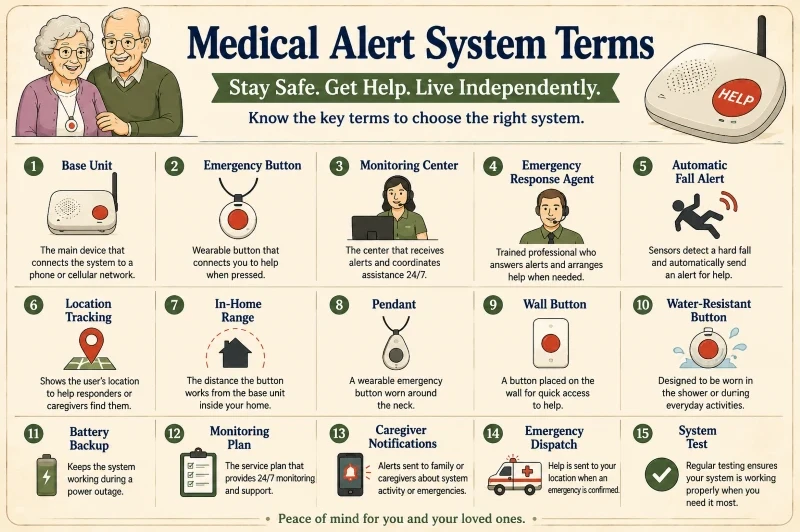
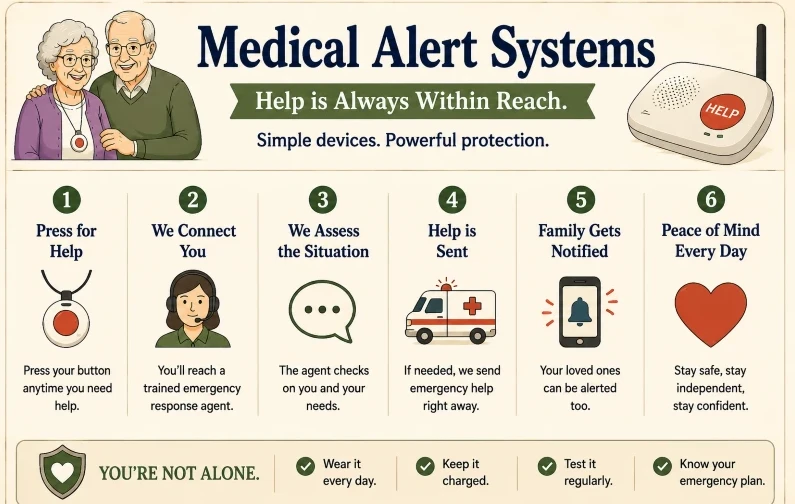
Medical alert systems help older adults get prompt assistance during emergencies. Becoming familiar with these common terms can make it easier to compare devices and choose a system that enhances safety and independence.
Base Unit
Definition: A base unit is the primary device that links a medical alert system to a phone or cellular network.
Why It Matters for Seniors: It serves as the communication hub between the user and the monitoring center.
Example: The base unit of a medical alert system is positioned close to a telephone or power outlet in the house.
What Seniors Need to Know: Position the base unit centrally to ensure it receives signals easily.
Related Terms: Monitoring Center, Cellular Network, Landline System.
Caregiver App
Definition: A caregiver app enables family members to receive alerts and track system activity.
Why It Matters for Seniors: It helps loved ones stay updated on safety and emergency alerts.
Example: Caregiver Apps can alert a daughter to get a notification on her phone when her parents’ emergency button is activated.
What Seniors Need to Know: Features differ among providers, so review what information the app discloses.
Related Terms: Emergency Alert, GPS Tracking, Monitoring Center.
Cellular Medical Alert System
Definition: A cellular medical alert system relies on mobile networks rather than a traditional landline.
Why It Matters for Seniors: It can work in homes without a landline connection.
Example:Emergency alert devices communicate via a cellular network rather than a landline phone.
What Seniors Need to Know: The quality of cellular coverage can impact overall performance.
Related Terms: Cellular network, base unit, and mobile medical alert system.
Emergency Button
Definition: An emergency button is a wearable device that contacts help when pressed.
Why It Matters for Seniors: It offers quick help in emergencies.
Example: Pressing the button after a fall contacts the monitoring center.
What Seniors Need to Know: Many buttons are intended for continuous 24-hour wear.
Related Terms: Fall Detection, Monitoring Center, and Pendant.
Emergency Response Agent
Definition: An emergency response agent is a trained professional who responds to emergency alerts.
Why It Matters for Seniors: They assess the situation and coordinate assistance as needed.
Example: An agent reaches out to emergency services following a conversation with a user.
What Seniors Need to Know: Response agents are usually accessible 24/7.
Related Terms: Monitoring Center, Emergency Alert, Dispatch.
Landline Medical Alert System
Definition: A landline medical alert system utilizes a standard home telephone line for connectivity.
Why It Matters for Seniors: It remains a favored choice for households with reliable landline service.
Example: The base unit connects directly to a home phone jack.
What Seniors Need to Know: These systems may stop working if the phone line disconnects.
Related Terms: Base Unit, Cellular Medical Alert System, Monitoring Center.
Mobile Medical Alert System
Definition: A mobile medical alert system functions effectively both indoors and outdoors.
Why It Matters for Seniors: It offers protection during shopping, walking, or traveling.
Example: A wearable device enables a user to call for help when they are outside the home.
What Seniors Need to Know: Mobile systems typically require charging more often than systems used at home.
Related Terms:GPS Tracking, Cellular Medical Alert System, Emergency Button.
Monitoring Center
Definition: A monitoring center is a facility that collects emergency alerts and directs assistance.
Why It Matters for Seniors: It serves as the primary point of contact during emergencies.
Example: An operator responds to an alert and contacts emergency services as needed.
What Seniors Need to Know: Most companies that offer medical alerts provide around-the-clock monitoring services.
Related Terms: Emergency Response Agent, Emergency Button, Monitoring Service.
Automatic Fall Alert
Definition: An automatic fall alert is a feature that sends an emergency notification when the device detects a hard fall.
Why It Matters for Seniors: It might be useful to ask for help if someone is unable to press the emergency button.
Example: A pendant detects a fall and automatically contacts the monitoring center.
What Seniors Need to Know: While automatic fall alerts are useful, they might not catch every fall.
Related Terms: Emergency Button, Monitoring Center, and Safety Monitoring.
Location Tracking
Definition: Location tracking helps determine a medical alert user’s position during an emergency.
Why It Matters for Seniors: It helps responders and caregivers locate someone more rapidly.
Example: A mobile alert device transmits the user’s location when the help button is pressed.
What Seniors Need to Know: Location tracking generally performs best outdoors or in environments with reliable signal coverage.
Related Terms: Mobile Medical Alert System, Caregiver App, Emergency Dispatch.
In-Home Range
Definition: In-home range refers to how far a wearable button can operate from the base unit within or around a residence.
Why It Matters for Seniors: A wider range provides improved coverage for larger homes or yards.
Example: A pendant remains connected to the base unit from both the bedroom and the garden.
What Seniors Need to Know: Walls, floors, and home layout can influence the actual range.
Related Terms: Base Unit, Emergency Button, Pendant.
Pendant
Definition: A pendant functions as a wearable emergency button typically worn around the neck.
Why It Matters for Seniors: It keeps help accessible during everyday activities.
Example: A senior citizen wears a pendant while walking around the house.
What Seniors Need to Know: The pendant should be comfortable for everyday wear.
Related Terms: Emergency Button, Fall Alert, Wearable Device.
Wall Button
Definition: A wall-mounted button is an emergency switch installed in a fixed position.
Why It Matters for Seniors: It allows for rapid assistance in dangerous zones.
Example: You can place a wall button near the shower or by the bed.
What Seniors Need to Know: Wall buttons are most effective when installed in fall-prone areas.
Related Terms: Emergency Button, Base Unit, and In-Home Safety.
Hearing Technology Terms.
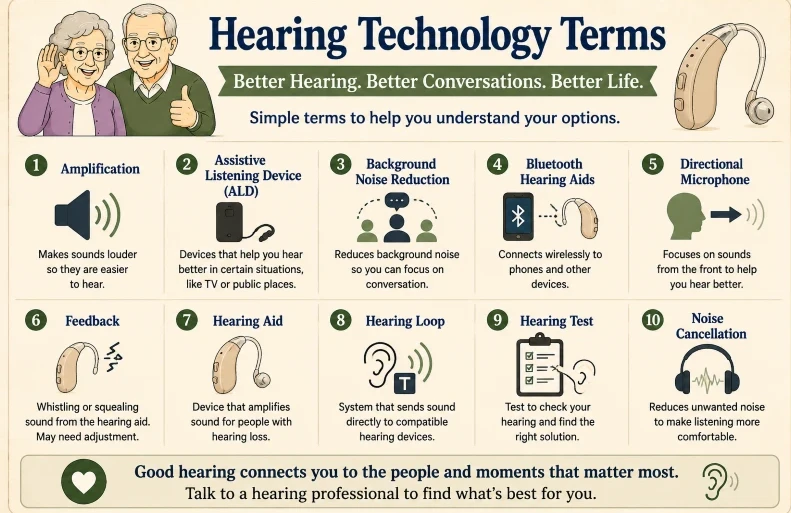
Hearing technology can help older adults communicate more easily, participate more fully in conversations, and stay connected to their surroundings. The definitions below offer clear, simple explanations of common hearing aids and assistive listening devices.
Amplification
Definition: Amplification boosts sound volume to help make sounds clearer and easier to hear.
Why It Matters for Seniors: It helps people with hearing loss perceive speech and environmental sounds more distinctly.
Example:A hearing aid boosts a family member’s voice during a conversation.
What Seniors Need to Know: More amplification isn’t always better; proper adjustment is key to comfort and clarity.
Related Terms: Hearing aid with speech enhancement and volume control.
Assistive Listening Device (ALD).
Definition: An assistive listening device helps enhance hearing in particular situations.
Why It Matters for Seniors: ALDs can help improve hearing for television audio, conversations, or public announcements.
Example: A wireless TV listening system transmits sound straight to headphones.
What Seniors Need to Know: You can use many ALDs with or without hearing aids.
Related Terms:Hearing Aids, Hearing Loop, Bluetooth.
Definition: A hearing test assesses how well a person can detect sounds across various volumes and frequencies.
Why It Matters for Seniors: It helps detect hearing loss and select appropriate treatment options.
Example: An audiologist conducts a hearing test to evaluate hearing capability.
What Seniors Need to Know: Regular hearing checks can identify changes early.
Related Terms: Audiology, hearing aids, and hearing loss.
Noise Cancellation
Definition: Noise cancellation employs specialized technology to diminish unwanted sounds.
Why It Matters for Seniors: It can enhance listening comfort in noisy settings.
Example: Wireless headphones help diminish airplane engine noise during travel.
What Seniors Need to Know: Noise cancellation differs from hearing aid noise reduction and might not enhance speech comprehension.
Related Terms: Background noise reduction, hearing aids, and speech enhancement.
Over-the-Counter (OTC) Hearing Aids
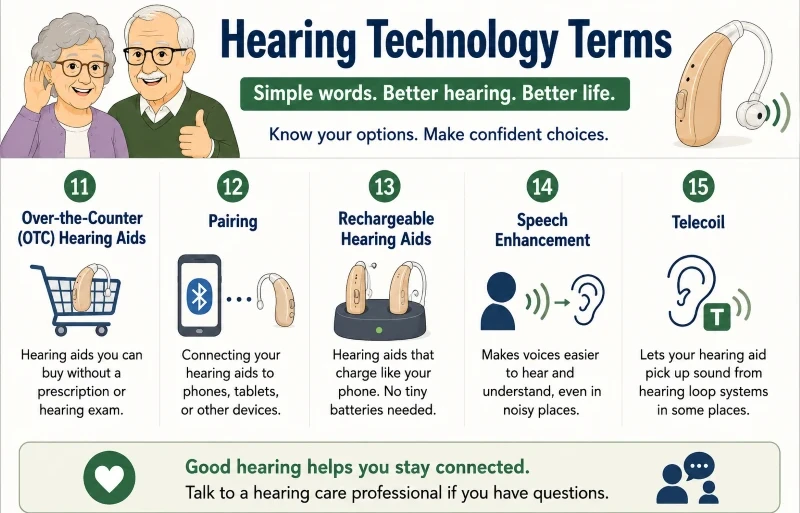
Definition: OTC hearing aids are available for purchase without needing a prescription or hearing test.
Why It Matters for Seniors: They provide a more accessible and cost-effective choice for individuals with mild to moderate hearing loss.
Example: A senior orders OTC hearing aids online without the need to visit a clinic.
What Seniors Need to Know: OTC hearing aids may not be appropriate for all kinds of hearing loss.
Related Terms: Hearing aids, hearing assessments, and sound amplification services.
Pairing
Definition: Pairing involves establishing a connection between two Bluetooth devices.
Why It Matters for Seniors: It allows hearing aids to connect with smartphones, tablets, and televisions.
Example: Pairing Bluetooth hearing aids with a smartphone.
What Seniors Need to Know: Devices typically only require pairing once unless the connection is reset.
Related Terms: Bluetooth hearing aids connect wirelessly to smartphones.
Rechargeable Hearing Aids
Definition: Rechargeable hearing aids feature integrated batteries that can be recharged rather than replaced.
Why It Matters for Seniors: It removes the need to manage small disposable batteries.
Example: Charging hearing aids in a dock overnight.
What Seniors Need to Know: Most rechargeable models offer a full day’s usage on a single charge.
Related Terms: Hearing Aid, Charging Dock, and Battery Life.
Speech Enhancement
Definition: Speech enhancement technology improves the clarity and comprehensibility of voices.
Why It Matters for Seniors: It can enhance clarity during conversations in difficult listening situations.
Example: A hearing aid highlights speech during a family gathering.
What Seniors Need to Know: Speech enhancement is most effective when paired with a proper hearing aid fitting.
Related Terms: Background noise reduction with a directional microphone feature in hearing aids.
Telecoil
Definition: A telecoil is a compact part within certain hearing aids that picks up sound signals from hearing loop systems.
Why It Matters for Seniors: It can enhance audio quality in churches, theaters, and public venues.
Example: A hearing aid activates telecoil mode when attending a community event.
What Seniors Need to Know: Some hearing aids do not come with a telecoil feature.
Related Terms: Hearing Loop, Hearing Aid, and Assistive Listening Device.
Smart Home Technology Terms
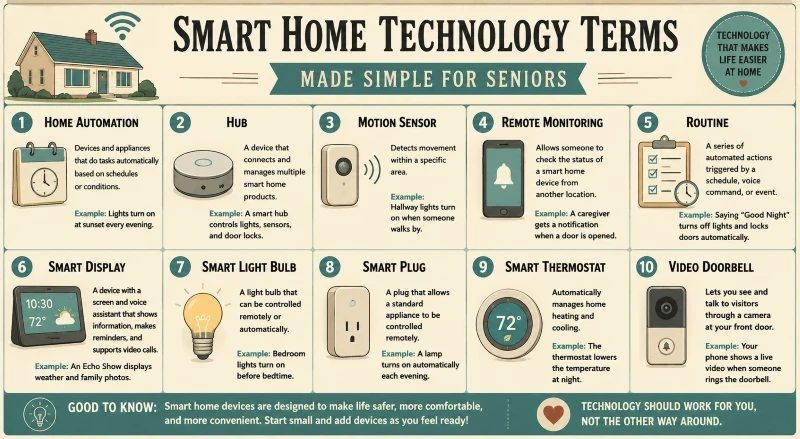
Smart home technology can help older adults enhance convenience, comfort, and safety at home. These devices typically automate routine tasks and can be operated via smartphones, tablets, or voice commands.
Home Automation
Definition: Home automation enables devices and appliances to automatically perform tasks based on predefined schedules or specific conditions.
Why It Matters for Seniors: It can reduce the need to manually control household devices.
Example: Lights automatically switch on at sunset each evening.
What Seniors Need to Know: Automation can typically be tailored to suit your daily habits.
Related Terms: Routine, smart home, smart plug.
Hub
Definition: A hub is a device that links and controls various smart home devices.
Why It Matters for Seniors: It enables multiple devices to operate seamlessly within a single system.
Example: A smart hub manages lights, sensors, and door locks across the home.
What Seniors Need to Know: Some smart home devices operate independently without a hub, whereas others need one.
Definition: A Wi-Fi device links to a home’s wireless internet network.
Why It Matters for Seniors: Most smart home devices need Wi-Fi to operate correctly.
Example: A video doorbell links to the home’s Wi-Fi network.
What Seniors Need to Know: Poor Wi-Fi signals can hinder smart home devices’ performance.
Related Terms: Smart Home, Router, and Remote Monitoring.
Health & Wellness Technology Terms
Health and wellness technology enables older adults to track vital health data, remain active, and achieve daily wellness objectives. These devices are increasingly integrated into smartphones, smartwatches, and connected health devices.
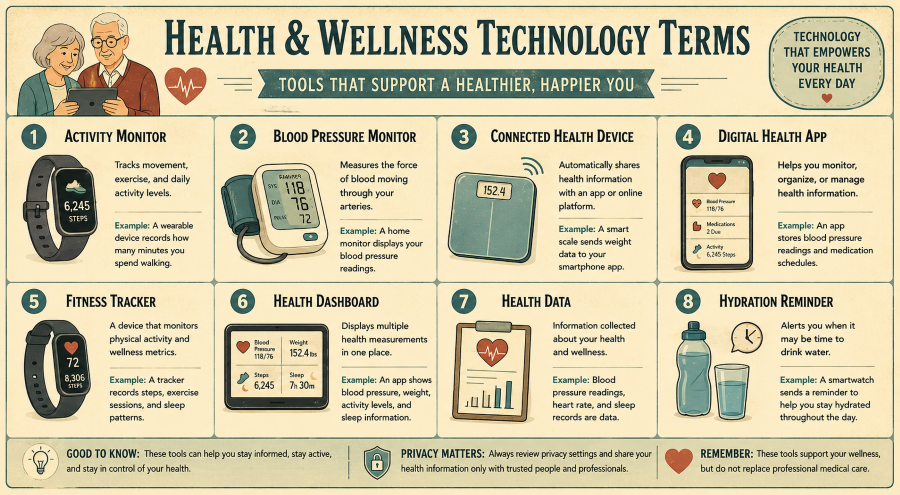
Activity Monitor
Definition: An activity monitor records movement, exercise, and daily activity levels.
Why It Matters for Seniors: It can promote consistent activity and help users stay active.
Example: A wearable device tracks how many minutes you walk each day.
What Seniors Need to Know: Activity monitors can motivate you, but your goals should be realistic and suited to your health.
Related Terms: Fitness Tracker, step counter, and wearable health device.
Blood Pressure Monitor
Definition: A blood pressure monitor gauges the force of blood traveling through your arteries.
Why It Matters for Seniors: Regular monitoring allows users to observe blood pressure changes over time.
Example: A home monitor shows systolic and diastolic blood pressure readings.
What Seniors Need to Know: Ensure readings are taken following the manufacturer’s instructions to achieve maximum accuracy.
Related Terms: Health Data, Connected Health Devices, and Remote Patient Monitoring.
Connected Health Device
Definition: A connected health device automatically transmits health data to an app or online platform.
Why It Matters for Seniors: It minimizes the necessity for manual documentation of health data.
Example: A smart scale transmits weight data straight to a smartphone app.
What Seniors Need to Know: Always check your privacy settings prior to sharing health information.
Related Terms: Health Dashboard, Blood Pressure Monitor, and Health Data.
Digital Health App
Definition: A digital health app helps users track, organize, and manage their health data.
Why It Matters for Seniors: It helps streamline health tracking and enhances organization.
Example: An app records blood pressure measurements and medication timings.
What Seniors Need to Know: Health apps should serve as a supplement, not as a substitute, for professional medical care.
Related Terms: Health Dashboard, Symptom Tracker, and Wellness App.
Fitness Tracker
Definition: A fitness tracker is a device that monitors physical activity and health-related metrics.
Why It Matters for Seniors: It can help users gain a clearer understanding of their activity habits.
Example:A fitness tracker logs steps, workout sessions, and sleep habits.
What Seniors Need to Know: Many fitness trackers now offer health and safety features in addition to exercise tracking.
Related Terms: Activity Monitor, Wearable Health Device, and Sleep Tracking.
Health Dashboard
Definition: A health dashboard consolidates various health metrics into a single view.
Why It Matters for Seniors: It simplifies the process of reviewing trends and tracking progress.
Example: An app displays blood pressure, weight, activity levels, and sleep data all on a single screen.
What Seniors Need to Know: Focusing on long-term trends generally provides more insight than concentrating on a single data point.
Definition: Health data refers to information gathered about your health and wellness.
Why It Matters for Seniors: It can help identify patterns and facilitate informed conversations about health.
Example: Blood pressure, heart rate, and sleep logs are types of health data.
What Seniors Need to Know: Health data must be kept secure and shared solely with trusted providers.
Related Terms: Health Dashboard, Connected Health Devices, Digital Health Applications.
Hydration Reminder
Definition: A hydration reminder notifies users when it’s probably time to drink water.
Why It Matters for Seniors: Maintaining hydration is key to supporting overall health and well-being.
Example: A smartwatch alerts you to drink water throughout the day.
What Seniors Need to Know: Hydration reminders are useful prompts but should not replace professional medical advice on fluid intake.
Related Terms: Wellness app, reminder feature, and smartwatch integration.
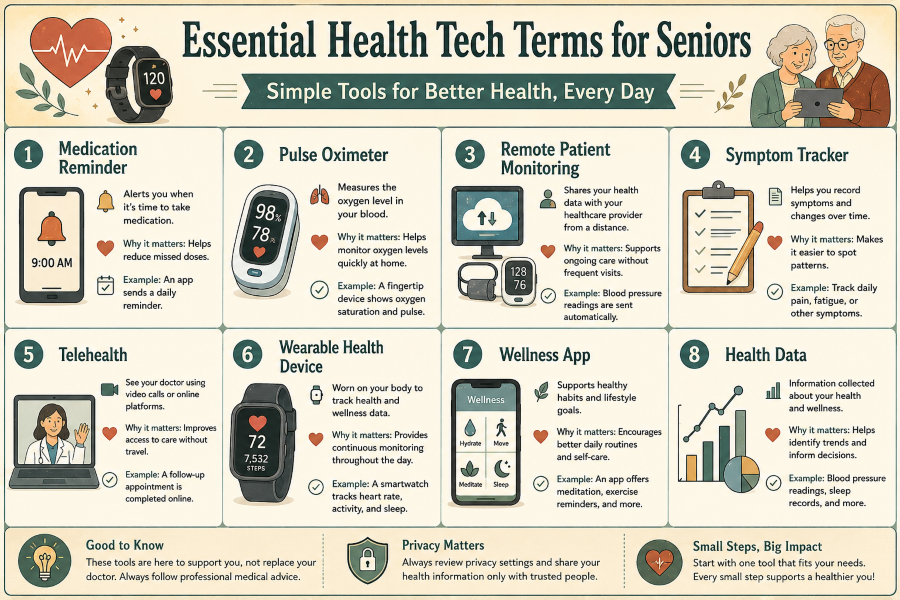
Medication Reminder
Definition: A medication reminder is a device that alerts users when it’s time to take their medication.
Why It Matters for Seniors: It can help reduce missed doses and improve medication adherence.
Example: A smartphone app sends a reminder each morning to take blood pressure medication.
What Seniors Need to Know: Reminders work best when medication schedules are up to date.
Related Terms: Digital health app, reminders, and health dashboard.
Pulse Oximeter
Definition: A pulse oximeter measures the oxygen saturation in your blood.
Why It Matters for Seniors: It offers a quick method to track oxygen levels at home.
Example: A fingertip pulse oximeter shows oxygen saturation levels and pulse rate.
What Seniors Need to Know: Cold fingers, movement, and poor circulation can sometimes impact readings.
Related Terms: Blood Oxygen Monitoring, Connected Health Device, and Health Data.
Remote Patient Monitoring
Definition: Remote patient monitoring enables healthcare providers to access and review patients’ health data remotely.
Why It Matters for Seniors: It enables continuous health management without frequent office visits.
Example: A blood pressure monitor automatically transmits readings to a healthcare provider.
What Seniors Need to Know: Participation typically depends on having compatible devices and an internet connection.
Related Terms: Connected health devices, telehealth services, and health data management.
Symptom Tracker
Definition: A symptom tracker enables users to log variations in their health conditions or symptoms over time.
Why It Matters for Seniors: It helps simplify the process of recognizing patterns and communicating concerns with healthcare providers.
Example: A user logs daily pain levels in a health app.
What Seniors Need to Know: Consistent tracking usually yields more valuable information than sporadic entries.
Related Terms: Digital Health App, Health Dashboard, and Health Data.
Telehealth
Definition: Telehealth enables patients to reach healthcare providers through video, phone, or online platforms.
Why It Matters for Seniors: It can improve access to care without requiring travel.
Example: A doctor holds a follow-up consultation via a secure video call.
What Seniors Need to Know: A stable internet connection ensures a smoother appointment experience.
Related Terms: Remote Patient Monitoring, Video Calling, and Digital Health Apps.
Wearable Health Device
Definition: A wearable health device gathers health and wellness data when worn on the body.
Why It Matters for Seniors:Wearable devices offer all-day monitoring.
Example: A smartwatch monitors heart rate, physical activity, and sleep habits.
What Seniors Need to Know: Wearable devices work best when used consistently and correctly.
Related Terms: Fitness Tracker, Activity Monitor, Health Data.
Wellness App
Definition: A wellness app helps users maintain healthy habits and achieve lifestyle goals.
Why It Matters for Seniors: It can promote healthier daily routines and self-care habits.
Example: A wellness app offers guided meditation sessions, exercise reminders, and hydration-tracking features.
What Seniors Need to Know: Select apps that align with your health objectives and your comfort with technology.
Related Terms: Digital health app featuring hydration and medication reminders.
Accessibility Technology Terms
Accessibility technology enables individuals to operate digital devices more easily, regardless of age, vision, hearing, mobility, or other impairments. Many of these features are already embedded in smartphones, tablets, computers, and smart gadgets.
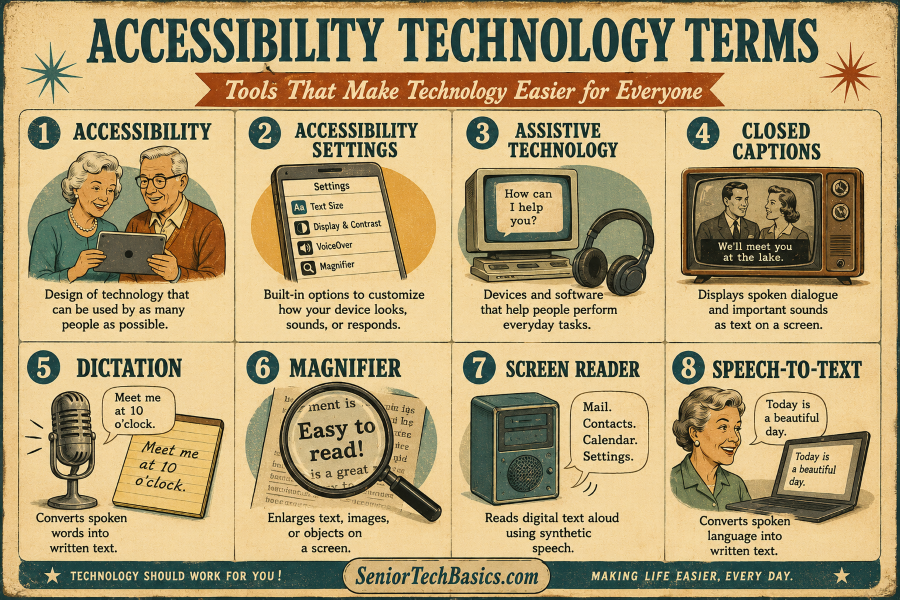
Accessibility
Definition: Accessibility refers to the creation of products and technology that are usable by the widest possible range of people.
Why It Matters for Seniors: Accessibility features can help make devices more visible, audible, and easier to use.
Example: Enlarging text size on a smartphone to enhance readability.
What Seniors Need to Know: Many accessibility features are free and built into modern devices.
Related Terms: Accessibility Settings, Assistive Technology options, and Large Print Mode.
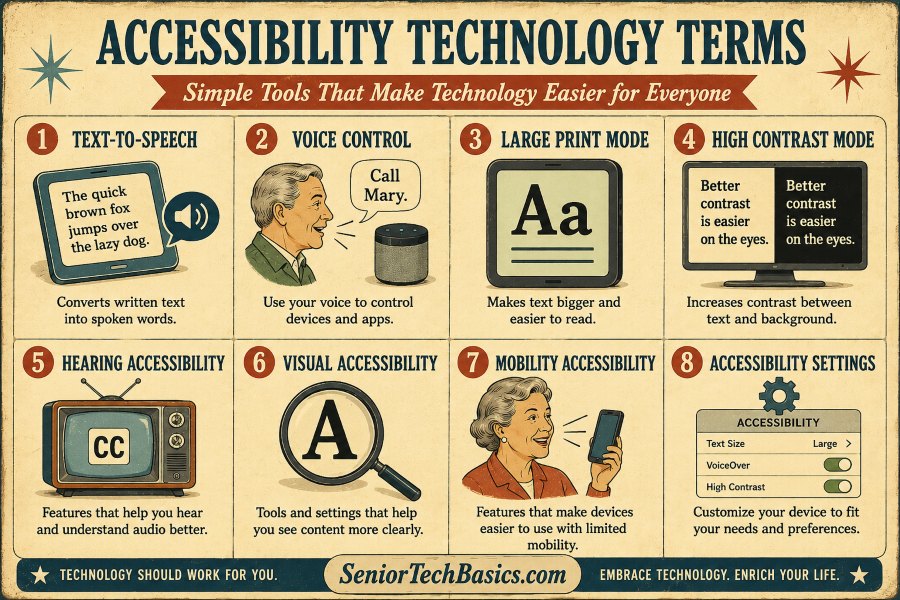
Accessibility Settings
Definition: Accessibility settings provide options to customize a device’s appearance, sound, or responsiveness.
Why It Matters for Seniors: They can enhance technology to be more user-friendly and accessible.
Example: Modifying text size, contrast, or audio options on a tablet.
What Seniors Need to Know: Adjusting these settings can greatly enhance the user experience.
Related Terms: Accessibility options include High Contrast Mode and Voice Control.
Assistive Technology
Definition: Assistive technology comprises devices and software that help individuals carry out daily activities.
Why It Matters for Seniors: It promotes independence and reduces technological barriers.
Example: A screen reader helps individuals with vision impairments use a computer.
What Seniors Need to Know: Assistive technology includes everything from basic tools to sophisticated electronic devices.
Related Terms: Screen Reader, Voice Control, and Accessibility features.
Closed Captions
Definition: Closed captions show spoken dialogue and key sounds as text on the screen.
Why It Matters for Seniors: They can simplify television programs and videos to improve understanding.
Example: Captions appear at the bottom of the screen during character dialogues in a movie.
What Seniors Need to Know: Most streaming services and TVs offer the option to enable or disable captions.
Related Terms: Hearing accessibility features, text-to-speech options, and accessibility settings.
Dictation
Definition: Dictation transforms spoken language into written form.
Why It Matters for Seniors: It reduces the need to type on small keyboards or touchscreens.
Example: Saying a text message aloud instead of typing it.
What Seniors Need to Know: Speaking clearly and naturally can lead to more accurate dictation.
Related Terms: Speech-to-Text, Voice Control, and Smartphone features.
Magnifier
Definition: A magnifier increases the size of text, images, or objects shown on a display.
Why It Matters for Seniors: It helps make small details more visible.
Example: Using a smartphone magnifier to read a prescription label.
What Seniors Need to Know: Many smartphones feature a built-in magnifier.
Related Terms: Large Print Mode, Visual Accessibility, and Accessibility Settings.
Screen Reader
Definition: A screen reader vocalizes digital text through synthetic speech.
Why It Matters for Seniors: It helps individuals with limited vision access digital content.
Example: A screen reader announces the menu options as you navigate through a smartphone.
What Seniors Need to Know: Most modern smartphones and computers offer screen reader features.
Related Terms: Text-to-Speech, Visual Accessibility, and Assistive Technology.
Speech-to-Text
Definition: Speech-to-text technology transforms spoken words into written text.
Why It Matters for Seniors: It can simplify the process of writing emails, messages, and documents.
Example: Speaking into a phone to automatically create a note.
What Seniors Need to Know: Speech-to-text technology is frequently integrated into smartphones, tablets, and computers.
Related Terms: Dictation, voice control, and accessibility features.
Text-to-Speech
Definition: Text-to-speech technology transforms written text into spoken language.
Why It Matters for Seniors: It can make reading easier for individuals with vision impairments or reading difficulties.
Example: A tablet reads a news article aloud.
What Seniors Need to Know: Many smartphones, tablets, and e-readers have text-to-speech capabilities.
Related Terms: Screen Reader, Speech-to-Text, and Accessibility features.
Voice Control
Definition: Voice control enables users to operate a device through spoken commands.
Why It Matters for Seniors: It reduces the need to use a touchscreen, mouse, or keyboard.
Example: Saying “Call John” to initiate a phone call.
What Seniors Need to Know: Voice control is particularly useful for individuals with arthritis or restricted hand mobility.
Related Terms: Dictation, speech recognition, and voice assistants.
Large Print Mode
Definition: Large print mode enlarges the text on the screen for easier reading.
Why It Matters for Seniors: It simplifies reading emails, messages, and websites.
Example: A smartphone shows larger text across the entire device.
What Seniors Need to Know: Most devices allow text size adjustments without affecting functionality.
Related Terms: Magnifier, Visual Accessibility, Accessibility Settings.
High Contrast Mode
Definition: High contrast mode enhances the distinction between text and background colors.
Why It Matters for Seniors: It can enhance readability for individuals with low vision.
Example: White text appears on a dark background to improve visibility.
What Seniors Need to Know: Different contrast options might be more effective depending on a person’s specific vision requirements.
Related Terms: Large Print Mode, Accessibility Settings, and Visual Accessibility options.
Hearing Accessibility
Definition: Hearing accessibility features make it easier for people to hear or comprehend audio.
Why It Matters for Seniors: Devices such as the Audien Atom can enhance communication and improve media enjoyment.
Example: Watching television with closed captions enabled.
What Seniors Need to Know: Many modern devices already include numerous hearing accessibility features.
Related Terms: Closed captions, hearing technology, and accessibility features.
Visual Accessibility
Definition: Visual accessibility features help people view digital content more clearly.
Why It Matters for Seniors: They can improve device usability for individuals with vision impairments.
Example: Enlarging the text and activating high contrast mode.
What Seniors Need to Know: Making small adjustments can greatly enhance comfort and readability.
Related Terms: Magnifier, Large Print Mode, and Accessibility Settings.
Mobility Accessibility
Definition: Mobility accessibility features help people with limited mobility use devices.
Why It Matters for Seniors: They can simplify technology for individuals with arthritis, tremors, or limited dexterity.
Example: Utilizing voice commands instead of keyboard input.
What Seniors Need to Know: Most major operating systems have built-in accessibility features for mobility.
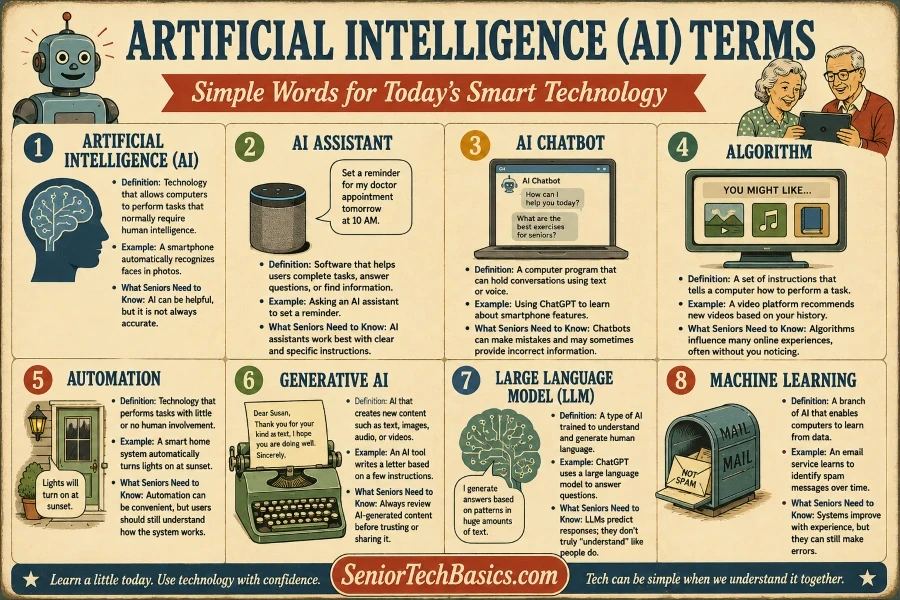
Artificial intelligence is increasingly integrated into daily technology, such as smartphones, smart speakers, search engines, and customer support services. Grasping these concepts can enable older adults to use AI-based products more confidently.
Artificial Intelligence (AI)
Definition: Artificial intelligence refers to technology that enables computers to perform tasks that typically require human intelligence.
Why It Matters for Seniors: AI powers numerous devices and services people use daily.
Example: A smartphone detects faces automatically in photos.
What Seniors Need to Know: AI can be useful, but it isn’t always precise and should not substitute human judgment.
Related Terms: Machine Learning, AI assistance, and automation.
AI Assistant
Definition: An AI assistant is a software program designed to help users accomplish tasks, answer queries, or locate information.
Why It Matters for Seniors: It can streamline technology and offer hands-free support.
Example: Requesting an AI assistant to create a reminder for a doctor’s appointment.
What Seniors Need to Know: AI assistants perform best when given clear, detailed instructions.
Related Terms: AI Chatbot, Voice AI, Prompt.
AI Chatbot
Definition: An AI chatbot is a software that can engage in conversations through text or voice.
Why It Matters for Seniors: It can provide information, answer questions, and help with simple tasks.
Example: Learning about smartphone features with ChatGPT.
What Seniors Need to Know: Chatbots can occasionally make errors and may give incorrect information.
Related Terms: AI Assistant, Generative AI, Prompt.
Algorithm
Definition: An algorithm consists of a series of instructions that guide a computer on how to complete a task.
Why It Matters for Seniors: Algorithms determine the content, products, or information displayed to you online.
Example: A video platform suggests new videos by analyzing your viewing history.
What Seniors Need to Know: Algorithms shape numerous online experiences, frequently without users realizing it.
Related Terms: Recommendation System, Machine Learning, AI.
Automation
Definition: Automation is the use of technology to carry out tasks independently, with minimal or no human input.
Why It Matters for Seniors: It helps save time and makes everyday tasks easier.
Example: A smart home system automatically switches on the lights at sunset.
What Seniors Need to Know: Automation offers convenience, but users still need to understand how the system works.
Related Terms: AI, smart home, routine.
Generative AI
Definition: Generative AI produces new content, including text, images, audio, and videos.
Why It Matters for Seniors: This trend is increasingly seen across search engines, apps, and online services.
Example: An AI tool generates a letter according to a few given instructions.
What Seniors Need to Know: AI-generated content should always be checked carefully before it’s trusted or shared.
Related Terms: AI Chatbot, Prompt, Large Language Model.
Large Language Model (LLM)
Definition: A large language model is a type of AI designed to understand and generate human language.
Why It Matters for Seniors: Many contemporary AI chatbots utilize large language models as their core technology.
Example: ChatGPT utilizes a large language model to respond to questions.
What Seniors Need to Know: Language models generate responses by recognizing patterns and do not genuinely “understand” information as humans do.
Related Terms: Generative AI, AI chatbots, and natural language processing.
Machine Learning
Definition: Machine learning is a subset of AI that allows computers to learn from data.
Why It Matters for Seniors: It enhances the precision of recommendations, predictions, and intelligent features.
Example: An email service gradually improves its ability to detect spam messages.
What Seniors Need to Know: Machine learning systems get better with experience, yet they can still make mistakes.
Related Terms: AI, Algorithm, Recommendation System.
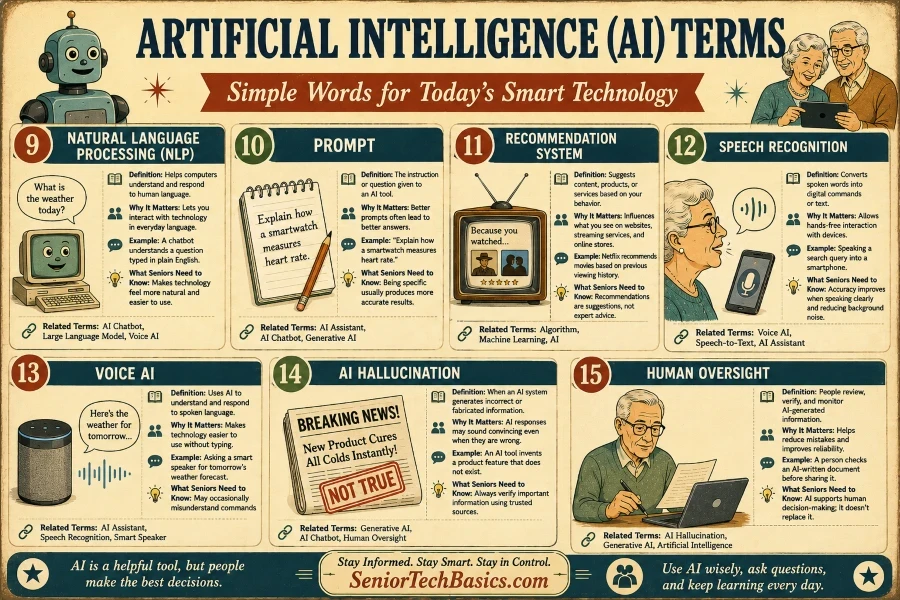
Natural Language Processing (NLP)
Definition: Natural Language Processing allows computers to comprehend and respond to human language.
Why It Matters for Seniors: It enables users to communicate with technology through natural, everyday language.
Example: A chatbot interprets a question written in simple English.
What Seniors Need to Know: NLP enables technology to feel more intuitive and user-friendly.
Related Terms: AI Chatbot, Large Language Model, Voice AI.
Prompt
Definition: A prompt is an instruction or question provided to an AI tool.
Why It Matters for Seniors: Clearer prompts tend to result in more accurate answers.
Example: Describing the process by which a smartwatch detects heart rate.
What Seniors Need to Know: Being specific generally leads to more accurate results.
Related Terms: AI Assistant, AI Chatbot, Generative AI.
Recommendation System
Definition: A recommendation system proposes content, products, or services tailored to user behavior.
Why It Matters for Seniors: It affects what users view on websites, streaming platforms, and online shops.
Example: Netflix suggests movies by analyzing your past watching habits.
What Seniors Need to Know: Recommendations are computer-generated suggestions, not professional advice.
Related Terms: Algorithm, Machine Learning, AI.
Speech Recognition
Definition: Speech recognition transforms spoken words into digital commands or text.
Why It Matters for Seniors: It enables users to interact with devices without using their hands.
Example: Speaking a search query aloud into a smartphone.
What Seniors Need to Know: Accuracy improves when you speak clearly and minimize background noise.
Related Terms: Voice AI, Speech-to-Text, AI Assistant.
Voice AI
Definition: Voice AI leverages artificial intelligence to interpret and reply to spoken words.
Why It Matters for Seniors: It simplifies using technology by eliminating the need to type.
Example: Requesting tomorrow’s weather forecast from a smart speaker.
What Seniors Need to Know: Voice AI might sometimes misinterpret commands.
Related Terms: AI assistant, speech recognition technology, and smart speakers.
AI Hallucination
Definition: An AI hallucination happens when an AI system produces inaccurate or made-up information.
Why It Matters for Seniors: AI responses can seem convincing despite being incorrect.
Example: An AI tool creates a new product feature that isn’t actually part of the existing design.
What Seniors Need to Know: Always verify important information with trusted sources.
Related Terms: Generative AI, AI Chatbot, and Human Oversight.
Human Oversight
Definition: Human oversight involves people reviewing, verifying, and monitoring information produced by AI.
Why It Matters for Seniors: It helps reduce errors and enhances overall reliability.
Example: Someone reviews an AI-generated document prior to sharing it.
What Seniors Need to Know: AI functions most effectively when it aids human decision-making rather than replacing it.
Related Terms: AI Hallucination, Generative AI, Artificial Intelligence.
Technology Terms for Seniors FAQs
What is the simplest method for seniors to learn new technology terminology?
The simplest way is to learn terms in each category and concentrate on the technologies you use most frequently.
What is the meaning of AI in straightforward language?
AI, or artificial intelligence, is technology that enables computers to perform tasks that typically require human cognition, such as answering questions or recognizing speech.
How do a smartwatch and a fitness tracker differ?
A smartwatch generally offers communication features, apps, and notifications, whereas a fitness tracker primarily concentrates on health and activity monitoring.
What exactly is a medical alert system?
A medical alert system is a device designed to enable users to rapidly reach emergency services when assistance is needed.
Why is GPS significant for seniors?
GPS aids in locating individuals during emergencies and enhances navigation and safety features on numerous devices.
What are accessibility features?
Accessibility features improve the usability of technology for individuals with vision, hearing, mobility, or other impairments.
What exactly is a smart home device?
A smart home device connects to the internet and can typically be managed remotely or via voice commands.
Are voice assistants safe to use?
Voice assistants are typically secure; however, users should check privacy settings and refrain from sharing sensitive personal details.
What exactly is telehealth?
Telehealth enables patients to connect with healthcare providers via video, phone, or online platforms.
What exactly is a hearing loop?
A hearing loop is a system that transmits sound directly to compatible hearing devices, improving audio clarity in public spaces.
Why is it essential to have strong passwords?
Strong passwords are essential for safeguarding online accounts against unauthorized access and cybercriminals.
Can artificial intelligence make errors?
AI tools may occasionally give inaccurate, outdated, or misleading information; therefore, it is essential to verify important facts.
What is a screen reader?
A screen reader is software that reads digital text aloud, aiding individuals with vision impairments in using computers and mobile devices.
What exactly is a smart plug?
A smart plug enables remote or automatic control of regular appliances.
How can older adults feel more at ease using technology?
Begin with a single device or feature, practice consistently, and feel free to ask questions or request help whenever necessary.
Final Thoughts.
This guide explains common technology terms in simple language and offers real-world examples relevant to older adults.
Whether you’re exploring smartphones, smartwatches, hearing aids, medical alert systems, smart home devices, accessibility features, or artificial intelligence, understanding these terms can help you make more informed decisions.
Keep in mind that you don’t need to learn everything at once. Focus on the technologies that matter most to you, explore new features gradually, and refer to this guide whenever you want a quick explanation.
Technology should make life easier, safer, and more enjoyable. Understanding the language behind it is an excellent first step toward that goal.