
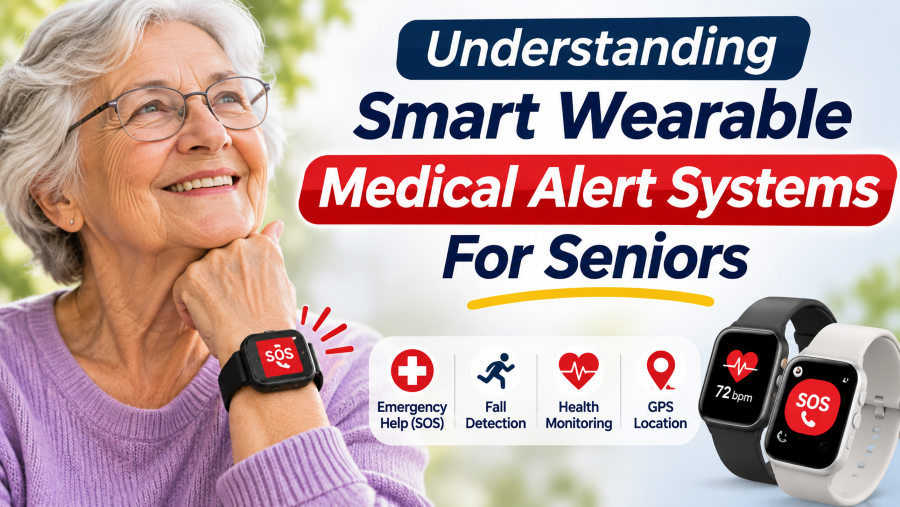
Smart wearable medical alert systems are watches or pendants that let seniors call for help with the press of a button. Depending on the model and plan, they may also offer two-way talk, location tracking, or automatic fall detection. Features vary widely, so check the exact device and subscription before you buy.
Here’s what matters: how home and mobile systems differ, who gets the alert when you press the button, and what to check before you buy, including charging, coverage, and ease of use.
What Is a Smart Wearable Medical Alert System?
A smart wearable medical alert system is a watch or pendant with a help button and connected features, such as two-way calling, location tracking, or optional fall detection. Don’t trust the word “smart.” Check exactly which features you’re getting.
The key difference is how each system connects:
- Home systems: A wearable button connects to a base station, but only within a limited range.
- Mobile systems: A portable device uses cellular, so it works away from home wherever coverage exists.
- Medical alert watches: Emergency features sit on your wrist, but what you get depends on the provider.
For a closer look, Medical Alert explains the equipment and connection behind its home, mobile, and smartwatch systems.
Before choosing, confirm whether the device reaches a professional monitoring center or only calls your contacts, and which features cost extra monthly.
Watch or Pendant: Which Is Easier to Use?
Pick the device you’ll actually wear and can use without thinking. Test the help button, check the fit, and ask about charging and connection needs. Don’t choose on looks alone.
| What to check | Medical alert watch | Medical alert pendant |
| Wearing it | Ensure you can fasten the strap with one hand. | Check the weight and cord, and follow the wearing instructions. |
| Requesting help | Can you press the help button instantly, without opening any menus? | Is the button easy to reach and to press? |
| Charging | Know the battery life and charging process. | Is it a rechargeable mobile device or a home-system button? |
| Coverage | Confirm that its cellular network covers your area. | Does it work on its own, or does it require a nearby base unit? |
Don’t assume every pendant lasts months without charging. A basic home-system button and a mobile GPS pendant have very different power needs, as Bay Alarm Medical’s FAQs explain.
Before you buy, see it in action: how it’s worn, how it’s activated, and how it charges. Then choose the one that fits your daily routine.
Want to compare your options first? Start with our guide to emergency alert devices for seniors.
Medical Alert Watch vs. Smartwatch: What’s the Difference?
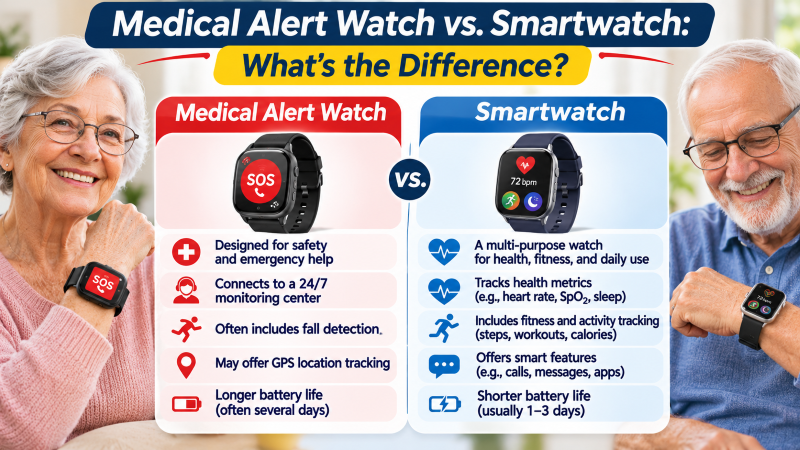
The key difference is who answers your call for help. A monitored medical alert watch connects you to the provider’s response center. A regular smartwatch may offer emergency calling and contact alerts, but what happens depends on the model, its settings, and its connection.
A monitored medical alert watch:
- Connects you to the provider’s monitoring service, included in the subscription.
- Has a dedicated help button, always ready to press.
- Some models have built-in cellular service, so you don’t need a paired phone.
Take Bay Alarm Medical’s SOS Smartwatch, which has built-in cellular and links to a monitoring center. Not every watch does.
A regular smartwatch:
- Handles everyday tasks like messages, apps, and activity tracking.
- Some models offer emergency SOS or fall detection.
- Emergency calling only works with the right setup, settings, and connection.
Apple Watch fall detection shows the gap. It sounds an alert and starts a countdown, but calls emergency services only under certain conditions. Detecting a fall doesn’t mean help is on its way.
Before you buy, ask who answers the call, whether the watch needs a phone, and which features cost extra. A comparison of smartwatches and medical alert devices covers the bigger differences.
How Does an Emergency Alert Start?
Most alerts start when the wearer presses the help button. Some systems also add automatic fall detection, which can send an alert when the wearer can’t press anything. Features and requirements vary by device and service.
What Happens When You Press the Help Button?
Pressing the help button sends a request for help. On a monitored system, it goes straight to the provider’s response center, either through the wearable or a separate base unit.
Medical Alert, for example, describes a simple sequence: press the button, talk to a response specialist, and get the right help sent.
Before using a device, check:
- Button operation: Tap or hold? Does it need a quick press or a longer hold?
- Speaker location: Where do you talk: on the wearable or a separate unit?
- Connection: Does it rely on a base station, a paired phone, or cellular coverage?
- Testing: Test calls: How does the provider want you to run one?
Choose a button you can find and press without thinking, then read the instructions. SOS buttons don’t all work the same way.
What Does Fall Detection Do?
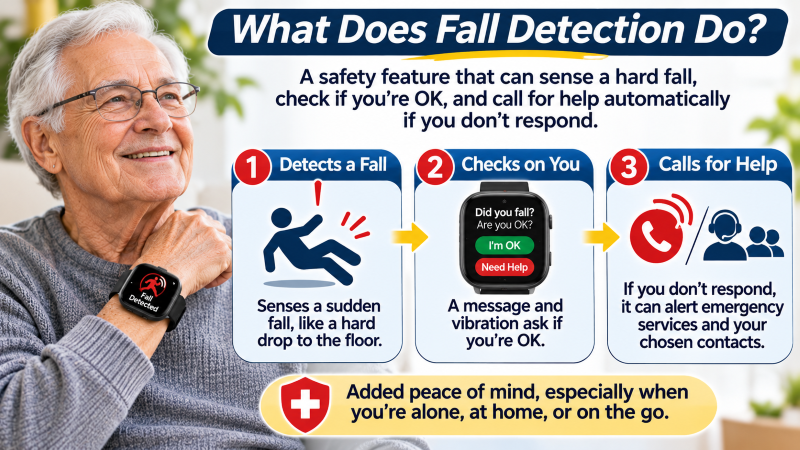
Automatic fall detection uses sensors to spot movements that may signal a fall. When it senses one, it can send an alert without the wearer pressing anything. What happens next depends on the device, its settings, and the connected service.
It cannot detect every fall. Medical Alert’s fall-detection documentation says so plainly: if you can press the help button, press it.
Before choosing this feature, check:
- Availability: Does your exact device support it?
- Cost: Is it included, or does it cost extra?
- Setup: Does it need activating, or a specific wearing position?
- Response: Who gets the alert, and what happens if you can’t answer?
Treat fall detection as a backup, not a guarantee. It adds one more way to get help, but it never replaces the button.
What Do You Do After a False Alarm?
Pressed the button by accident? Cancel the alert using your device’s instructions. If the call has already connected, tell the operator it was a mistake and whether you need help. Never ignore the call.
To familiarize yourself with your system:
- Check the cancellation procedure: Cancellation differs by device, whether by button press, screen prompt, or timing.
- Arrange a practice call: Follow the provider’s testing instructions, and tell the operator you’re testing.
- Report repeated false alerts: Call customer support to check your device’s fit, settings, and function.
No universal 15–30-second cancellation window exists. Learn the exact procedure for your model, and don’t rely on a general rule.
What Happens Once an Alert Connects?
With a professionally monitored system, an operator receives your alert, tries to speak with you, and arranges help based on the situation and the provider’s procedures. That may mean calling a personal contact or emergency services.
Can You Talk Through the Device?
Two-way communication lets you hear the operator and explain what happened. The speaker and microphone may sit in the wearable, a separate mobile unit, or a home base station.
During a provider-approved test, confirm you can hear and be heard in every spot where you normally use the system. A button’s connection range doesn’t guarantee the base station’s microphone will pick up your voice from that far away.
Who Will the Operator Contact?
The operator may call a relative, friend, neighbor, or emergency services, depending on the situation and the provider’s procedures. Don’t assume family comes first.
Before subscribing, ask the provider:
- What if I can’t speak or answer?
- Who gets called first: emergency services or my contacts?
- How do I change my contacts?
- Who tells my family, and how do they reach them?
Keep your contact details current, make sure everyone listed knows what’s expected of them, and test the device as your provider instructs. For more care habits, see our technology maintenance tips for seniors.
Does GPS Guarantee Coverage?
Some mobile medical alert systems use GPS to pinpoint the device’s location. But locating you and getting help are two separate tasks. GPS tells the system your position; it doesn’t guarantee the device can send an alert from that location.
Will It Work Away From Home?
A home-system button only works within range of its base station. A mobile system needs supported cellular coverage and enough battery power.
Before buying, ask the provider to confirm coverage at your address and any travel restrictions. A strong signal on your phone says nothing about a medical alert device on a different network.
Can Family See Where You Are?
It depends on the device. Some offer location sharing through a caregiver app or website, while others show location only to the monitoring center. Check your exact model and subscription before assuming family tracking is included.
Before relying on location sharing, ask these questions:
- Access: Who can see the device’s location, and can you change that list?
- Updates: How often does the location refresh?
- Accuracy: Is the map live or delayed?
- Notifications: Do location alerts come standard, or do they cost extra?
“Using a caregiver app? Check that it works with your phone. The Android vs. iPhone guide for seniors explains how the platforms differ.”
What Is Geofencing?
Geofencing draws a virtual boundary on a map. On systems that support it, crossing that line can trigger an alert.
Not every GPS device offers it. Ask the provider whether it’s available, how often locations update, and how it delivers alerts. And remember the limits: an alert can’t stop someone from leaving an area, and it doesn’t guarantee anyone will see the notification right away.
Is Charging Simple Enough?
A medical alert device only works if it fits your routine. Before you buy, check how it charges, how it warns you when the battery runs low, and what upkeep it needs. Battery life and water resistance vary by model, even among similar-looking devices.
How Often Do You Need to Charge It?
Charging needs vary by device, so check the recommended schedule for your exact model. A mobile pendant, a medical alert watch, and a home-system button can all have very different battery demands.
Ask the provider:
- How often will I need to charge this model?
- Is the charger simple to connect?
- How will it warn me when the battery is low?
- Can I still call for help while it’s charging?
- Does the base station have backup power, and how long does it last?
Choose a charging routine you can stick to, and don’t treat the advertised maximum battery life as the time between charges.

Is It Safe to Wear in the Shower?
Wear it in the shower only if the instructions say you can. Shower approval doesn’t cover baths, swimming, or long soaks.
Check the instructions for both the wearable and any separate communicator, since each part can have a different water-resistance limit.
How Do You Clean and Check It?
Clean it exactly as the manufacturer says, using only approved products and unplugging it from the charger first if required.
Regularly check the strap or cord, help button, charging contacts, and cable for damage. If anything is loose, damaged, or faulty, call the provider rather than trying to fix it yourself.
What Should You Check Before Subscribing?
Before subscribing, compare total cost, included services, and cancellation terms. The advertised monthly price may leave out equipment, activation, or optional features, so ask for a written breakdown for the exact device and plan.
What Is Included in the Price?
Ask about every possible charge:
- Activation and delivery: Are setup and shipping fees included, or billed on top?
- Monitoring: What does the monthly fee actually cover?
- Optional features: Do fall detection and caregiver tools cost extra?
- Replacement: Who pays if it’s lost or damaged?
Compare first-year totals, not just monthly fees; cheaper plans often carry higher upfront charges.
Can You Cancel or Return the Device?
Read the terms before you pay, especially for an annual plan.
Ask:
- Is there a minimum commitment, and what happens if you leave early?
- Does the subscription renew automatically?
- Can you test it risk-free, and for how long?
- Can you get a refund on prepaid fees?
- Does billing continue until you return the rented device?
- Who covers return shipping?
Helpful tip: Save the agreement and your cancellation confirmation.
Who Helps When Things Go Wrong?
Check when customer support is open and how to reach it for setup, charging, or connection problems. Technical support and emergency monitoring are separate services, so confirm each one’s hours.
Useful tip: Choose clear costs, fair terms, and support you can reach.
Final Thoughts
Start with everyday usability. A smart wearable medical alert system only works if the wearer wears it, so it should be comfortable, easy to use, and fit their routine.
Know exactly what you’re buying before you subscribe: where it works, how often it needs charging, and what happens when you press the button. Confirm which features are included, and read the full cost and cancellation terms.
Compare the exact device and service, without the look or the marketing. Know what it can and can’t do before you commit.