
Many of us hope to age comfortably at home, remaining in familiar surroundings with neighbors and cherished memories. Aging in place lets seniors maintain daily routines, independence, and the strong personal connections that give life meaning.
But honestly, staying safe at home gets harder as people age. Managing multiple pill bottles, climbing steep stairs, or even calling for help in an emergency can turn a cherished home into a source of ongoing worry for seniors and their families.
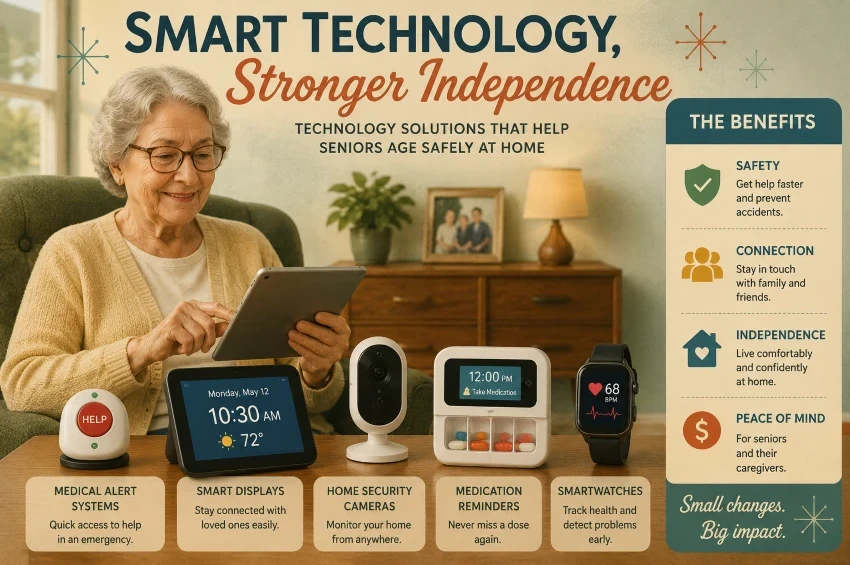
Thankfully, modern technology is gradually bridging the gap with practical solutions rather than complex gadgets, such as smartwatches that can detect falls or voice assistants that activate hallway lights. These small innovations quietly help older adults stay safe, connected, and independent on their own terms.
What Does Aging in Place Mean?
For many, aging in place means staying in their own homes as they get older. It’s about maintaining independence, staying connected with neighbors, and continuing beloved daily routines.
However, staying in one place entails more than simply remaining at the same address. As our physical needs evolve, our homes must adapt accordingly. This includes finding new ways to manage daily tasks—such as tracking medications, moving safely, and staying in touch with friends.
This is precisely where modern technology fills the gap. Devices such as voice-activated speakers or smart pill dispensers are not meant to replace human care; instead, they serve as an invisible safety net that helps seniors live independently on their own terms.
You can consult the National Institute on Aging’s guide to aging at home for more detail on this transition.
The Hidden Safety Net: Today’s Aging-in-Place Ecosystem
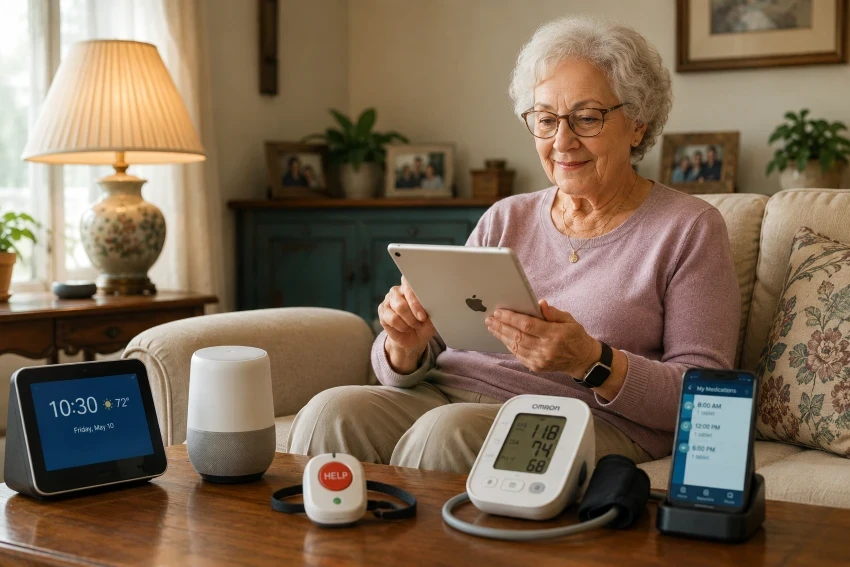
No single device can address all the challenges of aging at home. True effectiveness comes from seamlessly integrating simple, everyday technologies that work quietly behind the scenes, forming an invisible safety net that fosters independence without creating a clinical atmosphere.
Modern Emergency and Medical Alerts
Smart wearable medical alert systems feature automatic fall detection with built-in sensors that can summon help even if the wearer can’t. They also include GPS, enabling family members to coordinate assistance during emergencies.
Quietly Brilliant Wearables
Smartwatches and discreet health rings have moved beyond fitness trends to become essential health tools. They monitor heart rate, detect irregular rhythms, and track sleep without disrupting a senior’s daily routine. It’s peace of mind worn directly on the wrist or finger.
Smart Medication Management
Managing multiple prescriptions can be stressful. Smart pill dispensers and voice reminders serve as a helpful, organized assistant. They notify you when it’s time for a dose and can even alert a caregiver if you miss a critical medication.
Smart Home Infrastructure
A truly supportive home adapts to its residents. Voice-activated lights eliminate the need to navigate in the dark at night, smart thermostats automatically maintain a comfortable temperature, and automated door locks allow trusted family members or caregivers to enter without a physical key.
Effortless Connection
Social isolation poses a significant, often unnoticed risk to aging seniors. Easy-to-use tablets and simple video screens let seniors stay connected with children, grandchildren, or doctors by pressing a large, one-touch button.
Perimeter and Home Security
Being able to identify who is at the door before opening it significantly boosts confidence. Video doorbells and motion sensors installed around the home’s exterior help keep seniors safe. For family members, it offers a comforting glimpse into daily life, letting them know that mom is active and mobile without feeling like they are invading her privacy.
Finding the Right Fit: Matching Tech to Your Daily Life
The ideal gadget isn’t necessarily the one with the most features; it’s the one that solves a daily frustration. Before you buy, pause and ask: What specific problem am I trying to solve?
| Challenge | Helpful Technology |
| Fall risk | Medical alert systems, fall-detection watches |
| Missed medications | Reminder apps, smart pill dispensers |
| Limited mobility | Voice assistants, smart lighting, smart locks |
| Hearing difficulties | Hearing amplifiers, captioned phones |
| Loneliness and isolation | Tablets, video-calling devices |
| Home security concerns | Video doorbells, security cameras |
Choosing the right product typically comes down to a few key questions: Is it user-friendly? Are there hidden monthly fees? Does it require a robust Wi-Fi connection? Review our Technology Buying Checklist to consider these questions before you buy.
Ultimately, no single device can handle everything. Usually, the ideal approach is a small team of simple tools working together to ensure your safety, comfort, and full control.
A Room-by-Room Guide to a Safer Home
As we age, various areas of the house pose different challenges. The CDC states that falls are the main cause of injury among older adults, so the safest first step is to secure your living space.
You don’t have to make your home look like a sterile science lab. Instead, think of each room as a place for small, useful improvements.
The Entrance: Welcoming and Secure
- Video Doorbells: See who is at the door on your phone or tablet without rushing over.
- Smart Locks: Say goodbye to fumbling with keys. These can unlock automatically or let family members in with a simple code.
- Motion-Activated Lighting: Automatically brightens the porch and entryway so you never have to walk up to a dark doorstep.
The Living Room: Comfort and Connection
- Voice Assistants: Turn off the TV, check the weather, or call a loved one using simple voice commands.
- Tablets for Video Calls: Keep grandkids and friends just a tap away with a dedicated, easy-to-read screen.
- Smart Speakers: Set up gentle, daily reminders to drink water, lock the doors, or check the mail.
The Kitchen: Hassle-Free Cooking and Routines
- Medication Reminders: Automated systems that keep complex pill schedules on track without the daily guesswork.
- Smart Appliances: Stoves and ovens that automatically shut off if left on too long, reducing worry.
- Emergency Call Buttons: Placing a simple, accessible button near the floor or counter provides a backup line of communication if a phone is out of reach.
The Bathroom: Slip-Resistant Peace of Mind
- Waterproof Medical Alerts: Wearable buttons that can go right into the shower, where slip risk is highest.
- Motion Sensors: Automatically turn on soft path lighting the second your feet touch the floor at night.
- Smart Lighting: Eliminates the risk of reaching into the dark for a light switch.
The Bedroom: Rest and Reassurance
- Smartwatches: Quietly track heart rates, activity, and sleep patterns, and can even signal for help if they detect a hard fall.
- Sleep Trackers and Bed Sensors: Let caregivers know if a loved one gets out of bed in the middle of the night and needs assistance.
The CDC’s guide to preventing falls among older adults provides a comprehensive overview of how to keep your home safe.
How Technology Needs to Change Over Time
A device that suits a seventy-year-old well may not meet the needs of someone at eighty-five. As our bodies and routines change, the tools we rely on to stay independent should adapt too.
Consider aging-in-place technology as occurring in three separate stages:
For Active, Independent Seniors
Currently, technology emphasizes convenience, staying connected, and maintaining an active lifestyle. The best tools are discreet and fit daily habits.
- Smartwatches: Great for tracking daily steps, monitoring heart rates, and keeping a subtle eye on wellness.
- Tablets and Voice Assistants: Perfect for easy video calls with family, listening to audiobooks, or checking the weather hands-free.
- Smart Doorbells & Medication Apps: Simple ways to manage the front door and track daily vitamins or simple prescriptions.
For Seniors Navigating Mobility Challenges
As mobility becomes harder, safety and comfort take priority. The emphasis turns to minimizing physical effort and avoiding falls.
- Fall-Detection Wearables: Medical alerts that can automatically call for help, even if a button can’t be pressed.
- Smart Lighting & Automated Locks: No more fumbling in the dark or rushing to the front door; everything can be controlled right from a phone or by voice.
- Smart Pill Dispensers: Devices that automatically unlock only the correct dose at the exact time it’s needed.
For Seniors Requiring Additional Assistance
When daily tasks require hands-on support, technology helps caregivers deliver the best possible care, whether they are nearby or distant.
- Passive Sensors: Motion and bed sensors that let family members know their loved one is up and moving about their day, without invading their privacy with cameras.
- GPS Medical Alerts: Lightweight wearables that provide real-time location tracking for peace of mind during solo walks.
- Shared Caregiver Apps: Digital calendars and shared medication logs that keep family members, doctors, and professional caregivers on the exact same page.
The Golden Rule:
Check in regularly to adapt your technology as physical health and comfort change. Sitting down often with family or caregivers to discuss what works and what doesn’t helps keep the home safe and comfortable.
The Caregiver’s Toolkit: Supporting from a Distance
Caring for an aging parent or relative requires balancing safety with respecting their privacy and boundaries.
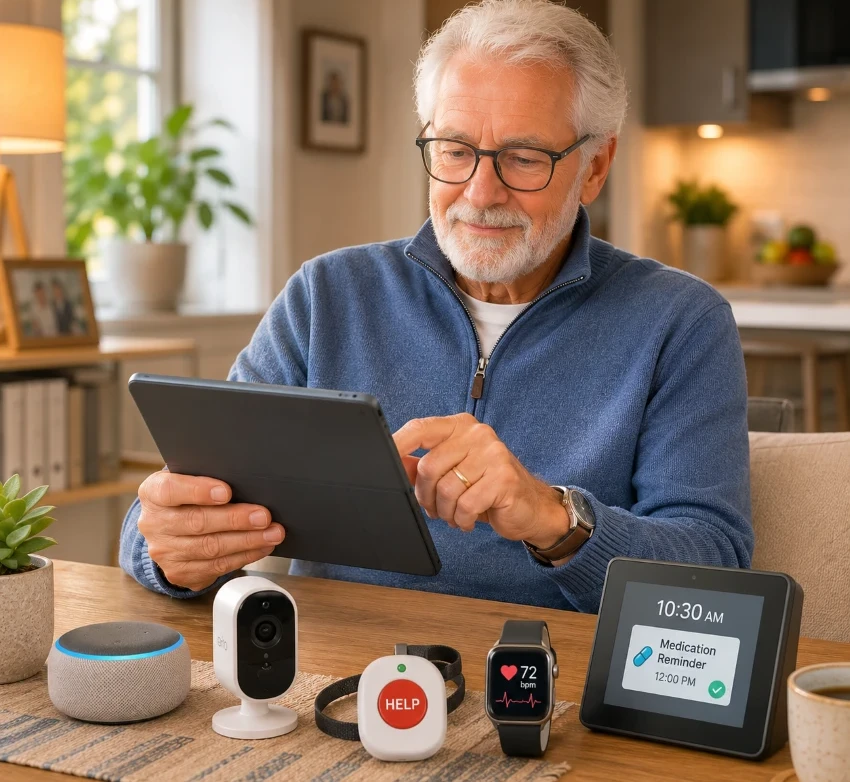
Fortunately, modern aging-in-place technology for caregivers and seniors can be a discreet partner that keeps you informed without making your loved one feel monitored.
Here’s how today’s tools enable you to support them from either down the street or across the country:
- Smart, Camera-Free Monitoring: Motion sensors can quietly let you know when Mom is up and making breakfast, or alert you to a sudden change in her normal routine without installing intrusive cameras.
- Real-Time Location Tracking: GPS-enabled wearables are a game-changer for families managing cognitive decline, making it easy to quickly locate a loved one if they wander or become confused.
- Coordinated Care Calendars: Shared digital schedules and smart pillboxes keep everyone, from siblings to visiting nurses, aligned on doctor visits, pharmacy runs, and medication times.
- Effortless Video Chats: Smart displays and simplified tablets let you drop in for a virtual cup of coffee, keeping isolation at bay with a single tap.
- Instant Emergency Alerts: If a fall occurs or an alarm is triggered, caregivers are notified instantly on their phones, ensuring help is on the way without delay.
Ultimately, these tools aim to support a senior’s independence rather than replace it. They provide a comforting safety net that ensures seniors stay safe while maintaining their dignity.
A Quick Tip for Daily Comfort: Check out our guide to the top five hand massagers for seniors with arthritis. These devices help relieve daily tension and support hand flexibility for those with joint pain.
Crucial Mistakes to Avoid When Buying Age-Tech
It’s tempting to get caught up in the excitement of new gadgets, especially when looking for ways to protect a loved one. However, the journey toward tech-supported independence often features costly devices that eventually sit unused in a drawer.
To protect your budget and peace of mind, watch out for these five common pitfalls:
Falling for the “Too Many Features” Trap
A device offering fifty features may seem valuable, but if it has a small screen and complicated menus, users will likely ignore it. Simplicity is also a key feature. Prioritize large buttons, easy-to-read screens, and highly intuitive designs.
Ignoring the Sneaky Monthly Costs
That smart home sensor or medical alert button might seem inexpensive at first, but does it require a $40 monthly subscription to function? Always consider the long-term costs before entering your credit card details.
Forgetting to Check the Tech Specs
Many smart devices require a strong Wi-Fi network, Bluetooth, or a smartphone to operate. Verify that your loved one’s existing home setup can support the device you’re purchasing.
Buying for the Hype, Not the Need
A popular smart-home technology doesn’t mean your loved one needs it. If their main daily challenge is remembering to take their morning pills, a dedicated smart dispenser is a more practical choice than a complicated whole-home security system.
Referring to it as a “Set It and Forget It” approach
Our physical and cognitive needs evolve with age. A tablet that works well today could become harder to use next year. Check every few months to ensure the technology stays helpful and doesn’t become a daily source of frustration.
How Much Does Aging-in-Place Technology Actually Cost?
The initial cost of preparing your home for long-term use greatly depends on your specific needs. Some devices require a one-time purchase, while others incur ongoing monthly fees for services such as professional monitoring, cloud storage, or cellular access.
Here’s a straightforward breakdown of your expected expenses to assist with budgeting.
Budget-Friendly Solutions ($20 to $100)
- Motion-Sensor Lights: They light up dark hallways. They help prevent trips and falls.
- Smart Speakers: Simple voice hubs. You can use them hands-free.
- Health Monitors: These include basic blood pressure cuffs. They track your vitals simply.
- Medication Apps: They keep pill schedules organized. You can use them on your phone.
Mid-Range Upgrades ($100 to $500)
- Video Doorbells: They show you who is at the door. You don’t have to rush to answer.
- Smartwatches: They track your daily heart rate. They can detect falls without a monthly fee.
- Dedicated Tablets: These are simplified smart screens. They make video calls easy for seniors.
- Basic Medical Alerts: Simple emergency systems. They help you stay connected to help.
Premium Safety Networks ($500+)
- Professional Alerts: They offer 24/7 monitoring. They require a monthly subscription fee.
- Home Monitoring: These quiet sensors track daily routines. They alert the family if something seems wrong.
- Automated Dispensers: These devices lock and unlock pills. They manage complex doses safely.
Before purchasing costly devices, families should prioritize technologies that meet their immediate needs. Often, comfort is as important as safety.
Older adults experiencing poor circulation, leg fatigue, or swelling can also consult our guide to the five best compression foot massagers for seniors to find relief at home.
Questions to Ask Before You Buy
Don’t hurry to purchase. Ask yourself these straightforward questions first to ensure the technology truly benefits you.
- Is it easy to use? Choose devices with large physical buttons and steer clear of small, confusing screens.
- Does it need Wi-Fi or a phone? Start by verifying your home internet connection. Some devices require a smartphone app.
- Are there monthly fees? Subscription expenses accumulate fast. Watch out for concealed recurring fees.
- Can family access it remotely? Ensure caregivers can get alerts so they can support you remotely.
- Will it fit your future needs? Physical needs evolve with time. Opt for tech that can be updated later.
- Is it proven in real life? Check genuine reviews from other seniors rather than trusting flashy ads.
What’s Next: The Future of Independent Living
Technology advances rapidly. In the future, smart homes will work even more seamlessly behind the scenes, keeping seniors safe with minimal effort.
- AI & Smart Assistants: AI is becoming significantly smarter. It can handle intricate schedules and respond to inquiries more effortlessly.
- Passive Monitoring: These sensors operate without requiring wearable devices. They discreetly observe daily routines and detect any unusual changes.
- Smart Health Tracking: Future wearables will monitor health more comprehensively, detecting medical issues before they become emergencies.
- Robotics and Automation: Friendly robots can help with physical chores, making daily household tasks much easier.
Helpful Note: No gadget can truly replace genuine human love, but the right tools can help you keep the home you cherish for many years.
Conclusion: Living Comfortably on Your Own Terms
Aging in place means more than just remaining in your home; it’s about maintaining your independence and comfort.
Simple technology can be an effective resource for tackling new physical challenges. Still, the best approach isn’t a single complex device. Instead, assemble a small set of tools tailored to your specific budget and daily routine.
Remember, technology can never replace genuine human love and care. It simply serves as a silent safety net, helping you live with confidence at home.