
The label “Bluetooth compatible” on a hearing device package does not guarantee it will stream phone calls, play music, or support hands-free use with your particular smartphone.
In the hearing industry, “Bluetooth” is a broad term that includes various protocols. A hearing aid could connect to your smartphone for volume control via an app but still not support streaming calls or podcasts.
Wireless features rely entirely on the connection standard used by both your hearing device and your phone.
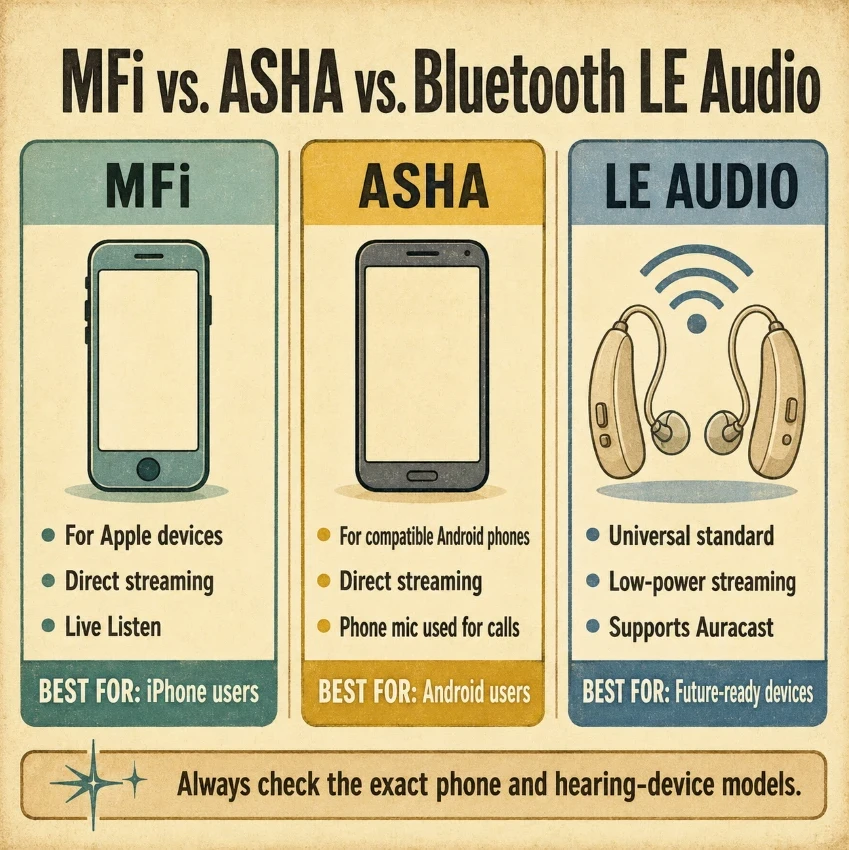
- MFi (Made for iPhone): Apple’s exclusive protocol for iOS devices, enabling streaming, remote control, and features such as Live Listen.
- ASHA (Audio Streaming for Hearing Aids): Android’s native direct-streaming protocol, compatible with select Android phones running Android 10 or newer.
- Bluetooth LE Audio: The modern universal standard provides low-power consumption, high-quality audio, native two-way calling, and venue broadcasting via Auracast.
- Bluetooth Classic: Select manufacturers (such as Phonak/Sonova) use the legacy standard to provide universal direct streaming across almost any phone or laptop.
This guide explains how each standard works, highlights their practical limitations, and details important compatibility considerations to check before buying a hearing device or smartphone.
Quick Comparison: MFi vs. ASHA vs. LE Audio vs. Bluetooth Classic
Each standard offers various features, but actual performance depends on the specific smartphone and hearing device.
| Feature | MFI | ASHA | LE AUDIO | Bluetooth Classic |
| Main platform | Apple | Android | Compatible modern devices | Broad device range |
| Direct streaming | Yes | Yes | Yes | Yes |
| Hands-free calls | Supported by select devices | Usually uses the phone microphone | Possible when supported | Commonly supported |
| Power efficiency | High | High | High | Lower |
| Auracast | No | No | Yes, on compatible devices | No |
Bluetooth LE Audio aims to enable efficient audio streaming, Multi-Stream Audio, and Auracast broadcasting, but both the source and receiver need to support these features. The Bluetooth Special Interest Group provides a technical overview of the standard and its capabilities.
What Is MFi?
MFi (Made for iPhone) is Apple’s specialized wireless technology designed for hearing aids and sound processors. It enables direct audio streaming from an iPhone or iPad to your hearing aids, eliminating the need for additional accessories like neck loops or streaming devices.
MFi integrates hearing controls into your Apple device, letting you adjust volume, monitor battery status, and change program settings directly from your phone.
It also includes Live Listen, which turns your iPhone into a remote microphone. You can place the phone near a speaker in a noisy room to hear the speaker’s voice clearly through your hearing aids.
MFi works well with Apple devices but is incompatible with Android phones. Features such as hands-free calling also vary depending on your specific iPhone and hearing aid models.
Check the official Apple MFi Compatibility List before buying to confirm your devices work together.
Advantages
- Direct Audio Streaming: Clear sound for calls, music, and TV without extra adapters.
- Long Battery Life: Uses low-energy technology to extend your hearing aid batteries’ life.
- Easy Built-in Controls: Swiftly change the volume by triple-clicking the side button on your iPhone.
- Live Listen Feature: Helps you hear conversations clearly in noisy restaurants or large rooms.
Limitations
- Apple Only: Cannot connect to Android smartphones or Windows computers.
- Limited Hands-Free Calling: Older iPhones still need you to speak directly into the microphone.
- Model Restrictions: Some iPhone models offer full functionality and require newer operating system versions.
What Is ASHA?
ASHA, which stands for Audio Streaming for Hearing Aids, is Google’s protocol for Android devices. It allows compatible phones to transmit calls, music, and app sounds directly to hearing aids via Bluetooth Low Energy.
Android compatibility differs by brand, unlike Apple. Even phones running Android 10 or newer may not have ASHA. It’s often available on flagship models such as the Google Pixel or the Samsung Galaxy S series, but is less common on budget phones.
ASHA offers one-way audio streaming, where sound is played directly into your ears. Your phone’s microphone records your voice, so you need to keep it close to your mouth during calls.
Consult the smartphone compatibility checklist for hearing devices to confirm the specific phone model, operating system, streaming capabilities, and calling features before purchasing.
Advantages
- Direct Android Streaming: Listen to music, calls, and videos directly in your ears.
- Low Battery Drain: Helps preserve your hearing aid battery life.
- No Extra Hardware: Connects directly, without intermediate neck loops or clip-on streamers.
Limitations
- Inconsistent Support: Works only on select Android phones.
- No Hands-Free Calling: You must speak into the phone microphone during calls.
- Limited Compatibility: Basic Bluetooth pairing doesn’t guarantee audio streaming.
What Is Bluetooth LE Audio and Auracast?
- Bluetooth LE Audio: A universal low-energy standard utilizing the LC3 audio format for high-quality sound with reduced battery use. Multi-Stream Audio transmits synchronized streams to both the left and right hearing devices.
- Auracast: An LE Audio feature that lets compatible hearing devices receive public audio broadcasts in venues like airports, lecture halls, and gyms.
Advantages
- Universal Standard: Built to work across both Android and Apple devices over time.
- Better Battery Life: The LC3 codec delivers clear sound while consuming less power.
- Synchronized Audio: Delivers stable left- and right-channel sound streams directly to both ears.
- Public Broadcasting: Auracast lets you connect directly to public PA systems and venue TVs.
Limitations
- Hardware Required: Having Bluetooth 5.2 or 5.3 on your phone doesn’t necessarily mean it supports LE Audio.
- Limited Availability: Both your phone and hearing aids need to support LE Audio for it to work.
- Slow Rollout: Public Auracast venues and supported smartphones continue to expand.
What About Bluetooth Classic?
Some hearing device manufacturers, including Phonak and Unitron, use standard Bluetooth Classic rather than MFi or ASHA. This protocol is the same as that used by typical wireless earbuds and headsets.
Bluetooth Classic bypasses specialized phone restrictions. It connects directly to almost any smartphone, tablet, laptop, or older cell phone with basic Bluetooth capability.
It also supports true two-way hands-free calling. Sound plays directly in your ears, and the hearing aid’s built-in microphones pick up your outbound voice. You do not need to hold the phone near your mouth during calls.
Advantages
- Universal Compatibility: Connects to Android devices, iPhones, flip phones, computers, and TVs.
- True Hands-Free Calling: Uses hearing aid microphones to capture your voice.
- Direct Audio Streaming: Delivers clear sound for phone calls, music, and media.
Limitations
- Higher Battery Drain: Consumes more battery power than Low Energy standards.
- Larger Hardware Size: May require slightly larger rechargeable batteries or device bodies.
- Connection Limits: Typically connects to one active audio source at a time.
What About Bluetooth Classic?
- Broad Compatibility: Certain hearing devices, such as Phonak, use standard Bluetooth Classic to connect directly to nearly any smartphone, laptop, or computer, sidestepping restrictions imposed by Apple and Android systems.
- True Hands-Free Calling: It enables full two-way calls by using your hearing aid’s microphones to capture your voice and directly deliver audio to your ears.
Our straightforward guide to hearing-device specs highlights key features to consider before purchase.
Which Connection Standard Is Best for You?
- iPhone users: MMFi typically offers a comprehensive experience with features like direct streaming, accessibility options, and Live Listen.
- Android users: ASHA functions effectively when both the phone and hearing device are listed on the manufacturer’s compatibility chart.
- Users who prioritize hands-free calls: Bluetooth Classic might provide wider compatibility for two-way calls.
- Users buying for the future: Bluetooth LE Audio provides low-power streaming, Multi-Stream Audio, and Auracast on supported devices.
There is no one-size-fits-all standard. Select based on your phone, needed features, and confirmed device compatibility.
Pre-Purchase Compatibility Checklist
Before purchasing a new hearing device or smartphone, use this step-by-step checklist to confirm compatibility.
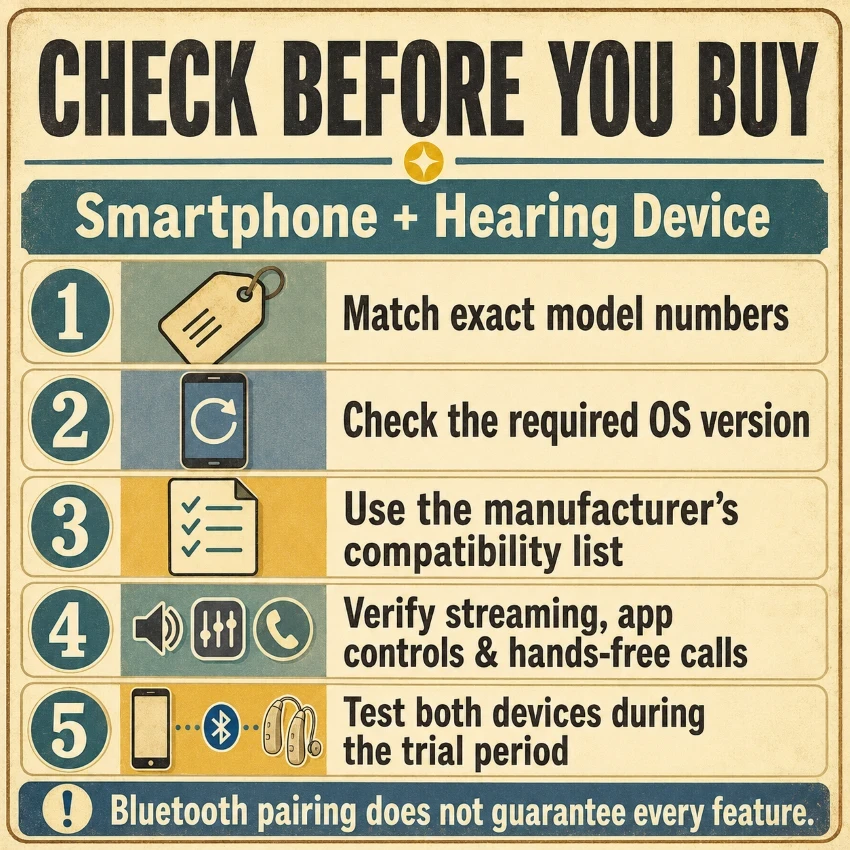
- Confirm Exact Model Numbers: Record the complete model names and numbers for your smartphone and hearing aids.
- Check Operating System Requirements: Make sure your phone runs the required operating system version, such as iOS 15.2+ or Android 10+.
- Consult Official Compatibility Lists: Check the hearing aid manufacturer’s verified compatibility page before purchasing.
- Verify Features Separately: Verify whether your setup supports direct streaming, app remote controls, and hands-free calling separately.
- Ask About Accessories: Check whether your phone needs an external clip-on streamer or a neckloop to transmit audio.
- Test During Your Trial Period: Utilize your consumer trial period to evaluate calls, media streaming, app connectivity, and automatic re-pairing in everyday use.
Avoid relying solely on generic “Bluetooth compatible” labels on packaging. Basic Bluetooth pairing does not ensure that features like audio streaming or hands-free calling will function properly.
For more details on consumer testing rights, review the Smartphone and Hearing Aid Compatibility Guide.
Common Connection Problems
- Pairs But Does Not Stream: Basic Bluetooth pairing only links the companion app. Ensure that both your phone and hearing aids support the same streaming standard, like MFi or ASHA, for audio streaming.
- Calls Use the Phone Microphone: This is typical for most ASHA and older MFi devices. True hands-free calling needs dedicated hardware support from both the phone and the hearing aid.
- App Keeps Disconnecting: Ensure your phone’s Bluetooth and background app permissions are enabled. Restart both your phone and device, then install any available updates for your app or phone.
- Problems After a Software Update: Remove the hearing aids from your phone’s Bluetooth menu, restart both devices, and then re-pair them.
The guide to the five best hand massagers for seniors can also help those with arthritis.
Our Verdict and Future Outlook
Bluetooth LE Audio holds the greatest long-term promise for hearing technology. It delivers clear sound, uses minimal battery, and enables synchronized audio in both ears.
The key feature, Auracast, enables your hearing aids to pick up public audio streams in locations like airports, theaters, and places of worship.
However, existing standards still serve practical needs today:
- MFi: The best choice for dedicated iPhone and iPad users.
- ASHA: A reliable option for supported Android phones.
- Bluetooth Classic: Great for universal compatibility with laptops, TVs, and older phones, plus genuine hands-free calling.
Ensuring device compatibility takes priority over adopting the latest standards. Always test your phone with hearing aids before finalizing your purchase.
Related Reading: The five best compression foot massagers for seniors.
Frequently Asked Questions
Is MFi the Same as Standard Bluetooth?
MFi is Apple’s custom system built specifically for iOS devices, while standard Bluetooth (Bluetooth Classic) is a broader universal technology.
Does Every Android Phone Support ASHA?
ASHA support depends on the phone model, manufacturer, and hardware, even with newer Android versions.
Does Bluetooth 5.2 or 5.3 Guarantee LE Audio?
The Bluetooth version number alone doesn’t confirm whether LE Audio is enabled. Always verify using the official device specifications.
Can a Hearing Device Support MFi, ASHA, and LE Audio?
Some modern hearing aids support multiple standards, but their features still depend on the connected smartphone.
Will LE Audio Replace MFi and ASHA?
Eventually, but not immediately. MFi and ASHA will remain vital as long as existing phones and hearing aids depend on them.
Final Thoughts
MFi remains a practical and seamless option for dedicated Apple users, while ASHA provides direct audio streaming for compatible Android phones. If you need universal compatibility with laptops, flip phones, and other non-smartphone devices, and want true hands-free calling, Bluetooth Classic is often the ideal choice.
Looking ahead, Bluetooth LE Audio offers the greatest long-term potential because of its low power consumption and public-broadcasting capabilities such as Auracast.
Regardless of the standard you select, avoid relying solely on a generic “Bluetooth compatible” label. Always double-check your specific model numbers, verify each necessary feature separately, and test your phone and hearing aids together before finalizing your purchase.