

Video call crystal clear in the living room, frozen in the bedroom? That usually points to weak Wi-Fi coverage, not a slow internet plan. Before you pay for a faster plan, check whether the signal simply isn’t reaching every room.
Boosters, extenders, and mesh systems all promise better coverage, but the names are confusing. A “booster” is usually just an extender, while a mesh system links several units to spread Wi-Fi through your home. Any of them can push a weak signal farther, but none can make your internet faster than your provider delivers.
This guide breaks down the differences, shows when each option makes sense, and tells you what to check before you buy, so you can pick equipment that fits your home, your budget, and your comfort with setup.
Booster, Extender, or Mesh: What’s the Difference?
The names sound interchangeable, but they aren’t always the same equipment. Here’s what each one means.
Wi-Fi Booster: Just a Sales Label
- “Booster” is a catch-all label for gear sold to improve Wi-Fi coverage.
- It might be an extender or part of a mesh system.
- Read the product description closely: the word “booster” alone doesn’t tell you how the device works or whether it needs a compatible router.
Wi-Fi Extender: Repeats Your Router’s Signal
- Catches your router’s Wi-Fi and rebroadcasts it farther.
- Needs a solid signal from your router to work. Place it where reception is already weak, and it has nothing to repeat.
- Some models broadcast a separate network name, so you may need to switch to it on your phone or tablet.
- Some models can also join a compatible mesh network, so check the features before you buy.
Mesh Wi-Fi: Several Units, One Network
- One main unit, plus extra units spread around your home.
- The main unit plugs into your internet equipment, and the extra units carry coverage into the other rooms.
- Gives your whole home one Wi-Fi name and one password.
- Hands your devices from one unit to the next, though how smoothly depends partly on your phone or tablet.
- Want the details? The Wi-Fi Alliance’s guide to Wi-Fi EasyMesh explains how compatible equipment works together.
| What matters | Wi-Fi extender | Mesh system |
| Coverage approach | Extends your router’s signal. | Covers your whole home. |
| Moving between rooms | May need a network switch. | Uses one network name. |
| Setup | Adds a device to your current router. | Set up the main unit first, then add the others. |
| Cost | Usually cheaper. | Usually costly. |
Helpful note: Neither option guarantees coverage everywhere. Walls, distance, and placement still matter.
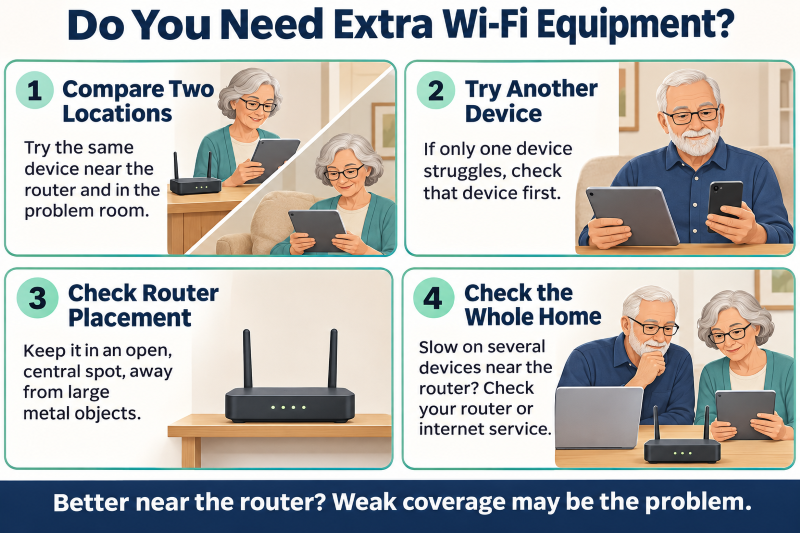
Do You Need Extra Wi-Fi Equipment?
Before buying an extender or mesh system, confirm that weak coverage is really the problem. A few quick checks could save you an unnecessary purchase.
- Compare two locations: Test the same device beside your router, then in the problem room. If it works well near the router but poorly in that room, coverage is likely the culprit.
- Try another device: If one tablet struggles but another works fine in the same spot, the tablet is the problem, not your coverage.
- Check your router’s position: Move it somewhere open and central, away from cupboards and metal objects, then test again.
- Test every device: If everything crawls even beside the router, the router or your internet plan is the problem, not coverage. An extender can’t fix an outage or speed up your service.
If coverage is the problem, compare options before buying. The Omega WiFi Amp Booster review covers one extender and its limits.
Which Fix Suits Your Home?
The right fix depends on where coverage is weak and how you use your devices. Layout and wall thickness matter as much as size.
One Weak Room: Try an Extender
- If Wi-Fi works well everywhere except one room, an extender may be the best choice
- It suits one fixed activity, like watching a bedroom smart TV.
- Place it where it still gets a strong signal from the router.
- Check whether you’d need to switch networks on your phone or tablet.
Several Weak Areas: Pick Mesh
- If weak spots span several rooms or floors, mesh is usually the better choice.
- Mesh uses one network name, so your devices move between rooms without switching.
- Thick walls can also weaken the link between mesh units. In a tricky layout, connecting compatible units with an Ethernet cable can help.
- Have cameras in the mix? See which home security camera features matter most.
Old or Badly Placed Router? Fix That First
- Move the router to an open, central spot before you buy anything else.
- If your router keeps dropping the connection or no longer gets security updates, ask your provider about a replacement.
- Ask your provider about compatible Wi-Fi units and rental costs.
- Whether you keep your router or replace it, follow the FTC’s guidance on securing your home Wi-Fi network: install updates and use WPA2 or WPA3 security.
What to Check Before You Buy
Before buying an extender or mesh kit, make sure it works with your equipment and is easy to set up and maintain.
- Compatibility with your internet equipment: Note your router’s model and confirm the new gear works with it. If your provider’s box also runs your home phone or TV, ask how those will keep working.
- Compatibility with older devices: Some cameras, printers, and smart plugs work only on 2.4 GHz. Confirm the new gear supports it and includes clear setup instructions.
- App and account requirements: Check whether setup needs a smartphone app, an online account, or a certain phone version. If someone helps you install it, keep the account and recovery details.
- Clear instructions and accessible support: Pick gear with setup guides you can actually read and support you can easily reach. Ask whether help comes by phone, chat, or email, and whether it costs extra.
- Ethernet ports where needed: If a computer or television connects by cable, check which units have Ethernet sockets. Not every mesh unit has them.
- The full cost: Ask whether security tools or parental controls cost extra, and which features stop working if you stop paying.
- Security update support: Choose gear that updates automatically, and ask how long the maker will keep supporting it.
- A practical return policy: Test coverage at home before you commit, and check the return deadline and any shipping or restocking fees.
Confirm the setup app works with your phone before you buy. Still choosing a phone? The Android vs. iPhone comparison for seniors will help you decide.

Where Should You Place an Extender or Mesh Unit?
An extender or mesh unit can only repeat the signal it receives, so place it where that signal is strong.
- Extender: Put it halfway between the router and the weak room.
- Mesh units: Follow the app’s placement guidance.
- Open space: Keep it away from cupboards, televisions, and large metal appliances.
- Signal check: Confirm the spot in the app or with the indicator lights.
- Test coverage: Make a video call from the problem room.
- Adjust: Move it closer to the router if the connection struggles.
- Cable safety: Tuck cords away from walkways.
Wi-Fi Booster and Mesh Questions Answered
Will a Wi-Fi booster speed up my internet?
It can strengthen the signal in rooms with weak reception, but it can’t make your internet faster than the plan you pay for with your provider.
Do I need a new provider for mesh Wi-Fi?
Usually not. Most mesh systems work with the internet service you already have, but check that the system is compatible with your provider’s equipment before you buy.
Will my devices reconnect automatically?
Often, yes. If the new equipment uses the same Wi-Fi name and password, most devices reconnect automatically, though printers, cameras, and smart plugs may need to reconnect manually.
Will I pay a monthly fee for this equipment?
Usually not. Equipment you buy outright rarely needs a subscription for basic Wi-Fi, though optional extras may cost more, and units rented from your provider carry monthly charges.
Final Thoughts: Match Your Wi-Fi Gear to Your Home
The right choice depends on where your connection struggles. Before you buy, determine whether the problem is in one room, several areas, or the whole home.
For a single weak spot, an extender usually does the job. For several rooms or floors, mesh is easier to live with. Neither can fix an outage or speed up your internet plan.
Ignore the big speed claims. Focus on compatibility, easy setup, and support you can actually reach. Check for subscription fees and a fair return policy so you can try the equipment without surprise costs.
Once it’s installed, put it to the test. Make a video call, stream a show, and see how it holds up. Keep whatever gives you steady coverage where you need it and is simple enough to use every day.