
Motion sensors enhance convenience and security without capturing indoor video. They detect movement and can trigger lights, activate alarms, or send alerts.
Older adults may encounter this technology in security systems, video doorbells, automatic lighting, and home-monitoring devices. This guide explains how motion detection works, its advantages and drawbacks, and key tips for choosing a device.
What Is Motion Detection?
Motion detection uses hardware sensors to identify changes in the environment within a defined area. When activated, the device performs an automatic action, such as:
- Switching on path lighting.
- Triggering a video camera.
- Sounding an alert.
- Sending a smartphone notification.
Standard motion sensors detect physical movement; however, most basic models cannot differentiate between a person, a pet, or a passing vehicle.
Typical Devices Employing Motion Detection
Motion sensors activate many common household devices.
- Security Cameras: Activate video recording or send immediate phone alerts when they detect motion.
- Alarm Systems: Detect unexpected intrusions to trigger a siren or notify a monitoring service.
- Automated Lighting: Activates automatically when a person enters a room, hallway, or outdoor space.
- Video Doorbells: Notify you when someone approaches the front door before they ring the bell.
- Dedicated Activity Sensors: Track movement patterns and daily routines discreetly, without capturing video, to ensure privacy within living spaces.
A device’s actions vary by sensor type and user settings.
How Motion Detection Works
Motion-detection devices use three primary technologies to detect movement:
- Passive Infrared (PIR): Detects alterations in thermal energy emitted by individuals or pets. This technology is widely used in safety lighting and security alarms.
- Camera-Based Detection: Monitors consecutive video frames and triggers an alert when the scene’s visual appearance changes noticeably.
- Microwave and Radar Detection: Sensors emit continuous high-frequency waves and monitor their reflections to detect subtle micro-movements, outperforming standard PIR sensors.
The U.S. Department of Energy reports that PIR is one of the most widely used motion-sensing technologies.
You don’t need to understand the technical details; what matters is if the device reliably detects movement in your intended area.
Motion Detection versus Person Detection
Standard motion detection triggers on any movement in its field of view, including:
- People and pets.
- Passing vehicles.
- Windblown tree branches.
- Shifting light and shadows.
Person detection employs computer vision algorithms to identify human shapes and movement patterns. Although this greatly decreases false alarms, its accuracy depends on lighting conditions and camera angles. Additionally, many manufacturers require a subscription fee to access this feature.
Advantages of Motion Detection for Elderly Individuals
Motion detection makes daily tasks easier and enhances safety around the house.
- Hands-Free Lighting: Pathway and hallway lights turn on automatically when someone enters a room, helping prevent trips in the dark.
- Instant Security Alerts: Sensors, alarms, and smart locks notify users instantly of unexpected activity near entry points.
- Automated Video Recording: Cameras automatically record events in real time without requiring manual app operation.
- Camera-Free Privacy Monitoring: Standalone movement sensors monitor daily routines and well-being without invasive cameras in private homes.
Some products listed in our guide to the five best smart locks with cameras for home security also offer motion detection.
Limitations and False Alerts
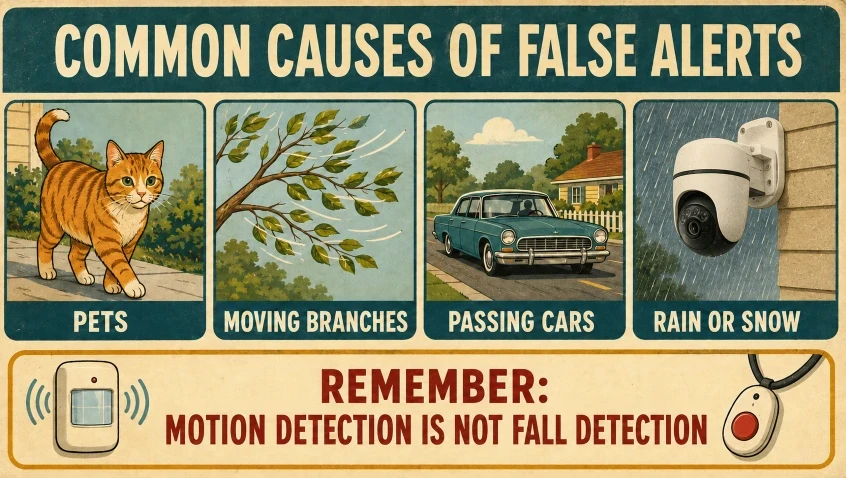
Motion detection offers important situational awareness; however, it is not perfect. Typical causes of false alarms include:
- Household pets passing through the sensor’s detection area.
- Tree branches swaying in the wind as vehicles pass by.
- Sudden shadow movements, direct sunlight, or headlight beams.
- Heavy rain, snow, or insects approaching outdoor camera lenses.
Sensors may fail to detect valid movement if they are installed at improper heights, misaligned angles, or configured with low sensitivity.
Importantly, regular motion sensors cannot detect whether someone has fallen. Detecting falls requires specialized radar, vision systems, or wearable sensors designed to measure sudden changes in height and impact forces.
Our guide explaining home security camera features also helps you know what matters for seniors.
Privacy and Security
Motion sensors without cameras capture only basic visual data, yet internet-enabled models still record timestamps and motion events. To protect your home privacy:
- Obtain Consent: Always notify household members and caregivers before starting active monitoring.
- Respect Sensitive Areas: Never place video sensors in private areas such as bedrooms and bathrooms.
- Secure the Network: Use strong, unique Wi-Fi passwords and activate two-factor authentication for all smart home accounts.
- Review Data Policies: Regularly review app permissions to control cloud storage retention and prevent vendor data sharing.
Privacy features differ among cameras. Our review of the top eight Rexing dash cams highlights how their recording capabilities vary.
Key Points to Review Before Selecting a Motion-Detection Device
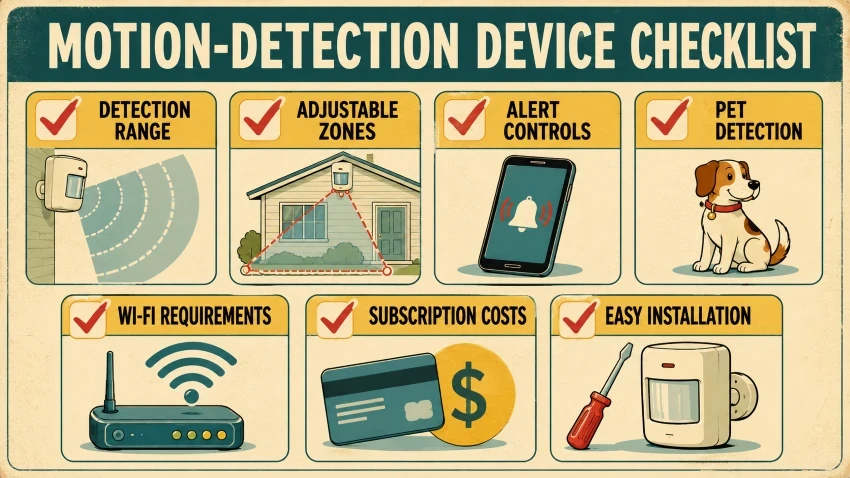
Consider these key factors before purchasing:
- Detection Range and Field of View: Confirm the sensor’s range and field of view (e.g., 110° vs. 180°) cover the target area without leaving blind spots.
- Customizable Motion Zones: Block out busy roads, adjacent yards, or ceiling fans to prevent constant alerts.
- Notification Controls: Look for flexible alert options to adjust sensitivity, set quiet hours, or personalize push notifications.
- Pet Immunity: Choose sensors equipped with pet-filtering logic if you have dogs or cats indoors to reduce false alarms.
- Connectivity Requirements: Check whether the device operates locally or requires a stable Wi-Fi connection and a smart home hub to send real-time alerts.
- Subscription Costs: Verify whether advanced features such as person detection, cloud recording, or activity history require a continuous monthly subscription.
- Accessibility and Ease of Use: Select models that offer easy mounting, simple battery replacement, and a user-friendly mobile app.
Frequently Asked Questions
Does motion detection work in the dark?
Yes. Passive Infrared (PIR) and radar sensors detect motion using thermal heat signatures and radio waves instead of visible light. Cameras need integrated infrared (IR) night vision to sense motion in complete darkness.
Can motion sensors pick up movement through walls?
Standard PIR sensors cannot detect movement through solid barriers. In contrast, advanced radar-based sensors, such as mmWave sensors, can detect movement through light materials such as drywall or wood; however, thicker materials like masonry or metal block them.
Will pets trigger the motion detection?
Yes. Pets generate heat and occupy physical space, which can activate basic sensors. Devices with adjustable sensitivity or specialized pet-immunity algorithms help prevent alerts caused by smaller animals.
Does a motion-detection camera record nonstop?
Typically, they don’t activate unless motion is detected, as most battery-powered and smart home cameras stay in low-power standby mode to conserve battery and storage.
Can standard motion sensors identify a fall?
Standard motion detection typically detects overall movement in a room. To specifically identify a fall, specialized fall-detection systems are needed, as they monitor quick changes in height, fast downward speed, and impact forces.
Final Thoughts
Motion detection improves convenience in lighting, security, and home monitoring for older adults by automatically turning on lights, starting camera recordings, or sending alerts when it detects motion.
The best device for you depends on your intended use, alert requirements, and privacy preferences. Features such as adjustable detection zones and sensitivity settings can help minimize unnecessary alerts.
Choose a device that is easy to install and use. Proper placement and appropriate settings will improve its reliability in your home.