

Want a lower internet bill? Start by comparing low-cost home plans at your address. Some providers cut rates for low-income households or those enrolled in programs like SNAP or Medicaid; some housing programs include free home internet, and many public libraries lend Wi‑Fi hotspots for a short time.
This guide covers monthly prices, eligibility rules, and equipment and installation fees, so you know what you’d actually pay. If you don’t qualify for an income-based discount, or need a connection while waiting for installation, you’ll also find prepaid plans and temporary options.
Before you switch, ask the provider two questions: Is this plan available at my address, and what will I pay once the introductory price ends?
Low-Cost Internet Providers Compared
Xfinity: Internet Essentials and NOW
Quick verdict: If your household qualifies, choose Xfinity Internet Essentials at $14.95 per month, which includes Wi‑Fi equipment and enough speed for a small household. No income requirement? NOW Internet starts at $30 per month and suits anyone who wants prepaid service and can self-install.
Pros
- Low starting price: Internet Essentials offers up to 75 Mbps for $14.95 per month.
- Equipment included: Internet Essentials has no equipment rental or activation fee, and NOW’s price covers the Wi‑Fi gateway, taxes, and fees.
- Flexible prepaid service: NOW has unlimited data and no contract.
Cons
- Recent Xfinity service can disqualify you: Internet Essentials generally requires no Xfinity Internet in the past 90 days, and unpaid bills or unreturned equipment can also block you.
- NOW is self-install only: You plug in the gateway and activate it in the Xfinity app, with no technician visits.
- Switching may cost you your bundle: Moving to NOW may mean dropping Xfinity TV or home phone. Xfinity Mobile is the exception.
Plans and pricing
- Internet Essentials: $14.95 per month for up to 75 Mbps down and 10 Mbps up.
- Internet Essentials Plus: $29.95 per month for up to 100 Mbps down and 20 Mbps up.
- NOW Internet: $30 per month for up to 100 Mbps down, or $45 per month for up to 200 Mbps down. Both top out at 20 Mbps up, and service is prepaid with automatic renewal.
Eligibility and availability
- Internet Essentials: You qualify if your household income is at or below 200% of the federal poverty level, or if anyone in your home receives benefits such as SNAP, Medicaid, or SSI.
- NOW Internet: No income requirement, but your address must qualify. Buildings where Xfinity supplies internet under a bulk agreement are excluded.
- Other options: The National Digital Inclusion Alliance’s directory compares Xfinity with other low-cost providers.
Setup, support, and everyday use
- Apply by phone if you prefer: Internet Essentials takes phone applications, so you can ask about eligibility and required documents as you go.
- Check your cable outlet before ordering NOW: You’ll plug the supplied gateway into a cable outlet and activate it through the app. Digital support is available around the clock, and if you’d rather have hands-on help, arrange it before the kit arrives.
- Match the speed to your household: The base Internet Essentials plan handles browsing, email, video calls, and streaming on one TV. Essentials Plus doubles the advertised upload speed from 10 to 20 Mbps, which helps if two people often video call at once or you upload large files.
- Fix weak Wi‑Fi before upgrading: If the signal is strong near your router but fades in another room, the problem is likely your home Wi‑Fi coverage, not your plan. Fix that before paying for more speed.
Who should choose Xfinity?
- Choose Internet Essentials if you qualify. It’s the cheapest Xfinity plan.
- Choose Internet Essentials Plus if you qualify and often video call or upload files from the same connection.
- Consider NOW Internet if you want a prepaid plan with equipment included, your address qualifies, and you’re fine with self-setup. If you bundle TV or home phone with Xfinity, compare the total cost before switching.
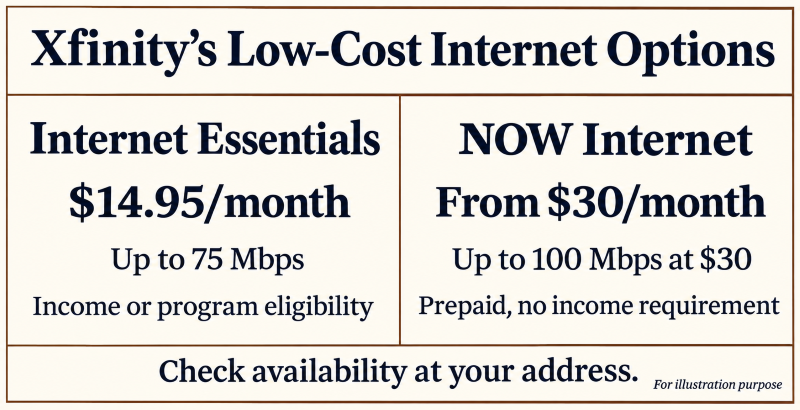
Alt text: Xfinity Internet Essentials starts at $14.95/month and NOW Internet at $30/month.
Spectrum Internet Assist
Quick verdict: Spectrum Internet Assist is worth a look if you’re 65 or older, receive Supplemental Security Income (SSI), and live at an eligible address. You get up to 50 Mbps for $25 per month, or $15 per month if your household qualifies, with the modem included. Spectrum’s optional Wi‑Fi adds $10 per month.
Pros
- Two price points: The standard rate is $25 per month, and some households can apply for $15 per month at the same speed.
- Modem included: No modem rental fee, ever.
- No contract, no data cap: Use the connection all month without tracking your data.
Cons
- Eligibility is narrow: Being 65 or collecting Social Security retirement benefits isn’t enough. You need to receive SSI.
- Wi‑Fi costs extra: Adding Spectrum Advanced Wi‑Fi raises the $25 plan to $35 per month.
- Setup fees can hit your first bill: Ask about activation or installation charges before you order, especially if a technician visits.
Plans and pricing
- Spectrum Internet Assist: $25 per month for up to 50 Mbps, or $35 with Advanced Wi‑Fi.
- Discounted Internet Assist: $15 per month for up to 50 Mbps, where offered and if approved. The modem is included, and upload speeds vary by location.
Eligibility and availability
- Check the SSI route: If you’re 65 or older and receive SSI, you qualify for Internet Assist. Some school meal programs can also qualify your household.
- Ask for the $15 rate by name: Whether you already have Internet Assist or are just applying, ask if your benefits qualify you for the lower price. New York offers more routes to eligibility.
- Confirm your address: Check that Spectrum serves your home, then ask for Internet Assist by name so you can compare its terms with other offers.
Setup, support, and everyday use
- Gather proof first: Keep a current benefits letter handy in case Spectrum asks to verify eligibility.
- Decide how you’ll get Wi‑Fi: The included modem connects your home to Spectrum. If you already own a Wi‑Fi router, ask whether you can use it and skip the monthly add-on. Our guide to basic computer terms explains the difference.
- Ask about setup help: If you’d like a technician, confirm the visit cost and whether they’ll connect your first device.
- Match the speed to your routine: Up to 50 Mbps covers browsing, email, and one TV stream. If several people video call or stream at once, ask about upload speed at your address first.
Is Spectrum Internet Assist right for you?
- Choose it if you qualify for the $15 rate and 50 Mbps is enough.
- Compare other plans if Spectrum’s Wi‑Fi add-on pushes your bill to $35 or you need installation help. A plan that bundles equipment and setup may cost less.
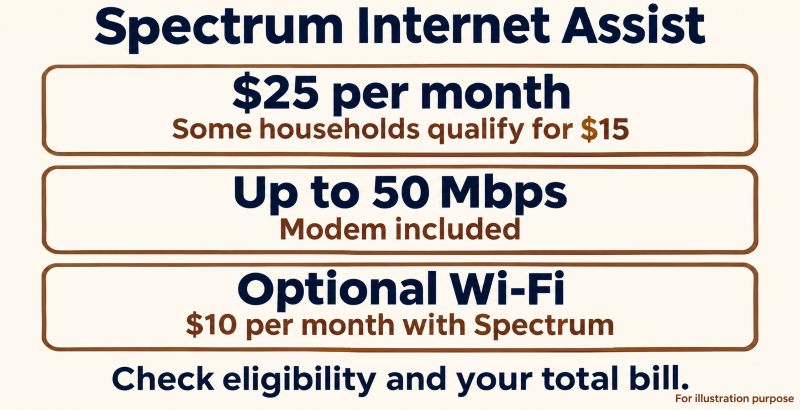
Alt text: Spectrum Internet Assist offers up to 50 Mbps for $25/month.
Access from AT&T
Quick verdict: Choose Access from AT&T if your household qualifies and you want Wi‑Fi equipment and installation included. It’s an especially good fit if you already have AT&T Internet: once approved, ask AT&T to apply the discount to your current service. Price and speed depend on your address.
Pros
- Equipment and installation included: Wi‑Fi equipment and setup come with no rental or installation fee.
- No deposit or annual contract: No upfront payment and no yearly commitment.
- Two ways to qualify: Household income or enrollment in an eligible assistance program.
Cons
- Price and speed depend on your address: Get a quote for your home before you commit, since it’s the only way to know what you’ll pay and how fast you’ll connect.
- You must prove you qualify: Expect to show proof of income or program enrollment.
- Your address decides your speed: If AT&T offers only a slower tier at your home, free installation helps, but confirm the speed still fits your household.
Plans and pricing
- Monthly rate: AT&T advertises Access from $30 per month, plus taxes and fees, but your address sets the actual price and speed, so check before you sign up. In Michigan, the Michigan High-Speed Internet Office’s affordability guide lists plans at $30 or less for up to 100 Mbps.
- First bill: Equipment and installation are included, but ask for the exact total on your first bill and a typical month’s cost before you sign up.
Eligibility and availability
- Household income: Your household may qualify if its income is below 200% of the federal poverty guidelines, which rise with household size.
- Qualifying benefits: Enrollment in a program like SNAP can also qualify your household.
- Address check: Ask which Access plan your street address qualifies for. New York has its own offer with separate pricing.
Setup, support, and everyday use
- Have your documents ready: If AT&T can’t verify your income automatically, you may need to send a recent W‑2 or SSA‑1099.
- Ask how installation works at your address: Find out whether you’ll get a self-install kit or a technician visit, and what help with your first device is included.
- Check both speeds if you video call: Download speed brings video and websites to you, while upload speed decides how well others see and hear you. Ask for both numbers. For more questions to ask before you sign up, see our technology buying checklist for seniors.
- Don’t cancel yet: If you already have AT&T Internet, confirm your approval first and ask when the new rate starts.
Who should choose Access from AT&T?
- Choose it if you qualify, the speed fits your needs, and the full monthly price fits your budget. Included installation helps if you’d rather not set up equipment yourself and a technician visit is available.
- Look elsewhere if AT&T quotes a slow speed, or another provider offers what you need for less.

Alt text: AT&T access includes equipment and installation. Price and speed vary by address.
Quantum Fiber Simply Fiber
Quick verdict: Simply Fiber gives qualifying households up to 200 Mbps for $30 per month, plus taxes and fees. It suits a household that wants a technician to handle setup. Confirm the plan is available at your address and ask whether installation needs construction work.
Pros
- Free Wi‑Fi equipment: Quantum Fiber includes its 360 Wi‑Fi gear at no monthly rental fee.
- Installation included: A technician handles the standard setup.
- No contracts: Cancel anytime without an early termination fee.
Cons
- Limited availability: Simply Fiber is offered only at select addresses, and your household must be enrolled in a qualifying assistance program.
- Construction can cost extra: Quantum Fiber covers the first $1,500 of any new construction at your address. You pay only for costs above that, and only if you approve them before work begins.
- Paperless billing and automatic payments: You pay in advance, and the plan renews monthly until you cancel.
Plans and pricing
- Monthly rate: $30 for up to 200 Mbps on a wired connection. Taxes and fees vary, so ask for the full monthly total before signing up.
- Upfront cost: Standard installation is included. If your address needs construction, get any extra charge in writing before you approve it.
- Changing speeds: Simply Fiber is a single discounted tier, so a faster Quantum Fiber plan costs more.
Eligibility and availability
- Qualifying benefits: SNAP, Medicaid, SSI, federal public housing assistance, and certain veterans’ pension or survivor benefits all count. Keep proof of participation handy.
- Address check: Quantum Fiber serving your neighborhood doesn’t mean Simply Fiber reaches your home, so confirm it at your exact street address. The FCC’s broadband map guide shows how to look up the providers available at your address.
- Existing customers: Already have Quantum Fiber? Check your account to see if you can verify eligibility and switch to Simply Fiber.
Setup, support, and everyday use
- Make the most of the technician visit: Have the installer place the equipment near the rooms you use most, and test a device from your usual seat before they leave.
- Plan for simultaneous use: The advertised speed leaves room for one person to stream on the TV while another makes a video call. If you use a tablet for calls, our simple tablet setup guide shows how to connect it to the new Wi‑Fi.
- Keep your old service for now: Cancel only after the installation is done and your everyday devices work on the new connection.
Is Simply Fiber right for you?
- Choose it if you qualify, the $30 tier reaches your address, and you want equipment and setup included.
- Look elsewhere if construction charges apply, you want paper billing, or a cheaper plan covers your needs.
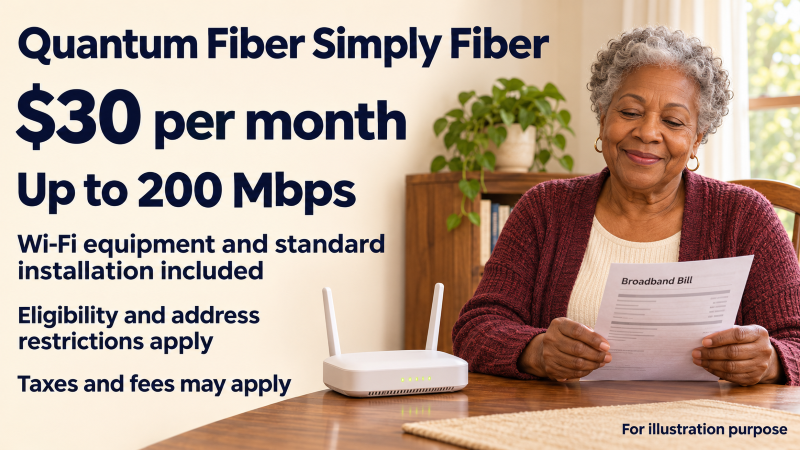
Alt text: Quantum Fiber’s Simply Fiber offers up to 200 Mbps for $30 a month.
T‑Mobile Rely Home Internet
Quick verdict: Try T‑Mobile Rely if cable and low-cost fiber don’t reach your address. It costs $50 per month with AutoPay, or $35 per month with AutoPay and an eligible T‑Mobile phone line, and includes the Wi‑Fi gateway. What matters most is the cellular signal inside your home, especially in the evening.
Pros
- Wi‑Fi gateway included: One device picks up the cellular signal and turns it into home Wi‑Fi.
- Unlimited data, no annual contract: Stream and video call freely, with no data allowance to track.
- Self-installation: Plug in the gateway and move it until the signal is strongest.
Cons
- Speeds can swing: Performance depends on indoor reception and local network traffic, so a fast afternoon doesn’t guarantee a fast evening.
- The best price needs a T‑Mobile phone line: Compare your combined phone and internet bills before switching carriers for the discount.
- Expect an upfront cost: T‑Mobile lists a $35 device connection charge. Ask if it applies to your order, and get the full total with taxes and fees before you sign up.
Plans and pricing
- Internet only: $50 a month with eligible AutoPay, before taxes and fees.
- With an eligible T‑Mobile phone line: $35 a month with eligible AutoPay. Ask for the combined total and what the internet price becomes if you drop the phone line.
- Advertised speeds: T‑Mobile lists typical speeds of 170–354 Mbps down and 12–55 Mbps up. Check the broadband label for your address.
Eligibility and availability
- No income or age requirement: Rely is a standard home internet plan open to anyone. The lower rate requires a T‑Mobile phone line and AutoPay.
- Check your exact address: Confirm Rely is available at your home before you sign up. Strong phone reception there doesn’t guarantee home internet service.
Setup and daily use
- Test the gateway near a window: Try a few spots, then check the signal where you watch TV or make calls.
- Use the 15-day test drive: Confirm when the clock starts and how cancellations, refunds, and equipment returns work. Then test it properly with a video call and a streamed show during your busiest evening hours.
- Price the whole bundle if you already have a budget phone plan: Keeping your low-cost mobile service and paying the standalone internet rate may still be cheaper overall. Our Visible by Verizon prepaid plans guide shows how mobile prices compare.
Who is T‑Mobile Rely best for?
- Choose it if wired plans are scarce or too pricey at your address and Rely gives a steady signal in the rooms you use most.
- Skip it if cheaper cable or fiber is available, or video calls freeze during your trial.

- If you qualify for a discount: Start with Xfinity Internet Essentials and Spectrum’s $15 rate, but read the fine print. If Spectrum quotes $25 and you add its Wi‑Fi service, you’ll pay $35 a month.
- If you need help with setup: Compare AT&T, AT&T Access, and AT&T Fiber at your address. Ask who installs the equipment and confirm any extra charges before you order.
- If you’re weighing the $30 NOW plan against the $35 T‑Mobile rate: Add the cost of a T‑Mobile phone line if you’d have to add or switch one, then compare the totals.
Low-Cost Home Internet Plans Compared
| Plan | Monthly Cost | Download Speed | Who Qualifies | What to Check |
| Xfinity Internet Essentials. | $14.95 | Up to 75 Mbps. | Qualifying households | Wi‑Fi equipment included. Recent Xfinity service may affect eligibility. |
| Xfinity Internet Essentials Plus. | $29.95 | Up to 100 Mbps. | Same eligibility as Internet Essentials | Wi‑Fi equipment included. Upload speed doubles to 20 Mbps. |
| Xfinity NOW Internet. | $30 or $45 | Up to 100 or 200 Mbps. | Eligible addresses, no income test. | Equipment, taxes, and fees included. Self-install only. |
| Spectrum Internet Assist. | $25 or $15, if eligible. | Up to 50 Mbps. | Qualifying households, including SSI recipients. | Modem included; Spectrum Wi‑Fi is optional for $10 per month. |
| Access from AT&T | Priced by address. | Per address. | Households qualifying by income or benefits. | Equipment and installation included. Ask for the monthly total and both speeds. |
| Quantum Fiber Simply Fiber. | $30 plus taxes and fees. | Up to 200 Mbps. | Households in select areas on a qualifying assistance program. | Wi‑Fi equipment and installation included; construction may cost extra. |
| T‑Mobile Rely Home Internet. | $50 with AutoPay, $35 with an eligible phone line. | 170–354 Mbps | Eligible addresses, no income test. | Gateway included. Check connection fees and indoor reception |
Got a quote? Compare the discounted price with the table above. A cheap plan that includes Wi‑Fi equipment may still win.
Cut Your Internet Bill With Discounts
Already have home internet? Ask for a lower rate without changing providers. Some discounts apply only to specific plans, so ask which ones you qualify for.
Before you switch or move a benefit from your phone service, price internet and phone together.
Federal Lifeline Discount
- How much you can save: Eligible households can save up to $9.25 per month on qualifying internet or bundled service, or up to $34.25 per month on qualifying Tribal lands. Universal Service Administrative Company
- Who may qualify: You may qualify based on household income or through a program such as SNAP, Medicaid, or Supplemental Security Income (SSI). Lifeline is limited to one benefit per household, so check whether someone at home already uses it for phone service.
- Ask before applying: Does Lifeline work with my current plan? If I switch, what will I pay monthly after the discount and equipment charges?
State Discounts Worth Checking
| Where you live | What to check |
| New York | The Affordable Broadband Act caps what covered providers can charge eligible households: 25 Mbps for $15 or less per month, or 200 Mbps for $20 or less per month, including taxes and equipment fees. Ask your provider which option is available at your address. |
| Oregon | Oregon Lifeline takes up to $24.25 per month off your internet bill when you have a participating provider and a plan that meets the speed requirement. Slower plans still qualify for up to $15 per month. |
Free Internet Access Options
Need internet at home? Start with your housing office and your library. Housing programs may cover service outright, and a library hotspot can bridge the gap while you wait for installation or shop for a plan.
- Ask if your building already includes internet: Some affordable housing properties provide it directly to residents. New York City’s Big Apple Connect covers participating NYCHA developments, and San Francisco’s Fiber to Housing serves participating affordable properties. Call your housing office to ask whether your unit is covered and how to activate service.
- Borrow a hotspot from your library: Oakland Public Library, for example, lends hotspots to cardholders for 21 days at no charge. Ask about the waitlist, then test the signal at home.
Use Your Phone Plan as a Backup
Check your phone plan first. If it includes hotspot data, you may not need a separate temporary connection. Visible’s $25 monthly plan, for example, offers hotspot speeds up to 5 Mbps, enough for email and basic browsing when reception is good. Planning video calls? Test one in the room where you’ll use it.
Confirm the Full Price First
Before signing up, get three answers in writing: the exact plan at your address, the total on your first bill, and the monthly price after any promotion ends. Already have internet? Keep it until the new connection works on your most-used devices.
Final Thoughts: Pay Only for What You Need
Start with your address to see which plans and discounts you qualify for. Then compare the total monthly bill, including equipment, any required phone line, and the price after the promotion ends. Choose the cheapest plan that covers what you actually do, whether that’s email, video calls, or streaming TV.
Still can’t afford a monthly plan? Ask your housing office about free home internet and your library about borrowing a hotspot. Switching providers? Keep the old service until the new one works on your most-used devices.