
Home security doesn’t have to be complicated. With a few simple habits and essential equipment, you can significantly enhance your home’s safety and enjoy greater peace of mind.
However, it’s easy to overlook small details, such as an outdoor camera aimed at a wall, a side gate left unlocked, or a smart device using a default password. The most common security mistakes and simple solutions to correct them are:
Relying Only on Security Cameras
Cameras capture activity and identify who’s at the door, but they can’t physically prevent an intruder. They work best as an added layer of security, not the only measure.
Pair your cameras with physical security:
- Solid deadbolts on every exterior door.
- Window locks, especially on the ground floor.
- Motion-activated pathway and side-entrance lighting.
- Locked side gates and garage access doors.
The most effective system begins with small routines, such as verifying that door locks are locked each night.
Forgetting to Lock Doors and Windows
It may seem obvious, but leaving a door or window unlocked immediately compromises your security. This often occurs during brief outings, while working outdoors, or simply because someone forgot at night.
Make it a habit to regularly inspect key entry points.
- Front, back, and side doors.
- Ground-floor and reachable windows.
- Sliding glass doors.
- The door connecting the garage to the house.
The Metropolitan Police’s home security guidance stresses that a house’s security depends on its weakest point of entry. Their notes on window security also emphasize that window locks are only effective if you engage them before leaving or going to bed. A brief nightly check that takes less than a minute helps prevent easy access.
Ignoring Side and Back Entrances
Most people concentrate mainly on the front door, often overlooking side entrances, back doors, garages, and low windows.
Take a brief walk outside to check for concealed or inadequately lit entry points, such as:
- Back and side doors.
- Sliding patio doors.
- Garage entry doors.
- Hidden ground-floor windows.
Addressing these areas typically doesn’t need costly equipment. Straightforward adjustments are most effective:
- Trim bushes blocking sightlines.
- Add a bright, motion-sensor light.
- Install a better lock latch.
- Adjust the outdoor camera’s position to eliminate blind spots.
Stick with Hard-to-Use Traditional Locks
Standard keys function well until they become hard to turn, easy to lose, or difficult to hand over to family and caregivers.
A smart lock typically addresses these everyday problems by allowing you to:
- Use a basic keypad or smartphone app instead of a physical key.
- Assign temporary codes to trusted visitors.
- Check lock status remotely.
- Combine access control with an integrated camera.
If you add smart technology, keep it secure. The FTC advises changing default passwords right away, activating two-factor authentication, and keeping software up to date.
Check out our guide to the top five smart locks with cameras for everyday use and improved home security.
Leaving Dark Areas Around the Home
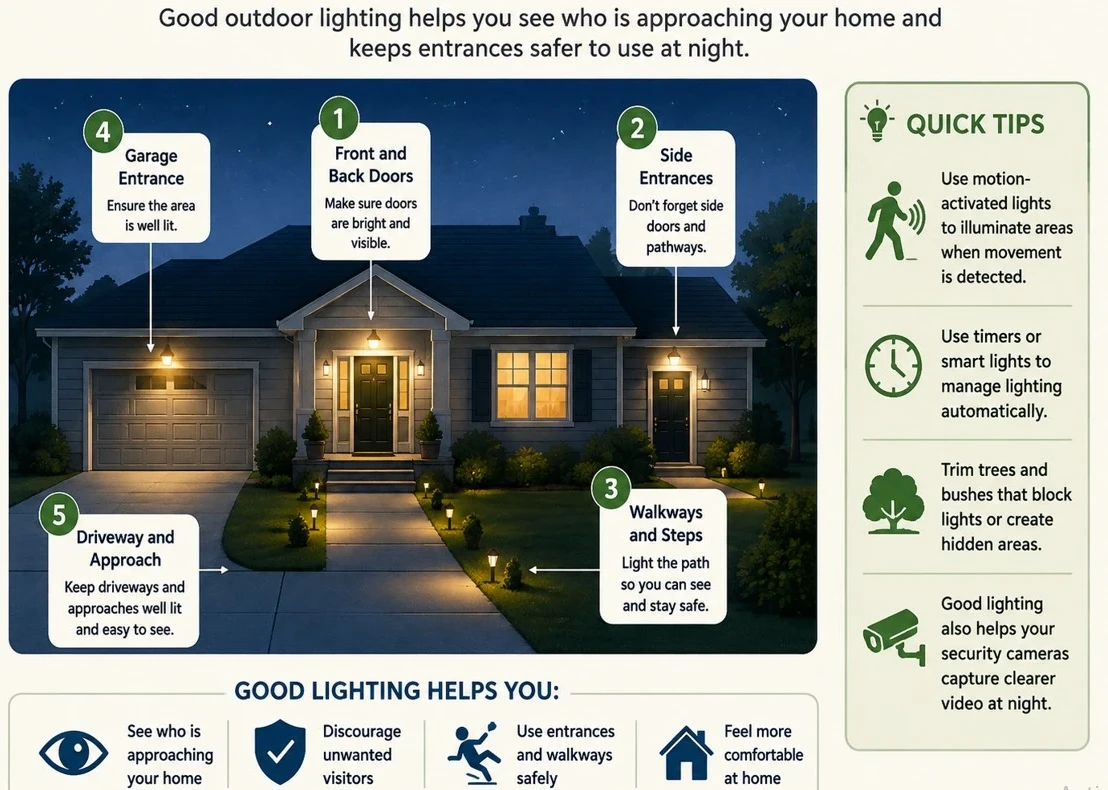
Poor lighting makes it hard to see who is outside and increases the risk of trips and falls at night.
Inspect your property at night to assess visibility around:
- Front, side, and back doors.
- Pathways, steps, and driveways.
- Blind spots near security cameras.
You don’t need to leave every light on all night. Simple fixes include the following:
- Lights that activate only when motion is detected and needed.
- Timers or smart bulbs to set automatic schedules.
- Trimming overgrown bushes that block light fixtures.
Installing Security Cameras in the Wrong Places
A security camera’s effectiveness is nullified when walls, trees, decorations, or other obstructions block its line of sight.
Ensure the cameras work properly when reviewing your feed.
- Cover the main entrances (front and back doors) clearly.
- Maintain a clear line of sight to the target area.
- Mount cameras high enough to keep faces recognizable.
- Provide a legible image after dark.
- Primarily directed at the street or adjacent properties.
Camera placement impacts privacy. Focus on your entrances, driveway, and garden, not your neighbor’s property.
Our guide to the Seven Best Home Security Cameras for Smart Homes highlights options designed for modern systems if you’re still shopping for hardware.
The goal isn’t maximum coverage; a handful of well-placed cameras is far more effective than many poorly positioned ones.
Ignoring Software Updates for Security Devices
Ignoring update alerts can expose your cameras, smart locks, and video doorbells to security vulnerabilities and bugs.
Secure your connected devices easily with a few simple steps:
- Enable automatic updates in your device settings if this option exists.
- Install app and firmware updates as soon as you receive a notification.
- Regularly verify that they are connected and operating properly.
You don’t need to understand the technical details; manufacturers handle the code. The Federal Trade Commission (FTC) recommends keeping security camera software and companion apps updated to patch critical security vulnerabilities.
Don’t ignore update notifications for too long. Regular updates are a simple way to ensure your system remains secure.
Using Weak or Reused Passwords
A smart lock or camera’s security depends on the strength of the controlling account. Using weak or reused passwords can make it easier for unauthorized individuals to gain remote access to your device or feed.
Secure your accounts with these essential tips.
- Change default passwords right after setting up a new device.
- Create a distinct, strong password for every security app you use.
- Activate two-factor authentication (2FA) whenever it is available.
- Consider using a password manager if tracking your logins becomes challenging.
Handle your home security credentials with the same caution you use for your online banking information.
Living Too Many People Access to Security Devices
Sharing access to a smart lock or camera feed with trusted family members and caregivers is convenient, but these permissions can accumulate over time.
Take a moment to review who still has access, including:
- Family members and neighbors.
- Current and former caregivers.
- House sitters or trade workers.
- Anyone who no longer needs entry.
Regularly review your user list in security apps and remove expired permissions. Use unique access codes or guest accounts instead of sharing your primary login credentials.
According to the FTC, you should also limit permissions to what is necessary and give guests or helpers only the access level they need to perform their duties. Keep full control restricted to those who currently require it.
Consult our guide, “Home Security Camera Features Explained: What Matters for Seniors,” if you’re unsure which features meet your needs without overcomplicating your setup.
Opening the Door Without Checking First
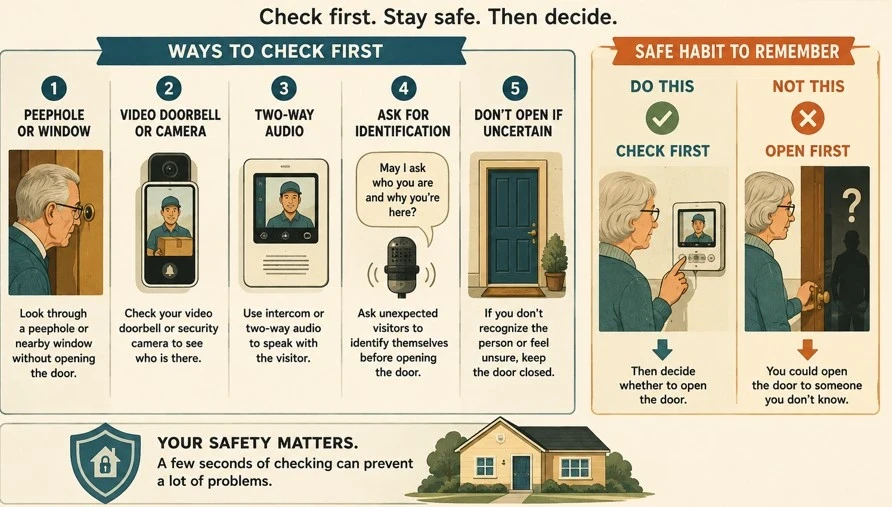
It’s easy to open the door automatically when you hear a knock, especially if you’re expecting a delivery. Always get into the habit of verifying visitors before unlocking or opening the door.
Simple methods to check who is outside:
- Check through a door peephole or a nearby window.
- Verify your video doorbell or security camera feed.
- Use two-way audio or an intercom to communicate.
- Request unfamiliar visitors to introduce themselves and their purpose before granting entry.
- Keep the door locked if you don’t recognize the person or feel uneasy.
You don’t need high-tech equipment; a standard peephole will do. The key is the habit: always verify before opening.
Making It Obvious That Nobody Is Home
Small giveaways, such as accumulated mail, packages on the porch, or a consistently dark house at night, clearly indicate you’re away.
- Before you leave, complete a few quick steps.
- Request a neighbor or relative to collect mail, newspapers, and packages.
- Pause deliveries when you’ll be away for several days.
- Schedule timers or smart lights to turn on and off during typical evening hours.
- Wait to post your trip photos on social media until you return home.
- Ensure all entry points- doors, windows, and the garage are secure before you leave.
Test them a day or two in advance to prevent troubleshooting problems while traveling, especially if you use smart lights or security apps.
Our buying guide for seniors on smart video doorbell cameras can also be worth checking out.
Choosing a Too Complicated Video Doorbell
A video doorbell is only beneficial if it’s simple to operate. A feature-packed model may seem attractive, but it can be frustrating if you’re dealing with complicated apps, too many menus, or frequent false alarms.
Before purchasing, ensure you can easily:
- See a clear live view when someone is at the door.
- Easily receive and read visitor alerts.
- Use the two-way speaker to communicate.
- Play the recorded clips.
- Modify your alert settings to prevent your phone from ringing nonstop.
Remember to consider everyday details such as battery life, charging needs, Wi-Fi reliability, monthly subscription costs, and compatibility with your current phone.
Don’t neglect to verify that your security devices are still functioning properly.
It’s tempting to believe your security equipment will work indefinitely after installation. However, batteries deplete, Wi-Fi connections drop, and settings may be changed unintentionally.
- Conduct a brief regular check of your system.
- Test camera feeds to ensure they are recording clearly and consistently.
- Ensure notifications are sent to your phone when motion is detected.
- Check battery levels on wireless locks and doorbells.
- Confirm that smart locks lock and unlock smoothly.
- Maintain a consistent Wi-Fi connection on all devices.
No strict schedule is needed; test your setup periodically, and always before leaving.
The UK’s National Cyber Security Center (NCSC) emphasizes that regular checks of settings and connectivity are essential to keeping smart home systems reliable. A security device can only safeguard your home if it is powered on, connected, and functioning properly.
Adding Too Many Security Devices
Adding more technology doesn’t necessarily ensure better security. Juggling multiple apps, unique passwords, and constant alerts can cause frustration rather than reassurance.
Emphasize a straightforward, yet powerful base:
- A doorbell with a video camera at the main entrance.
- Install one or two cameras in key outdoor areas.
- Equip all entry doors with sturdy, dependable locks.
- Implement strategic outdoor lighting to illuminate dark spots.
- Simplify alerts to prevent your phone from constantly buzzing.
Choose devices that work with a single app whenever possible to simplify daily use.
The goal isn’t to showcase the latest technology, but to build a straightforward, reliable security routine you can trust.
Conclusion: A Simple Home Security Check
You don’t have to overhaul everything immediately; a brief walkthrough is enough to identify the most common vulnerabilities.
Reflect on these key questions:
- Are all exterior doors and ground-floor windows securely locked?
- Are the front, back, and side entrances well-lit at night?
- Can security cameras see key areas without obstructions?
- Have you verified that cameras, smart locks, and doorbells are fully charged and properly connected?
- Are the companion apps and device firmware up to date?
- Are connected devices protected with strong, unique passwords?
- Do you know exactly who currently holds digital access to your system?
- Can you quickly confirm who is at the door before opening it?
- Is your setup easy to use and frustration-free?
Helpful Tip: Start with the simplest fix, such as securing a side window, replacing a dead battery, adjusting a camera angle, or installing a motion-sensor bulb if you notice a gap.
Small, practical repairs typically enhance home safety without requiring additional technology.