
A smartwatch cannot prevent a fall, but some models can detect movements that may signal one and help the wearer contact assistance. They use motion sensors and software to distinguish a potential hard fall from ordinary activities.
Depending on its settings and connectivity, the device might notify emergency contacts or call emergency services if the wearer ignores the watch’s alert.
This guide explains how smartwatch fall detection works, what happens after a fall is detected, and what older adults and caregivers should confirm before relying on the feature. It also highlights a key limitation: no smartwatch can detect every fall or ensure the wearer always receives help.
What Is Smartwatch Fall Detection?
Smartwatch fall detection is an automatic safety feature that identifies movement patterns similar to a human fall. It uses integrated motion sensors and processing algorithms to continuously analyze physical dynamics in real time.
- Speed and Velocity: Sudden shifts in body acceleration.
- Directional Trajectory: Rapid vertical drops toward the ground.
- Rotational Dynamics: Shifts in wrist orientation and pitch.
- Impact Force: G-force metrics recorded at the moment of impact.
- Post-Impact Status: Prolonged physical inactivity after a rapid motion spike.
Detection Capabilities and Blind Spots
Most consumer smartwatches accurately identify hard falls with clear impact forces. However, their algorithms often miss slower or low-velocity incidents.
Table from Gemini
A study in the National Library of Medicine highlights that real-world accuracy depends on factors such as sensor sampling rates, algorithm sensitivity, device fit, and a person’s physical characteristics during falls.
Critical Distinctions
To guarantee effective safety planning, fall detection should not be mistaken for similar features.
- Manual SOS vs. Automatic Fall Detection: Manual SOS requires the user to actively press a button or swipe the screen to request assistance.
- Fall Detection vs. Fall Prevention: Smartwatches help with emergency communication after a fall; however, they do not offer mechanical or physiological support to prevent falls.
How Does a Smartwatch Detect a Potential Fall?
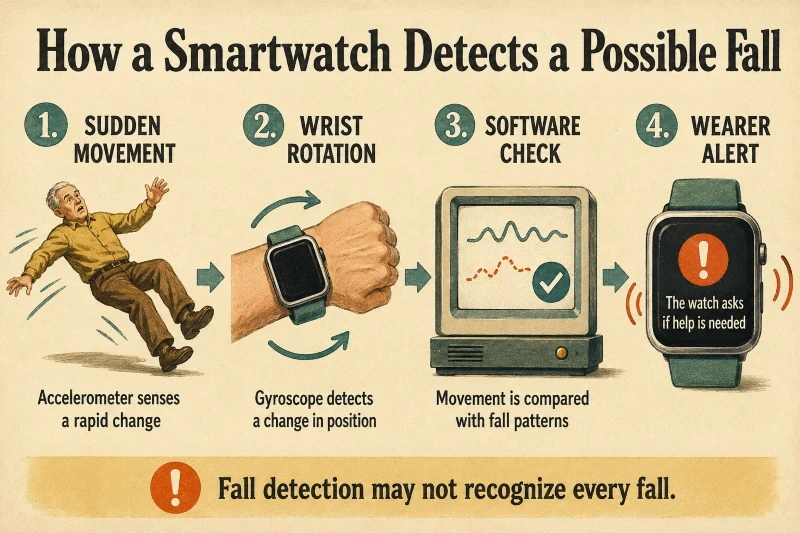
A smartwatch doesn’t detect a fall directly. Instead, it constantly analyzes raw data from small sensors that detect movement, looking for patterns that suggest a collapse.
Sudden Motion Registration
The accelerometer detects real-time changes in velocity, direction, and acceleration. It flags:
- Rapid Downward Trajectory: A sudden drop towards the ground.
- High-G Impact Force: A sharp spike in g-force caused by striking a hard surface.
- Abrupt Velocity Shifts: Unintentional stops following fast movement.
Spatial Orientation Check
The 3-axis gyroscope measures rotation and spatial position to assess mid-air body movement.
- Balance Anomalies: A rapid, uncontrolled shift in body angle.
- Wrist Trajectory: Unsteady hand movements or awkward wrist positions during a drop.
- Postural Changes: Shifting from an upright to a horizontal position.
Pattern Recognition and Algorithm Analysis
The device’s algorithm processes multi-sensor data to identify and exclude benign daily activities.
A study in the National Library of Medicine explains how wearable systems integrate motion sensors with deep learning algorithms to accurately classify movement patterns.
The software actively distinguishes true falls from actions such as:
- Sitting down heavily or flopping into a chair.
- Jumping, running, or high-impact exercise.
- Hitting a desk or table forcefully with your arm.
Immobility Check and Alert Sequence
The watch begins an escalation process when it detects a possible fall signature.
- Immediate Haptic and Audio Feedback: The device beeps, vibrates intensely, and shows a message on the screen.
- Movement Monitoring: The watch detects movement after impact. Intentional motion might delay automated dialing, whereas complete stillness accelerates emergency dispatch.
- Response Window: The wearer has 30 to 60 seconds to dismiss the prompt by selecting “I’m OK.” If not canceled, the watch automatically alerts emergency contacts and shares the wearer’s GPS location with emergency services, such as 911.
Technical Summary
| Mechanism | Primary Function | Primary Function |
| Accelerometer. | Measures impact force and velocity. | Registers a 3G+ impact when striking the floor. |
| Gyroscope. | Tracks rotational pitch and roll. | Detects a sudden shift from vertical to horizontal angle. |
| Altimeter. | Measures altitude/air pressure changes. | Sensing a 3-foot height drop in less than one second. |
| Software Algorithm. | Filters noise and prevents false positives. | Distinguishing a fall from clapping, chopping food, or flopping on a bed. |
What Happens After a Fall Is Detected?
When it detects a potential fall, a smartwatch initiates an automated escalation to determine whether the wearer needs help before alerting emergency services or family.
The Alert Phase
The smartwatch attempts to alert the wearer as soon as a high-impact fall is detected:
- Vibrations (Haptic Alerts): The watch taps the wrist forcefully.
- Audible Alarm: A sounding alert tone that gradually grows louder, ensuring it can be heard even if the user is disoriented.
- On-Screen Emergency Prompt: The display shows a clear prompt with options to tap “I’m OK” to dismiss the alert or “Call Emergency Services” to request immediate assistance.
The wearer can immediately dismiss the prompt to prevent false alarms if the event was caused by sudden exercise or an arm dropping onto a hard surface.
Response and Movement Assessment
The smartwatch detects physical interaction and body movement during a grace period, usually lasting 30 to 60 seconds.
- Movement Detection: The watch considers the wearer alert and delays automatic dialing. If sensors detect intentional movement after a fall, the wearer can manually dismiss the alert or make a call.
- Immobility Detection: When the watch notices no movement for about a minute, it presumes the wearer may be incapacitated or unconscious. It then starts a 30-second countdown with loud alarms before automatically calling.
Automated Emergency Dispatch
If the countdown reaches zero without user action, the watch activates its safety protocols according to its settings.
- Calling Emergency Services: The watch automatically dials regional dispatchers (like 911). It plays a recorded message indicating a hard fall was detected and provides the wearer’s precise latitude and longitude coordinates.
- Emergency contacts, such as family members or caregivers set in the device’s Medical ID or SOS options, automatically get text alerts with the fall notification and a live GPS location link.
- Professional Monitoring Integration: For supported models with dedicated subscriptions, the watch notifies a 24/7 commercial monitoring dispatcher, who attempts to contact the user via the watch speaker.
Related Reading: Kospet Smartwatch Review for Seniors.
Factors Influencing Emergency Response
| Setting / Factor | Impact on Response |
| Connectivity | Requires an active LTE cellular plan on the watch, a nearby smartphone connected via Bluetooth, or a supported Wi-Fi network. |
| Device Settings | Fall detection must be explicitly enabled, as it is often disabled by default for younger users. |
| Medical ID Setup | To receive text alerts, set up emergency contacts in the watch app beforehand. |
| Regional Features | Availability of automatic emergency dispatch and satellite backup features depends on the country and local legislation. |
What Happens After Fall Detection?
A smartwatch gives the wearer time to respond before taking further action when it detects a fall.
- Initial Watch Alert
- Taps or vibrates on the wrist.
- Sounds an alarm tone.
- Displays an on-screen pop-up message.
- Lets the wearer tap “I’m OK” to cancel.
- Offers a button to request immediate help.
- Movement and Response Check
- Monitors for physical movement after impact.
- Waits for manual action if it detects movement.
- Triggers a countdown if the user remains still.
- Increases alarm volume to attract attention.
- Allows manual cancellation during the countdown.
- Automated Emergency Outreach
- Calls local emergency services automatically.
- Plays a recorded message explaining the fall.
- Sends GPS coordinates to dispatchers and contacts.
- Text-alerts designated emergency contacts.
- Connects to paid monitoring services if available.
- Key Response Factors
- Requires fall detection to be turned on.
- Needs cellular, Wi-Fi, or phone connection.
- Depends on correct emergency contact setup.
- Relies on active location-sharing permissions.
- Varies by local laws and device model.
Related Reading: Smartwatches vs Medical Alert Devices: Which Is Safer for Seniors?
Can a Smartwatch Detect Every Fall?
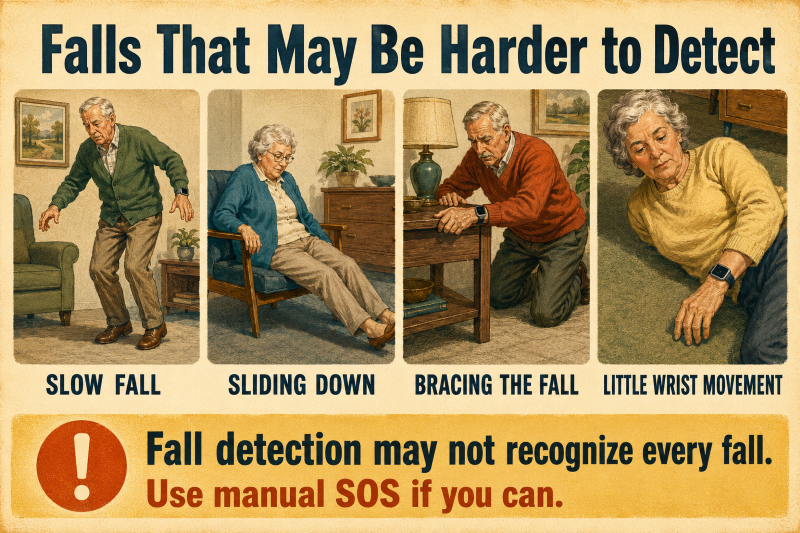
No smartwatch can detect every fall. Fall detection software analyzes patterns of speed, wrist motion, impact, and inactivity. If an event doesn’t match these patterns, the watch might not identify it as a fall.
Potentially Missed Falls
Smartwatches struggle to detect incidents without clear speed or high-g impact:
- Slow or Gradual Collapses: Fainting, sliding against a wall, or gradually sinking to the floor.
- Controlled Falls: Getting up from a bed, chair, or sofa.
- Supported Falls: Lowering oneself to the ground while gripping furniture or a handrail.
- Low-Wrist Movement: Falling while arms are tucked in, held in place, or cushioned.
- Padded Impacts: Drops softened by thick carpets, rugs, or soft surfaces.
- Improper Device Fit: Incidents that occur when the watch is worn loosely or off the wrist.
The National Library of Medicine confirms that wearable sensors achieve high accuracy for hard impact drops, but real-world accuracy drops for soft, low-velocity falls.
Common Daily Activities That Cause False Alerts
Basic daily movements can resemble fall signatures and trigger false alerts.
- Jumping or running heavily.
- High-impact fitness activities.
- Clapping forcefully or slapping a desk or table.
- Sitting or plopping down abruptly on hard surfaces.
- Sporting with sudden wrist motion.
Press “I’m OK” immediately to cancel a false alarm. If an emergency call is placed automatically, remain on the line and tell the dispatcher it was an accidental alert rather than hanging up.
Our guide on how smartwatch features work and when seniors should use them may also be helpful.
Prepurchase Checklist
Don’t select a watch solely because it has ‘fall detection.” Instead, confirm how the feature works and whether it suits the user’s daily activities.
Fall-detection capabilities
Ask:
- Does it detect only hard falls?
- Is fall detection available on this specific model?
- Must the feature be enabled manually?
- Does it work all day or just during workouts?
- Can the wearer easily cancel a false alert?
Emergency response
Confirm:
- Who receives the alert?
- Whether the watch contacts emergency services directly.
- Whether family members can receive notifications.
- Location-sharing information.
- Accessible professional monitoring.
- What happens when the wearer can’t speak?
Phone and connection requirements
Check whether the watch:
- Requires a compatible smartphone to be nearby.
- Has a dedicated cellular connection.
- Needs a separate mobile plan.
- Can use Wi-Fi calling.
- Works outside the house.
- Enables emergency calls within the user’s country.
Everyday usability
The wearer should be able to:
- Read the screen clearly.
- Hear or feel alerts.
- Press the SOS control.
- Learn about the available response choices.
- Ensure the watch fits comfortably on your wrist.
- Fasten and remove the band.
- Charge it without assistance.
Practical ownership considerations
Also compare:
- Battery life and charging time.
- Water-resistance rating and device price.
- Cellular or monitoring fees.
- Warranty and return period.
- Compatibility with the wearer’s phone.
- Customer-support options
Fall-detection settings and requirements may vary across watches, even from the same manufacturer. For instance, Samsung’s official guidance states that supported Galaxy Watches need emergency contacts and provide different options for activating hard-fall detection.
Whenever feasible, test the display, controls, band, and alert volume before the return window closes. The ideal watch isn’t always the one with the most features; it’s the one that the older adult can reliably wear, charge, and operate.
Frequently Asked Questions
Is fall detection possible without a phone?
Certain cellular-enabled smartwatches operate independently, while others need a nearby Bluetooth-connected phone or an active Wi-Fi network.
Can a smartwatch detect all falls?
No, smartwatches may miss slow, gradual, or cushioned falls that don’t generate high-impact forces.
Does a smartwatch automatically summon an ambulance?
Not necessarily. Depending on the device’s configuration, it could call local emergency services, alert family members, or connect to a professional monitoring service.
Is it possible for fall detection to trigger unintentionally?
Yes. Powerful actions such as clapping, exercising, or jumping may trigger false alarms.
Is a subscription required for fall detection?
The detection feature is generally free, but ongoing cellular connectivity or specialized monitoring services typically involve recurring subscription plans.
Final Thoughts
Smartwatch fall detection employs motion sensors and software algorithms to identify movement patterns indicative of a fall. If the user is unresponsive, the device can automatically call emergency services, family members, or response teams.
Main factors to consider before buying:
- Emergency Routing: How the watch detects and prioritizes alerts.
- Connectivity requires a cellular network, a paired smartphone, or Wi-Fi.
- Usability and Fit: Simple navigation, clear presentation, and comfortable strap fit.
- Battery Performance: daily charging habits and how long the power lasts.
- Feature scope includes sensor accuracy limits and the frequency of false positives.
A smartwatch offers extra peace of mind, but it works best as a backup safety measure rather than a guaranteed life-safety solution.