
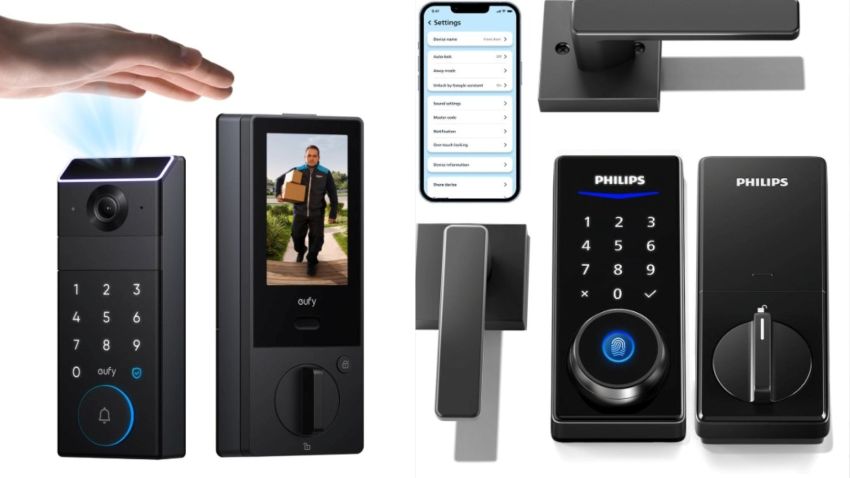
Home security is an increasing concern for many, including seniors and their families, as answering the door, checking unexpected visitors, or managing physical keys can become more difficult.
Smart locks with built-in cameras let you see who’s at the door before unlocking. They help prevent scams, unwanted visits, and misunderstandings, providing peace of mind for seniors living alone, caregivers, and family members.
These smart devices integrate multiple functions into a single device, provide secure locking and unlocking, offer live video or recorded footage of visitors, and enable remote access via a smartphone app.
Top models also emphasize clear video, simple controls, reliable alerts, and strong privacy protections, making them essential for older adults who value safety without the frustration that comes with technology.
In this guide, we review five of the best smart locks with cameras, focusing on trusted brands, real-world usability, and senior-friendly features to help you choose a smart lock that improves safety, independence, and confidence at home.
Factors to Consider in a Smart Lock Camera.
Choosing the right smart lock is about finding a secure, reliable, and senior-friendly solution that fits your home and lifestyle. Here are the key factors worth considering.
Ease of Use and Accessibility.
Look for locks that offer multiple access methods, such as keypad, app, or fingerprint, and provide precise visual feedback on the device or app. A cluttered or confusing app interface defeats the purpose of convenience.
Camera Quality and Functionality.
A smart lock’s camera should deliver clear video and images, ideally with night vision and a wide field of view, so that you can easily identify visitors.
Some locks also provide real-time alerts and two-way audio, allowing you to communicate through the lock, which is helpful for caregivers or family checking in remotely.
Connectivity and Compatibility.
Ensure the smart lock connects to your home’s Wi-Fi so you can monitor and control it from anywhere. Other protocols, such as Bluetooth and Z-Wave, are also essential if you use a broader smart home system.
Confirming compatibility with voice assistants like Google Assistant or Amazon Alexa is also crucial if you use them daily.
Easy Installation.
Some smart locks are suitable for DIY installation, while others may require a professional. Check whether the lock replaces your existing deadbolt or works with it (retrofit), and if special tools are required.
Security and Privacy.
Select models from trusted brands that provide software updates, robust encryption, and encrypted cloud or local storage for video footage to ensure comfort and safety at home.
Other extra features to consider include:
- Long battery life for fewer maintenance hassles
- Physical keys or secondary access methods when batteries die.
- Temporary codes for visitors or caregivers for enhanced security
Security.org highlights the importance of assessing factors like encryption, remote access security, and device reliability when selecting a smart lock, especially for long-term home safety.
Top Smart Locks With Cameras for Home Security.
Eufy Security Video Smart Locks.
Eufy’s video smart locks integrate a full smart lock with a built-in camera, effectively replacing the need for a separate doorbell camera in many homes, reducing device clutter and simplifying daily use.

Key features.
- An integrated camera lets you see who is at the door before unlocking, directly from the Eufy app.
- Live view and motion alerts for real-time notifications when someone approaches the door.
- Multiple unlock methods, including app control, keypad, physical key backup, and fingerprint access in some models.
- Local video storage reduces reliance on monthly subscriptions and improves privacy.
- Two-way audio lets you speak to visitors without opening the door.
- Auto-lock and remote control let caregivers and family members lock or unlock the door from anywhere.
Ease of use for seniors.
A clean and easy-to-use app, with large icons and simple navigation, designed for seniors who feel comfortable using a smartphone to view the camera feed or unlock the door remotely.
The keypad and physical key backup also ensure the lock remains usable even without the app for less tech-savvy.
Security and privacy considerations.
Eufy also offers local storage options, allowing video footage to stay on the device rather than being sent to the cloud, which reduces privacy concerns and ongoing costs. Encryption and regular firmware updates enhance long-term security, which is vital for home safety.
Pros and Cons.
Pros.
- Sthe
- Built-in camera eliminates the need for a separate doorbell.
- Privacy-focused with local storage options.
- Clear video and reliable motion alerts.
- Senior-friendly access methods.
Cons.
- Higher upfront cost than basic smart locks.
- Wi-Fi connection required for full remote features.
- Some advanced features may feel unnecessary for minimal users.
Best for: Eufy video smart locks are best for seniors living alone or families who want to monitor visitors remotely without complex setups.
Users who prioritize privacy, reliability, and an all-in-one security solution over managing multiple devices might also find Eufy video smart locks worthwhile.
Lockly Vision Series (Elite, Prime, Zeno).
Lockly specializes in smart access solutions, including the Vision Series that combines advanced security features with practical, everyday usability.
Lockly’s Vision models provide multiple secure options, ensuring access stays available even if one method fails or is inconvenient.

Key features.
- Built-in camera lets users see who is at the door before unlocking, with live video access through the Lockly app.
- Fingerprint recognition for seniors who may struggle with minor keys.
- PIN Genie touchscreen keypad that shuffles after each use, reducing the risk of code guessing or smudge tracking.
- Remote locking, unlocking, and visitor monitoring for caregivers or family members.
- Temporary codes can be generated without needing constant internet access.
- Physical key backup for emergencies or power outages.
Ease of use for seniors.
Individuals comfortable with technology can use the app or a fingerprint reader, while others may prefer a simple PIN code or a physical key. A bright, easy-to-read touchscreen keypad helps with reduced vision.
However, the range of features may require a slight learning curve at first, but daily use becomes straightforward once you get the hang of it.
Security and reliability.
A Lockly’s rotating keypad layout enhances PIN security, while encrypted communication safeguards remote access.
Battery-powered operation also ensures the lock continues to work during power outages, and alerts notify users when batteries are low.
Elite vs Prime vs Zeno (Quick Clarity).
- Elite is the most advanced, with full camera features and expanded access options.
- Prime has similar core features with fewer premium extras.
- Zeno features a sleeker, modern design focused on simplicity while retaining camera functionality.
Pros and Cons.
Pros.
- Multiple access methods, including fingerprint, PIN, app, and key.
- Built-in camera with live viewing.
- Strong security design (PIN Genie).
- Suitable for shared homes or caregivers.
Cons.
- More complex initial setup.
- Higher price than single-function smart locks.
- App features may feel excessive for minimal users.
Best for: Lockly Vision smart locks are ideal for seniors who want maximum flexibility and backup access options, as well as households where multiple people need secure, controlled entry.
Philips Smart Locks With Cameras.
Philips’s smart locks with cameras provide visual verification at the door, combining modern security with a conservative, safety-first approach.
The brand’s camera-equipped smart locks aim to balance simplicity, durability, and core protection rather than feature overload.

Key features.
- Built-in cameras allow users to see visitors before unlocking the door, improving safety against unexpected or suspicious visits.
- Real-time monitoring via live video view through the companion app, with motion alerts when someone approaches the door.
- Multiple access methods, including app control, keypad entry, and physical key backup, ensure usability in all situations.
- The auto-lock function helps prevent doors from being accidentally left unlocked, providing peace of mind.
- Solid build quality for daily use and long-term reliability.
User-friendly for seniors.
Philips smart locks prioritize straightforward interfaces and consistent performance with an easy-to-read keypad, while the app maintains simplicity without added complexity.
Seniors who prefer minimal smartphone interaction can rely on PIN codes or physical keys, while caregivers can manage access remotely when needed.
The learning curve is also generally lower than that of more feature-rich competitors, given that Philips models tend to avoid advanced biometric or experimental features, making them a good option for users who value straightforward security over customization.
Security and privacy considerations.
Philips highlights secure communication and device reliability, with encrypted connections between the lock and the app.
As with any camera-equipped device, users should review storage options and permissions during setup to ensure footage is handled in line with their privacy preferences.
Pros and Cons.
Pros.
- Strong brand trust and reputation.
- Built-in camera for door visibility.
- Simple, senior-friendly operation.
- Multiple access methods with physical backup.
Cons.
- Fewer models compared to specialized brands.
- Availability may vary by region.
- Less customization than advanced smart-home ecosystems.
Best for.
- Philips smart locks with cameras are perfect for seniors who value brand reliability, ease of use, and basic visual security.
- They are also an excellent option for households seeking modern protection without the hassle of managing complex smart-home systems.
Aqara Video Smart Lock Series.
The Aqara brand has established a strong reputation for reliable hardware that works well with platforms like Apple Home and other smart home standards.
The brand’s video smart locks feel like a natural extension rather than a standalone device for seniors who already use connected gadgets.

Key features.
- Integrated cameras provide a live view of visitors at the door, helping users identify them before unlocking.
- Remote monitoring app-based access allows family members or caregivers to check activity and receive alerts.
- Smart home compatibility integrates with Aqara hubs and compatible platforms for automation.
- Multiple access options for continued usability.
- Automation support can trigger routines, such as turning on lights when the door unlocks.
Seniors’ user-friendly.
Aqara locks are perfect for seniors who are comfortable with basic smart home concepts or who have family members managing the setup.
Daily use is straightforward after setup for a more connected experience (alerts, camera views, and door activity) in one place rather than across multiple apps. Still, the initial installation and pairing might need help.
Consumer Reports explains that newer smart locks make it easier to monitor who comes and goes, providing homeowners with greater visibility and control over their home’s security.
Security and reliability.
Aqara emphasizes secure device communication in its ecosystem. The system encrypts data transfer, allowing users to control access permissions when connected to a hub.
Battery-powered operation keeps the lock working during power outages, with low-battery alerts giving early warnings.
Pros and Cons.
Pros.
- Strong smart home integration.
- Built-in camera with live viewing.
- Automation features improve safety.
- Suitable for connected households
Cons.
- Full functionality requires a hub.
- Non-technical users can find the setup complex.
- Not ideal as a standalone solution.
Best for: Aqara video smart locks are ideal for tech-comfortable seniors or families who already use smart home devices and want a larger, automated system.
Euface and Kaadas Camera Smart Lock Models.
Euface and Kaadas represent a newer generation of smart lock manufacturers focusing on camera-integrated access control at more competitive price points.
The brands’ camera smart locks usually combine simple video monitoring with basic smart-lock features, offering clear door visibility and controlled access without relying heavily on complex smart-home systems.
Key features.
- Users can see visitors at the door before unlocking.
- Alerts when someone approaches the door.
- Keypad entry, app-based control, and physical key backup.
- Auto-lock functionality prevents accidentally unlocked doors.
- Slim profiles that fit contemporary home styles.
Seniors’ straightforward use.
Euface and Kaadas Camera Smart Lock models are easy to use day-to-day, especially with keypad access or physical keys, though the companion apps may be less polished than those from established brands.
However, initial setup and configuration may require assistance from a family member or installer to ensure alerts and camera functions work correctly.
Security and reliability.
These locks can provide dependable security when properly maintained, but long-term software support should be monitored.
Check for firmware updates, encryption standards, and customer support options for Euface and Kaadas Camera Smart Lock models.
Pros and Cons.
Pros.
- More affordable than premium brands.
- Camera-equipped smart lock functionality.
- Simple access options suitable for daily use.
Cons.
- Lower brand recognition.
- App experience may vary.
- Unproven long-term software support.
Best for: Euface and Kaadas smart locks are ideal for budget-conscious buyers who want door visibility and smart access, and are willing to trade brand recognition for affordability.
Our guide to six top-rated heating pads for seniors might also help improve comfort and well-being at home.
FAQS About Smart Locks With Cameras.
Do smart locks with cameras record continuously?
Most smart locks with cameras only record when motion is detected, when someone rings the doorbell, or when the door is locked, helping protect privacy while still providing valuable security footage.
Can seniors use these locks without a smartphone?
Nearly all models feature keypads, fingerprints, or physical key backups. A smartphone assists with viewing videos and managing settings, but it is not always necessary for daily use.
What happens if the power or internet is cut off?
These battery-powered locks continue working during power outages, but local unlocking methods (keypad, fingerprint, key) still function. However, remote viewing and alerts may be temporarily unavailable when the internet is down.
Are smart lock cameras safe from hacking?
Choosing trusted manufacturers and keeping the app and firmware up to date greatly reduces risk, especially since reputable brands use encrypted connections and regularly update their software. Strong passwords and two-factor authentication also improve security.
Can family members or caregivers access the lock remotely?
Most smart locks allow you to share access with trusted family members or caregivers, which can be helpful for seniors who want someone to assist remotely or monitor door activity when needed.
Are smart locks with cameras difficult to install?
Many models are designed for DIY installation using standard tools. However, seniors may prefer assistance from a family member or professional installer to ensure everything is set up correctly.
Our guide to the seven best home security cameras for smart homes may also help you explore other reliable options that work well alongside smart locks.
Final Thoughts on the Right Smart Locks With Cameras.
Smart locks with built-in cameras provide visibility, reassurance, and control, especially for seniors who want to feel safer at home without adding complexity.
Eufy Security stands out for privacy-focused video features and ease of use, while Lockly’s Vision Series offers the most flexibility with multiple access methods.
Philips, on the other hand, offers trusted reliability and simplicity, while Aqara and emerging brands like Eufy or Kaadas provide alternatives for connected homes or those with tighter budgets.
Choose a smart lock from trusted brands that enhance independence without causing new technical problems. Physical key backups, readable keypads, and reliable alerts help build lasting trust.